
Overview
You can use our Merchant API to create a payment flow you need. For example, you can design your own fully customized payment page and connect it to our Payment Gateway.
You can download Postman collection of some basic API methods below. Make sure to send requests as POST with attributes in the body.
Mandatory parameters
The mandatory presence of a parameter in a request/response may have the following values:
- Mandatory - the parameter must always be included. If it is not provided, an empty value should be passed, depending on the expected format;
- Optional - the parameter may be included or excluded, and its excessive inclusion will not cause a system error;
- Conditional - the parameter can either be included (be mandatory) or excluded, depending on one or more specified conditions.
The mandatory transmission of a parameter in the request/response description is indicated in the "Required" column.
Authentication
For merchant authentication in the payment gateway two methods can be used.
- Using login and password of the merchant's API user (account with
-apipostfix) received on registration. These values are passed inuserNameandpasswordparameters correspondingly (see the table below).
| Required | Name | Type | Description |
|---|---|---|---|
| Conditional | userName |
String [1..50] | Merchant 's API account login (mandatory, unless token is passed). If you pass your login and password to authenticate in the payment gateway, do not pass token parameter. |
| Conditional | password |
String [1..30] | Merchant's API account password (mandatory, unless token is passed). If you pass your login and password to authenticate in the payment gateway, do not pass token parameter. |
- Using a special token - you can request its value in the technical support service. In requests its value is passed in
tokenparameter (see the table below).
| Required | Name | Type | Description |
|---|---|---|---|
| Conditional | token |
String [1..256] | Value that is used for merchant authentication when requests are sent to the payment gateway (mandatory, unless userName and password are passed). If you pass this parameter, do not pass userName and password. |
API URLs
TEST: https://vtb.rbsuat.com/payment/rest/
PROD: https://platezh.vtb24.ru/payment/rest/
Errors
HTTP status codes:
200- in case of the Payment Gateway API calls the JSON payload from the response must be inspected to determine whether processing was successful or not. Success is indicated by either:
- thesuccessparameter value beingtrue
- theerrorCodeparameter value being0
If both parameters are present,successoverrideserrorCode.400- an internal error occurred in the system.404- error while calling API - URL is incorrect (does not exist).429- this code means that the system is overloaded. Most often the main reason is that the limit of requests per second or limit of simultaneous requests is reached. But it may also be due to the fact that the system as a whole is overloaded (regardless of your requests).500 or 502- this code means that something went wrong on our side.
If the request, associated with an order payment, is processed successfully, it does not directly mean that the payment itself was successful.
To determine whether the payment was successful or not, you may refer to the description of the request used, where the intepretation of the payment success is thoroughly described, or you may follow the rule of thumb here:
- Call getOrderStatusExtended.do;
- Check the
orderStatusfield in the response: the order is considered to be payed only if theorderStatusvalue is1or2.
API request signature
Facing insecure integration, you may be requested to implement an asymmetric request signature. Usually, this requirement is applied only if you carry out P2P/AFT/OCT requests.
To have a possibility to sign requests, you need to perform the following steps:
- Generate and upload a certificate.
- Calculate a hash and a signature using your private key and pass the generated hash (X-Hash) and the signature value (X-Signature) in the request header.
These steps are described below in details.
Generating and uploading a certificate
-
Generate 2048-bit RSA private key. The way of generation depends on privacy policy in your company. For example, you can do it using OpenSSL:
openssl genrsa -des3 -out private.key 2048 -
Generate public CSR (Certificate Signing Request) using the generated private key:
openssl req -key private.key -new -out public.csr -
Generate a certificate using the generated private key and CSR. The example of generating a certificate for 5 years:
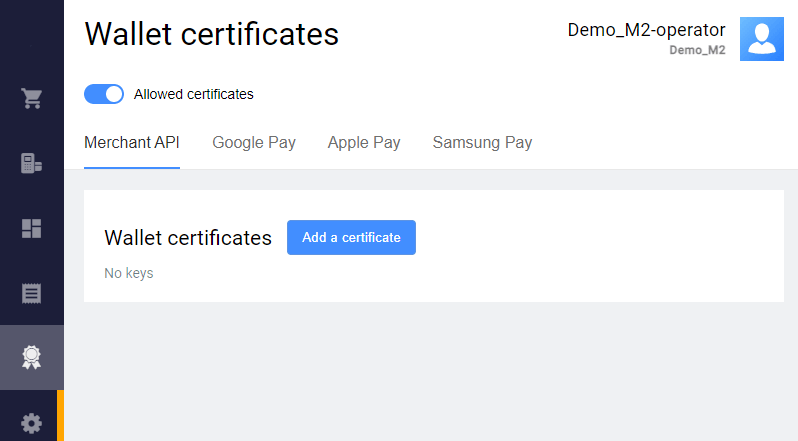
openssl x509 -signkey private.key -in public.csr -req -days 1825 -out public.cer Upload the generated certificate in the Personal Area. To do this, go to Wallet certificates > Merchant API, click Add a certificate and upload the generated public certificate.
Calculating a hash and a signature
-
Calculate SHA256 hash of the request body as follows:
- Use request body as a string (in our example it is
amount=10000&password=gcjgcW1&returnUrl=http&userName=signature-api). - Calculate SHA256 hash from this string, in raw bytes.
- Convert the raw bytes into base64 encoding.
- Use request body as a string (in our example it is
Generate a signature for the calculated SHA256 hash with RSA algorythm using the private key.
In our example we use the following private key with the password 12345:
-----BEGIN RSA PRIVATE KEY-----


        Proc-Type: 4,ENCRYPTED


        DEK-Info: DES-EDE3-CBC,C502560EDE8F82B7


        O4+bY1Q1ZcXFLDGVE8s9G2iVISHR/c/IMZKZEjkBED/TbuOCUGVjcav2ZaZO2dO0
        lm771N6JNB01uhJbTHScVQ6R0UnGezHFTcsJlAlBa9RQyOwujs4Pk6riOGnLliIs
        urnTXD0oskBR1wLRA2kp8+V0UPOAMXQaoLxFGE/o8taDGSrkyIcYTBoh9o7ZBxvO
        SqUWAt2vPbGVyc6XspyuVtgHgEctaJO+E26QTweqdpN5JITF+fDFPNwUrFHoho4N
        pxpKRWbiCJSpbvbsvhdizkmfgvRw+qYJvTirF3JTfGr14DttudFwjm7sNrr0JILR
        XPKDUhRyWjkthZM+oDjF2HwISAGkbxcpn4PU7Tywq0uax+5KCQQn2uz4jLM2P6+9
        000cvVLwhMnoUdOxuISRXeOcOWVyTO1mPfKiWnHaoO4yS3Y36OCIOe9RHGP8TTmq
        acb3LUIF30eQyk3KxH/tUB0ScPDKEKMiww13/Kcfr0JkdIe/BWCvV+hSQm38TLQe
        bTFy+wnD9kHACCwTSVVSOO+rHgJGVIyLgnpClZKWQyyJ4clH7/cORA7mTmp85Ckx
        IjV5Egu0bPPUMudOB5BnQ4u85RnqXavasgrLRA3JZM4+Jzl8MNy/fsFXnVBQLJJC
        Wlz/B7S7W8sabRogFuiqkkPmXE/QcpdKQoY3yh748QqMSl8vkA6WgndyYv1EnDDl
        jA5j7vSf0wKI8BHgdHBEWuEjn3X/s0S/BiPPI6puboYY90tYVJTWSQCR83QrMF3N
        BIcMu4+RIYu6GWnPx9npZpt0858c670ZII56np24iMse3qgHCOZxsGOenK2x7ta6
        163gvaD8bu8xoeQcGVfd6IMbXWVb0+z1hvWR5HWHSalof4lMzZrDsQDKc2UA0ygh
        hA1+VAl1MAEHVLNCCmyG1SwRwg1PI7FfftW7YARngCZRWkJ1haj1fgy7rtYolrdv
        lEz/vjFD6diABx67omGgfiJhWdiKIlzsYlX1SW7yaik/Uxf1j8gTFwY34y8ekVd9
        6pQTzV2V/4a48ELZl4LvelLWyt1AB3AR+/fM7YG6LYIqlo+qnLtro7Bqu8RNTNRP
        wcWCd04r/20ulFWMIH8pVa60C98pSdOXriWEI1KDLc0E/fCdhjW2kL+FTPLC7ORe
        cuzmfI27+06P/BvLZq/FAVBrDAmkioKwe6XYzTjpK1p5jZ3IrNwjAiasY1MNxCRy
        5ufhQwkW//d+VUdU5m8Sm30/kXe9UkxMaetXgzPxbB7+5QFFr0bi7D1MjIrJNtTx
        5g5E+UfOhqrp8ztBht9csQeFYSYabyyGX4Lh7ymVWrKCVdHlJib3M36nvOjpV/lA
        zf35sxFz9kaQqNK7xJdQ9Bx6TBUzLjpYhNry37vKk+SIB6Weo+LJ99mALMeX79CB
        osRqZqX5yrZhaQ8bbpo981nvLy5xFnpRqCuSWVZrVMBq3LQLaOvaCeyGC0V+ZN0C
        CU6lHlR6XQqd/IjoEN8+8aiVp6Ubw8FuD28TDaEvCltrX3ARL0xFpABsa42LgV1F
        09Vi+ju7SSNDvbezN8q0EILq9xp/zNCVhMpyRCIXBq9fzHkyCZ5qMw==


        -----END RSA PRIVATE KEY-----
and get the signature:
pJ/gM4PR1/mKGuIxMvTl5pYDDjJslb0BcXFnIxijFn5qKdPd7W+2ueoctziU7omnkYp01/BlracukH1GOPWMSO+9zKuTDdFueFm1utsS0zaPFU+dmc1niGDRWE0CbCXcti/rGSTDPsnR58mwqgVkbCWxKyCDtuo5LxiKPK9mzgWTUuJ8LX6f6u42MURi5tRG6a9dc8l/+J94g0YOk911R6Lqv2jcluEvZ9ZeMMt8hyxowb0eDaCHlussu2CAyqpE9V+EUAc81Jkwv96MMSsA6UnFwEaCV/k+kwYd0jHCx94m2yWX734p9cWsBW7Fr5F0zox9Yck4GOjqe9nJMMB9jQ==
3. Now you should pass the generated hash (X-Hash) and the signature value (X-Signature) in the request header. The request will look like this:
curl --request POST \
  --url https://vtb.rbsuat.com/payment/rest/register.do \
  --header 'content-type: application/x-www-form-urlencoded' \
  --header 'X-Hash: eYkMUF+xaYJhsETTIGsctl6DBNZha1ITN8muCcWQtZk=' \
  --header 'X-Signature: pJ/gM4PR1/mKGuIxMvTl5pYDDjJslb0BcXFnIxijFn5qKdPd7W+2ueoctziU7omnkYp01/BlracukH1GOPWMSO+9zKuTDdFueFm1utsS0zaPFU+dmc1niGDRWE0CbCXcti/rGSTDPsnR58mwqgVkbCWxKyCDtuo5LxiKPK9mzgWTUuJ8LX6f6u42MURi5tRG6a9dc8l/+J94g0YOk911R6Lqv2jcluEvZ9ZeMMt8hyxowb0eDaCHlussu2CAyqpE9V+EUAc81Jkwv96MMSsA6UnFwEaCV/k+kwYd0jHCx94m2yWX734p9cWsBW7Fr5F0zox9Yck4GOjqe9nJMMB9jQ==' \
  --data 'amount=10000&password=gcjgcW1&returnUrl=http&userName=signature-api'
The request should meet the following requirements:
- All the request parameters are included into the request body (not into the URL).
-
If the request parameters are in JSON format, then the following header should be used:
--header 'content-type: application/json' -
If the request parameters are in Query format (like
parameterA=valueA¶meterB=valueB), then the following header should be used:--header 'content-type: application/x-www-form-urlencoded' The request contains correct login and password of the API user.
The
X-Hashheader contains SHA256 hash of the request body (calculated at step 1).The
X-Signatureheader contains the signature for the calculated SHA256 hash with RSA algorythm using the private key (generated at step 2).
Java code example
Below is the Java code example that loads a private key, calculates SHA256 hash, signs it using the private key with the password 12345, and then sends a correct register.do request:
import javax.net.ssl.HttpsURLConnection;
import java.io.BufferedReader;
import java.io.DataOutputStream;
import java.io.InputStream;
import java.io.InputStreamReader;
import java.net.URL;
import java.nio.file.Files;
import java.nio.file.Paths;
import java.security.KeyStore;
import java.security.MessageDigest;
import java.security.PrivateKey;
import java.security.Signature;
import java.util.Base64;

import static java.net.HttpURLConnection.HTTP_OK;

public class SimpleSignatureExample {

    // This example is not production ready. It just shows how to use signatures in API.
    public static void main(String[] args) throws Exception {
        // load private key from jks
        KeyStore ks = KeyStore.getInstance("JKS");
        char[] pwd = "123456".toCharArray();
        ks.load(Files.newInputStream(Paths.get("/path/to/certificates.jks")), pwd);
        PrivateKey privateKey = (PrivateKey) ks.getKey("111111", pwd);

        // Sign
        String httpBody = "amount=10000&password=gcjgcW1&returnUrl=http&userName=signature-api";

        MessageDigest digest = MessageDigest.getInstance("SHA-256");
        Signature signature = Signature.getInstance("SHA256withRSA");
        signature.initSign(privateKey);

        byte[] sha256 = digest.digest(httpBody.getBytes());
        signature.update(sha256);
        byte[] sign = signature.sign();

        // Send
        Base64.Encoder encoder = Base64.getEncoder();
        HttpsURLConnection connection = (HttpsURLConnection) new URL("https://<YOUR_DOMAIN>/payment/rest/register.do").openConnection();
        connection.setDoOutput(true);
        connection.setDoInput(true);
        connection.setRequestMethod("POST");
        connection.addRequestProperty("content-type", "application/x-www-form-urlencoded");
        connection.addRequestProperty("X-Hash", encoder.encodeToString(sha256));
        connection.addRequestProperty("X-Signature", encoder.encodeToString(sign));
        connection.addRequestProperty("Content-Length", String.valueOf(httpBody.getBytes().length));
        try (final DataOutputStream outputStream = new DataOutputStream(connection.getOutputStream())) {
            outputStream.write(httpBody.getBytes());
            outputStream.flush();
        }
        connection.connect();

        InputStream inputStream = connection.getResponseCode() == HTTP_OK ? connection.getInputStream() : connection.getErrorStream();
        BufferedReader reader = new BufferedReader(new InputStreamReader(inputStream));
        String line;
        while ((line = reader.readLine()) != null) {
            System.out.println(line);
        }
    }
}
Python code example
Below is the Python code example that generates the signature:
import OpenSSL
from OpenSSL import crypto
import base64
from hashlib import sha256
key_file = open("./priv.pem", "r")
key = key_file.read()
key_file.close()
if key.startswith('-----BEGIN '):
pkey = crypto.load_privatekey(crypto.FILETYPE_PEM, key)
else:
pkey = crypto.load_pkcs12(key, password).get_privatekey()
data = “amount=2000¤cy=978&userName=test_user&password=test_user_password&returnUrl=https%3A%2F%2Fmybestmerchantreturnurl.com&description=my_first_order&language=en”
sha256_hash = sha256(data.encode()).digest()
base64_hash = base64.b64encode(sha256_hash)
print(base64_hash)
sign = OpenSSL.crypto.sign(pkey, sha256_hash, "sha256")
signed_base64 = base64.b64encode(sign)
print(signed_base64)The private key file for the Python example should have the format:
-----BEGIN PRIVATE KEY-----
  MIIEvwIBADANBgkqhkiG9w0BAQEFAASCBKkwggSlAgEAAoIBAQDdpOwhY/p9x0WmBd3HaDfCD+KYung3M8Cxrw0ozF+h//GltRdnkJD7ejsBDB6/YeIVXZeU3AyqWvsi/IfeHwnokGxVg2IMw8OPacY6o1x7W0EQtfRoZa2Cn2PMCpZhEHlIVraXZDDeg4HY26YP0FZxRbpNnpXhGbiop+Bq0wHeE3JIk53cRmwYhxdxMmvFpgNd6C3dYhmnQqLv6WSpVNDFbQxBVU+JDNyR9FQwB1dU2MadgYwFJnEssbhUkM+sXAC4Wv3qhcZek6MWeWsbFIIlyTPa1T3yrWSXIb4qFJEro4pRMmwQ72qG02p8EPx1tlveQo22TojV9WbTPtaVwQtxAgMBAAECggEBANheTGkYOYsZwgMdzPAB7BSU/0bLGdoBuoV6dqUyRdVWjqaOTwe519625uzR0R5RRqxGzlfyLKcM5Aa2cUhEEp8mhatA87G0Va8lue66VOjTH4RZq/tR7v0J7hlc6Ipe05brl5nYo+BEjriNS+I6Jnizcfid7IBvZJW4NFr0G+mWTxl2BhUK/Mk895n8hg9QtgSRoMNO4jK2f0vJrH4hBHehTYpjHx+QhbUyIvsp60bEnNOXzl054TuWBVCYAQHcHTTZowWMY0s1Z0kGNxwsqQm4amW/v+1EqCF4fjRDrU6v/kjDKxGFx9GJUktKZAe2T8e2LySjgGpJO5g4AdxIVpUCgYEA8x9te+i2ijxoS3kIUSwXaPq5EdKGWGl5mW8KZHzmt9LB/CqTKvSOiDkMGoAx/76t5QmKOYojP+Vsc2XdfQfhT6d00MGTdiPBd+8//MmQQ07/D1/PV58Jd1O8bQFU4fZCMpQl/8Azp9ix/NEx0sHDv2KigLfFMBVGeJxwSoU2JzMCgYEA6WJC0BDTA9vx+i+p9i/41f7ozpQuYey5sxdZa2emOSYen6ptxUFLAYXMxVDaBJ89PMUa8GzWoXHhgXzbuRJk74IzUhWgPpneS4HTr5KDStJh2TqWWVLwEIgLwxvtuw0i9uSEU64D/Czzm801lrOhVgmZsWwNpFtP8ujz0v84MssCgYEA1P4YhbB3kx2e5VfwgGSXUcIttr5wMi6deF0+hpCh9DNw/QEzkzNTV2ZbAzCCHSKo5/n2nbg2b3kIDQUWCL6JlqYHAghErwBeMztoHIddmoovjAGM/Z93xJGYhwremWOL1RHTRH7XAlomfG2tL43PdvDrmsbkut44sdujyLVxnt8CgYBirK3tBMADKLJVgmOM+FlwORe7iAFYW9tj8iJXe/pWvVxDS66fsOyCl0ytvHKBc8ZTdE7gilPw7JJYyi6oQDO25EjIkuYusaXALQMQf5TNRMgkLVY2LA/eHXdDpgJMjNBUrOeZ7cA3ldXl8MyQjCBRnTuDPVlDPWw/GulEM65SIwKBgQDIEv8XK2YBkZrr+0fZSFTQAeK4R7Ve3z4hbpHhJi41YanCNaEWoeYAuQd6/b/QLwABllvfJBDYCNnF8heUxqISpyWd+FZ8nhZtxBoKj5l80czTcutIz/M+ETcvl8FqnMBsoCdp1wodqaLkOx6DIldgKLze6AqKXl5lHUsU4mvVqg==

    -----END PRIVATE KEY-----
Order registration
Order registration
To register an order, use https://vtb.rbsuat.com/payment/rest/register.do request.
When sending the request, you should use the header:
Content-Type: application/x-www-form-urlencoded
Request parameters
| Required | Name | Type | Description |
|---|---|---|---|
| Conditional | userName |
String [1..50] | Merchant 's API account login (mandatory, unless token is passed). If you pass your login and password to authenticate in the payment gateway, do not pass token parameter. |
| Conditional | password |
String [1..30] | Merchant's API account password (mandatory, unless token is passed). If you pass your login and password to authenticate in the payment gateway, do not pass token parameter. |
| Conditional | token |
String [1..256] | Value that is used for merchant authentication when requests are sent to the payment gateway (mandatory, unless userName and password are passed). If you pass this parameter, do not pass userName and password. |
| Mandatory | orderNumber |
String [1..36] | Order number (ID) in the merchant's system, must be unique for each order. |
| Mandatory | amount |
Integer [0..12] | Payment amount in minor currency units (e.g. in cents). |
| Optional | currency |
String [3] | ISO 4217 encoded currency key. If not specified, the default value is used. Only digits are allowed. |
| Mandatory | returnUrl |
String [1..512] | The address to which the user will be redirected if the payment is successful. The address must be specified in full including the protocol used (for example, https://mybestmerchantreturnurl.com instead of mybestmerchantreturnurl.com). Otherwise, the user will be redirected to the address of the following type https://vtb.rbsuat.com/payment/<merchant_address>. |
| Optional | failUrl |
String [1..512] | The address to which the user is to be redirected in case of a failed payment. The address must be specified in full including the protocol used (for example, https://mybestmerchantreturnurl.com instead of mybestmerchantreturnurl.com). Otherwise, the user will be redirected to the address of the following type https://vtb.rbsuat.com/payment/<merchant_address>. |
| Optional | dynamicCallbackUrl |
String [1..512] | This parameter allows you to use the functionality of sending callback notifications dynamically. Here you can pass the address to which all "payment" callback notifications activated for the merchant will be sent. "Payment" notifications are callback notifications related to the following events: successful hold, payment declined by timeout, cardpresent payment is declined, successful debit, refund, cancellation. At the same time, callback notifications activated for the merchant that are not related to payments (enabling/disabling a stored credential, storing a credential) will be sent to a static address for callbacks. Whether the parameter is mandatory or not depends on the merchant configuration on Payment Gateway side. |
| Optional | description |
String [1..598] | Order description in any format. To enable sending this field to the processing system, contact the technical support service. It is not allowed to fill this parameter with personal data or payment data (card numbers, etc.). This requirement is due to the fact that the order description is not masked in Merchant Portal and log files. |
| Optional | language |
String [2] | ISO 639-1 encoded language key. If the language is not specified, the default language specified in the store settings is used. Supported languages: ru,en,hy,az. |
| Optional | ip |
String [1..39] | Buyer's IP address. IPv6 is supported in all requests. (up to 39 characters). |
| Optional | clientId |
String [0..255] | Customer number (ID) in the merchant's system — up to 255 characters. Used to implement the functionality of stored-credential transactions. Can be returned in the response if the merchant is allowed to store credentials. Specifying this parameter in stored-credential transactions is mandatory. Otherwise, a payment will be unsuccessful. |
| Optional | merchantLogin |
String [1..255] | To register an order on behalf of another merchant, specify the merchant's API account login in this parameter. Can be used only if you have the permission to see the transactions of other merchants or if the specified merchant is your child merchant. |
| Optional | cardholderName |
String [1..150] | Cardholder's name in Latin characters. If it's passed, it will be displayed on the payment page. |
| Optional | jsonParams |
Object | A set of additional free-form attributes, structure:jsonParams={"param_1_name":"param_1_value",...,"param_n_name":"param_n_value"}Can be passed to the Processing Center for further processing (additional configuration required - contact support). Some predefined jsonParams attributes:
|
| Optional | sessionTimeoutSecs |
Integer [1..9] | Order lifetime in seconds. If the parameter is not specified, the value specified in the merchant settings or the default value (1200 seconds = 20 minutes) will be used. If the request contains expirationDate, the value of sessionTimeoutSecs is not taken into account. |
| Optional | expirationDate |
String [19] | Date and time of the order expiry. Format used: yyyy-MM-ddTHH:mm:ss.If this parameter is not passed in the request, sessionTimeoutSecs is used to define the expiry of the order. |
| Optional | bindingId |
String [1..255] | Identifier of an already existing stored credential. This is the card ID tokenized by the Gateway. Can be used only if the merchant has the permission to work with stored credentials. If this parameter is passed in this request, it means that:
|
| Optional | features |
String | Features of the order. To specify multiple features, use this parameter several times in one request. As an example, below are the possible values.
|
| Optional | postAddress |
String [1..255] | Delivery address. |
| Optional | orderBundle |
Object | Object containing cart of items. The description of the nested elements is given below. |
| Optional | additionalOfdParams |
Object | Some additionalOfdParams parameters duplicate cartItems.items.itemAttributes parameters. additionalOfdParams is applied to all position IDs while cartItems.items.itemAttributes is applied to each individual position. If additionalOfdParams and cartItems.items.itemAttributes values do not match, then, cartItems.items.itemAttributes will override, i.e. — individual parameters have priority.The description of the nested elements is given below. |
| Optional | taxSystem |
Integer | Tax system, the following values are allowed:
|
| Optional | feeInput |
Integer [0..8] | Fee amount in minimum currency units. Must be enabled by respective Merchant-level permission in the Gateway. |
| Optional | email |
String [1..40] | Email to be displayed on the payment page. Customer's email must be passed if client notification is configured for the merchant. Example: client_mail@email.com.The email will not be validated on registration. It will be later validated on payment. |
| Optional | merchantInn |
String [1..16] | To register an order on behalf of a child merchant, specify the merchant's INN in this parameter. |
| Optional | billingPayerData |
Object | A block with the client's registration data (address, postal code) necessary for passing the address verification within the AVS/AVV services. Mandatory if the feature is enabled for the merchant on Payment Gateway side. See nested parameters. |
| Optional | shippingPayerData |
Object | Object containing customer delivery data. It is used for further 3DS authentication of the client. See nested parameters. |
| Optional | preOrderPayerData |
Object | Object containing pre-order data. It is used for further 3DS authentication of the client. See nested parameters. |
| Optional | orderPayerData |
Object | Object containing data about the order payer. It is used for further 3DS authentication of the client. See nested parameters. |
| Optional | billingAndShippingAddressMatchIndicator |
String [1] | Indicator for matching the cardholder's billing address and shipping address. This parameter is used for further 3DS authentication of the customer. Possible values:
|
Below are the parameters of the billingPayerData block (data about the client registration address).
| Required | Name | Type | Description |
|---|---|---|---|
| Optional | billingCity |
String [0..50] | The city registered on a specific card of the Issuing Bank. |
| Optional | billingCountry |
String [0..50] | The country registered on a specific card of the Issuing Bank. Format: ISO 3166-1 (Alpha 2 / Alpha 3 / Number-3) or the country name. We recommend to pass a two/three-letter ISO country code. |
| Optional | billingAddressLine1 |
String [0..50] | The address registered on a specific card of the Issuing Bank (A payer’s address). Line 1. Mandatory to be passed in order AVS verification works. |
| Optional | billingAddressLine2 |
String [0..50] | The address registered on a specific card of the Issuing Bank. Line 2. |
| Optional | billingAddressLine3 |
String [0..50] | The address registered on a specific card of the Issuing Bank. Line 3. |
| Optional | billingPostalCode |
String [0..9] | Postal code registered on a specific card of the Issuing Bank. Mandatory to be passed in order AVS verification works. |
| Optional | billingState |
String [0..50] | The state registered on a specific card of the Issuing Bank. Format: full ISO 3166-2 code, its part, or the state/region name. Can contain Latin characters only. We recommend to pass a two-letter ISO state code. |
Description of parameters in shippingPayerData object:
| Required | Name | Type | Description |
|---|---|---|---|
| Optional | shippingCity |
String [1..50] | The customer's city (from the delivery address) |
| Optional | shippingCountry |
String [1..50] | The customer's country |
| Optional | shippingAddressLine1 |
String [1..50] | The customer's primary address (from the shipping address) |
| Optional | shippingAddressLine2 |
String [1..50] | The customer's primary address (from the shipping address) |
| Optional | shippingAddressLine3 |
String [1..50] | The customer's primary address (from the shipping address) |
| Optional | shippingPostalCode |
String [1..16] | The customer's zip code for delivery |
| Optional | shippingState |
String [1..50] | Customer's state/region (from delivery address) |
| Optional | shippingMethodIndicator |
Integer [2] | Shipping Method Indicator. Possible values:
|
| Optional | deliveryTimeframe |
Integer [2] | Product delivery timeframe. Possible values:
|
| Optional | deliveryEmail |
String [1..254] | Target email address for delivery of digital distribution. Note that it is preferrable to pass the email in a separate email parameter of the request. The deliveryEmail parameter specified in this block is only used to fill MerchantRiskIndicator during 3DS authorization. |
Description of parameters in preOrderPayerData object:
| Required | Name | Type | Description |
|---|---|---|---|
| Optional | preOrderDate |
String [10] | Expected date when delivery will be available (for pre-ordered purchases), in the format YYYYYYMMDD. |
| Optional | preOrderPurchaseInd |
Integer [2] | Indicator of a customer placing an order for available or future delivery. Possible values:
|
| Optional | reorderItemsInd |
Integer [2] | An indicator that the customer is rebooking a previously paid delivery as part of a new order. Possible values:
|
Description of parameters in orderPayerData object:
| Required | Name | Type | Description |
|---|---|---|---|
| Optional | homePhone |
String [7..15] | Customer's phone number. It is always necessary to specify the country code, but you can specify or omit the + sign or 00 at the beginning. The number must be 7 to 15 digits long. Thus, the following options are valid:
|
| Optional | workPhone |
String [7..15] | Customer's phone number. It is always necessary to specify the country code, but you can specify or omit the + sign or 00 at the beginning. The number must be 7 to 15 digits long. Thus, the following options are valid:
|
| Conditional | mobilePhone |
String [7..15] | Customer's phone number. It is always necessary to specify the country code, but you can specify or omit the + sign or 00 at the beginning. The number must be 7 to 15 digits long. Thus, the following options are valid:
For payment by VISA with 3DS authorization, it is necessary to specify either phone or email of the cardholder. If you have a setting to display phone number on the payment page and have specified an invalid number, the customer will have a possibility to correct it on the payment page. |
Description of parameters in orderBundle object:
| Required | Name | Type | Description |
|---|---|---|---|
| Optional | orderCreationDate |
String [19] | Order creation date in the following format: YYYY-MM-DDTHH:MM:SS. |
| Optional | customerDetails |
Object | Block containing customer attributes. The description of the tag attributes is given below. |
| Mandatory | cartItems |
Object | Object containing cart items attributes. The description of nested elements is given below. |
| Optional | agent |
Object | Object with information about an agent. The description of the nested elements is given below. |
| Optional | supplierPhones |
Array of strings [1..19] | Supplier's phone number array in format +N. |
Below are the parameters of the agent block (agent data).
| Required | Name | Type | Description |
|---|---|---|---|
| Optional | agentType |
Integer [1..2] | Agent type, the available values are:
|
| Optional | payingOperation |
String [1..24] | Name of the transaction of the paying agent. |
| Optional | payingPhones |
Array of strings [1..19] | Phone numbers array of the paying agent in format +N. |
| Optional | paymentsOperatorPhones |
Array of strings [1..19] | Phone numbers array of the payments operator in format +N. |
| Optional | mtOperatorPhones |
Array of strings [1..19] | Phone numbers array of the MT operator in format +N. |
| Optional | mtOperatorName |
String [1..64] | Transaction operator name. |
| Optional | mtOperatorAddress |
String [1..256] | Transaction operator address. |
| Optional | mtOperatorInn |
String [10..12] | Transaction operator ITN. |
Description of parameters in customerDetails object:
| Required | Name | Type | Description |
|---|---|---|---|
| Conditional | email |
String [1..40] | Customer's email address. Multiple emails can be passed as comma-separated values. Note that it is preferrable to pass the email in a separate email parameter of the request (but if you pass it in this block, the same rules will be applied to it). |
| Conditional | phone |
String [7..15] | Customer's phone number. It is always necessary to specify the country code, but you can specify or omit the + sign or 00 at the beginning. The number must be 7 to 15 digits long. Thus, the following options are valid:
The phone will not be validated on registration (unless you have a special setting). It will be later validated on payment. Note that it is preferrable to pass the phone number in the orderPayerData.mobilePhone parameter (but if you pass it in this block, the same rules will be applied to it). |
| Optional | contact |
String [0..40] | Customer's preferred way of communication. |
| Optional | fullName |
String [1..100] | Payer's full name. Specify payer's full name only if it is required by FTS (Federal Tax Service). In other cases, we don't recommend to specify it as this may result in an error due to customer's details check (see Checking the customer's data when passing the shopping cart). |
| Optional | passport |
String [1..100] | Customer's passport serial number in the following format: 2222888888. |
| Optional | deliveryInfo |
Object | Object containing delivery address attributes. The description of the nested elements is given below. |
| Optional | inn |
Integer [10..12] | Individual taxpayer number. 10 or 12 characters. |
Checking the customer's data when passing the shopping cart
According to FTS (Federal Tax Service) requirements, in case of passing the customer's full name, it is necessary to pass either the customer's INN, OR their passport data.
With that, if the request with a shopping cart contains either of the following parameters (in orderBundle or additionalOfdParams blocks):
-
Full name –
customerDetails.fullnameorclient.name -
INN –
customerDetails.innorclient.inn -
Document data –
customerDetails.passportorclient.passport_number -
Document code –
client.document_code -
Birth date –
client.birth_date -
Citizenship –
client.citizenship
the request is checked for passing either INN of the customer OR the following set of parameters: Birth date, Document code, Document data. If this condition is not met, the request results in an error.
Description of parameters in deliveryInfo object.
| Required | Name | Type | Description |
|---|---|---|---|
| Optional | deliveryType |
String [1..20] | Delivery method. |
| Mandatory | country |
String [2] | Two letter code of the country of delivery. |
| Mandatory | city |
String [0..40] | City of destination. |
| Mandatory | postAddress |
String [1..255] | Delivery address. |
Description of parameters in cartItems object.
| Required | Name | Type | Description |
|---|---|---|---|
| Mandatory | items |
Object | An element of the array containing cart item attributes. The description of the nested elements is given below. |
Description of parameters in items object.
| Required | Name | Type | Description |
|---|---|---|---|
| Mandatory | positionId |
Integer [1..12] | Unique product identifier in the cart. |
| Mandatory | name |
String [1..255] | Name or the description of an item in any format. |
| Optional | itemDetails |
Object | Object containing the parameters describing an item. The description of the nested elements is given below. |
| Mandatory | quantity |
Object | Element describing the total of items of one positionId and its unit of measurement. The description of the nested elements is given below. |
| Optional | itemAmount |
Integer [1..12] | The total cost of all instances of one positionId specified in minor denomination of the currency. itemAmount must be passed only if the itemPrice parameter has not been passed. Otherwise passing of itemAmount is not required. If both parameters itemPrice and itemAmount are passed in the request, then itemAmount shall be equal itemPrice * quantity, otherwise the request will return an error. |
| Optional | itemPrice |
Integer [1..18] | Total cost of instance of one positionId specified in minor currency units. Mandatory for merchants using fiscalization. |
| Optional | itemCurrency |
Integer [3] | ISO 4217 currency code. If the parameter is not specified, it is considered to be equal to the Order currency. |
| Optional | itemCode |
String [1..100] | Number (identifier) of an item in the store system. |
| Optional | tax |
Object | Object containing tax attributes. Below is the description of the contained attributes. |
| Optional | itemAttributes |
Object | Object containing item attributes. |
Description of parameters in quantity object.
| Required | Name | Type | Description |
|---|---|---|---|
| Mandatory | value |
Number [1..18] | Number of items in one positionId. Use a decimal point as a separator in fractions. Maximal number of decimal places is 3. If Fiscal data format is 1.2+ the value is always 1. |
| Mandatory | measure |
String [1..20] | The unit of measurement for the quantity of item instances. For Fiscal data format 1.2+ if nomenclature and markQuantity parameters are passed, measure is always 0. Otherwise, it can have possible values described below. |
Possible values of measure parameter:
| Value | Description |
|---|---|
| 0 | Applied to payment objects that can be implemented individually or in single units as well as if a payment object is an item subject to mandatory identification marking. |
| 10 | Gram |
| 11 | Kilogram |
| 12 | Tonne |
| 20 | Centimeter |
| 21 | Decimeter |
| 22 | Meter |
| 30 | Square centimeter |
| 31 | Square decimeter |
| 32 | Square meter |
| 40 | Milliliter |
| 41 | Liter |
| 42 | Cubic meter |
| 50 | Kilowatt hour |
| 51 | Gigacalorie |
| 70 | Day |
| 71 | Hour |
| 72 | Minute |
| 73 | Second |
| 80 | Kilobyte |
| 81 | Megabyte |
| 82 | Gigabyte |
| 83 | Terabyte |
| 255 | Applied to other measures |
Description of parameters in itemDetails object.
| Required | Name | Type | Description |
|---|---|---|---|
| Optional | itemDetailsParams |
Object | Parameter describing additional information regarding a line item. The description of the nested elements is given below. |
Description of parameters in itemDetailsParams object.
| Required | Name | Type | Description |
|---|---|---|---|
| Mandatory | value |
String [1..2000] | Additional item info. |
| Mandatory | name |
String [1..255] | Name of the parameter describing the details of an item |
Description of parameters in tax object:
| Required | Name | Type | Description |
|---|---|---|---|
| Mandatory | taxType |
Integer | VAT rate, the following values are allowed:
|
| Mandatory | taxSum |
Integer [1..18] | Tax amount calculated by the merchant. The amount is specified in minor denomination. |
Description of parameters in itemAttributes object:
itemAttributes parameter must include attributes array, where the item attributes should be located (see the example and table below).
"itemAttributes":{"attributes":[{"name":"paymentMethod","value":"1"},{"name":"paymentObject","value":"1"}]}
Description of parameters in markQuantity object.
| Required | Name | Type | Description |
|---|---|---|---|
| Mandatory | numerator |
Integer [1..12] | The numerator of the fractional part of the payment object. |
| Mandatory | denominator |
Integer [1..12] | The denominator of the fractional part of the payment object. |
Description of parameters in additionalOfdParams object:
| Required | Name | Type | Description |
|---|---|---|---|
| Optional | agent_info.type |
Integer | Agent type, the available values are:
|
| Optional | agent_info.paying.operation |
String [1..24] | Name of the transaction of the paying agent. |
| Optional | agent_info.paying.phones |
Array of strings | Phone numbers array of the payments operator in format +N. |
| Optional | agent_info.paymentsoperator.phones |
Array of strings | Phone numbers array of the payments operator in format +N. |
| Optional | agent_info.mtoperator.address |
String [1..256] | Transfer operator's address. |
| Optional | agent_info.MTOperator.inn |
String [10..12] | ITN of the transfer operator. |
| Optional | agent_info.mtoperator.name |
String [1..256] | Name of the transfer operator. |
| Optional | agent_info.mtoperator.phones |
Array of strings | Phone numbers array of the MT operator in format +N. |
| Optional | supplier_info.phones |
Array of strings | Supplier's phone number array in format +N. |
| Optional | cashier |
String [1..256] | Cashier's name. |
| Optional | additional_check_props |
String [1..16] | Additional receipt property. |
| Optional | additional_user_props.name |
String [1..24] | Name of the additional user property |
| Optional | additional_user_props.value |
String [1..24] | Value of the additional user property. |
| Optional | cashier_inn |
String [10..12] | Cashier's INN. |
| Optional | client.address |
String [1..256] | Client's (customer's) address. |
| Optional | client.birth_date |
String [10] | Client's (customer's) date of birth in dd.mm.yyyy format. |
| Optional | client.citizenship |
String [3] | Numeric code of the country of which the buyer (customer) is a citizen. |
| Optional | client.document_code |
String [2] | Numeric code of the type of identity document (e.g., 21 - passport of a citizen of the Russian Federation). |
| Optional | client.passport_number |
String [11] | Series and number of the payer's passport. |
| Optional | client.email |
String [1..64] | Buyer's e-mail address. It is mandatory to fill in strictly one of the fields: email or phone. |
| Optional | client.phone |
String [19] | Buyer's phone number. Together with the country code without spaces and additional symbols, except for the "+" symbol (the number "+371 2 1234567" should be transmitted as "+37121234567"). It is mandatory to fill in strictly one of the fields: email or phone.. |
| Optional | client.inn |
String [12] | Client's INN. |
| Optional | client.name |
String [1..256] | Client's name. |
| Optional | operatingcheckprops.name |
String | Transaction identifier. Takes values "0" until the value of the FTS (Federal Tax Service) of Russia requisite is determined. |
| Optional | operatingcheckprops.timestamp |
String [1..19] | Date and time of the transaction in the format: dd.mm.yyyy HH:MM:SS. |
| Optional | operatingcheckprops.value |
String [1..64] | Transaction data. |
| Optional | sectoralcheckprops.date |
String [10] | Date of the normative act of the federal executive body regulating the procedure for filling in the "value of the industry requisite", in the format: dd.mm.yyyyy. |
| Optional | sectoralcheckprops.federalid |
String | Identifier of the federal body of executive power. Must accept one of the values in the directory of federal bodies of executive power. |
| Optional | sectoralcheckprops.number |
String [32] | Number of the normative act of the federal executive body regulating the procedure for filling in the "value of the sectoral requisite" requisite. |
| Optional | sectoralcheckprops.value |
String [1..256] | Composition of values determined by a regulatory act of a federal executive body. |
| Conditional | company.automat_number |
String | The number of the vending machine. Conditions for mandatory parameter transmission:
|
| Conditional | company.location |
String | Billing address. Conditions for mandatory parameter transmission:
|
| Conditional | company.payment_address |
String | Address for receipt of invoices. Conditions for mandatory parameter transmission:
|
| Optional | use_legacy_vat |
boolean | The parameter is used if it is necessary to pass an obsolete VAT value. Possible values:
|
Response parameters
| Required | Name | Type | Description |
|---|---|---|---|
| Optional | errorCode |
String [1..2] | Information parameter in case of an error, which may have different code values:
|
| Optional | errorMessage |
String [1..512] | Information parameter that is an error description in a case of error occurance. errorMessage value can vary, so it should not be hardcoded. Language of the description is set in language parameter of the request. |
| Optional | formUrl |
String [1..512] | URL of the payment form, to which a customer will be redirected The URL is not returned if the registration of the order fails due to an error specified in errorCode. |
| Optional | orderId |
String [1..36] | Order number in the payment gateway. Unique within the payment gateway. |
Examples
Request example
curl --request POST \
  --url https://vtb.rbsuat.com/payment/rest/register.do \
  --header 'content-type: application/x-www-form-urlencoded' \
  --data amount=123456 \
  --data userName=test_user \
  --data password=test_user_password \
  --data orderNumber=1234567890ABCDEF \
  --data returnUrl=https://mybestmerchantreturnurl.com \
  --data failUrl=https://mybestmerchantfailurl.com \
  --data email=test@test.com \
  --data clientId=259753456 \
  --data features=FORCE_SSL \
  --data language=ru \
  --data 'jsonParams={"param_1_name":"param_1_value","param_2_name":"param_2_value"}'
Response example - success
{
  "orderId": "01491d0b-c848-7dd6-a20d-e96900a7d8c0",
  "formUrl": "https://vtb.rbsuat.com/payment/payment/merchants/ecom/payment_en.html?mdOrder=01491d0b-c848-7dd6-a20d-e96900a7d8c0"
}
Response example - fail
{
  "errorCode": "1",
  "errorMessage": "Order number is duplicated, order with given order number is processed already"
}
Order pre-authorization
The method used for registration of an order with preauthorization is https://vtb.rbsuat.com/payment/rest/registerPreAuth.do.
When sending the request, you should use the header:
Content-Type: application/x-www-form-urlencoded
Request parameters
| Required | Name | Type | Description |
|---|---|---|---|
| Conditional | userName |
String [1..50] | Merchant 's API account login (mandatory, unless token is passed). If you pass your login and password to authenticate in the payment gateway, do not pass token parameter. |
| Conditional | password |
String [1..30] | Merchant's API account password (mandatory, unless token is passed). If you pass your login and password to authenticate in the payment gateway, do not pass token parameter. |
| Conditional | token |
String [1..256] | Value that is used for merchant authentication when requests are sent to the payment gateway (mandatory, unless userName and password are passed). If you pass this parameter, do not pass userName and password. |
| Mandatory | orderNumber |
String [1..36] | Order number (ID) in the merchant's system, must be unique for each order. |
| Mandatory | amount |
Integer [0..12] | Payment amount in minor currency units (e.g. in cents). |
| Optional | currency |
String [3] | ISO 4217 encoded currency key. If not specified, the default value is used. Only digits are allowed. |
| Mandatory | returnUrl |
String [1..512] | The address to which the user will be redirected if the payment is successful. The address must be specified in full including the protocol used (for example, https://mybestmerchantreturnurl.com instead of mybestmerchantreturnurl.com). Otherwise, the user will be redirected to the address of the following type https://vtb.rbsuat.com/payment/<merchant_address>. |
| Optional | failUrl |
String [1..512] | The address to which the user is to be redirected in case of a failed payment. The address must be specified in full including the protocol used (for example, https://mybestmerchantreturnurl.com instead of mybestmerchantreturnurl.com). Otherwise, the user will be redirected to the address of the following type https://vtb.rbsuat.com/payment/<merchant_address>. |
| Optional | dynamicCallbackUrl |
String [1..512] | This parameter allows you to use the functionality of sending callback notifications dynamically. Here you can pass the address to which all "payment" callback notifications activated for the merchant will be sent. "Payment" notifications are callback notifications related to the following events: successful hold, payment declined by timeout, cardpresent payment is declined, successful debit, refund, cancellation. At the same time, callback notifications activated for the merchant that are not related to payments (enabling/disabling a stored credential, storing a credential) will be sent to a static address for callbacks. Whether the parameter is mandatory or not depends on the merchant configuration on Payment Gateway side. |
| Optional | description |
String [1..598] | Order description in any format. To enable sending this field to the processing system, contact the technical support service. It is not allowed to fill this parameter with personal data or payment data (card numbers, etc.). This requirement is due to the fact that the order description is not masked in Merchant Portal and log files. |
| Optional | ip |
String [1..39] | Buyer's IP address. IPv6 is supported in all requests. (up to 39 characters). |
| Optional | language |
String [2] | ISO 639-1 encoded language key. If the language is not specified, the default language specified in the store settings is used. Supported languages: ru,en,hy,az. |
| Optional | clientId |
String [0..255] | Customer number (ID) in the merchant's system — up to 255 characters. Used to implement the functionality of stored-credential transactions. Can be returned in the response if the merchant is allowed to store credentials. Specifying this parameter in stored-credential transactions is mandatory. Otherwise, a payment will be unsuccessful. |
| Optional | merchantLogin |
String [1..255] | To register an order on behalf of another merchant, specify the merchant's API account login in this parameter. Can be used only if you have the permission to see the transactions of other merchants or if the specified merchant is your child merchant. |
| Optional | cardholderName |
String [1..150] | Cardholder's name in Latin characters. If it's passed, it will be displayed on the payment page. |
| Optional | jsonParams |
Object | A set of additional free-form attributes, structure:jsonParams={"param_1_name":"param_1_value",...,"param_n_name":"param_n_value"}Can be passed to the Processing Center for further processing (additional configuration required - contact support). Some predefined jsonParams attributes:
|
| Optional | sessionTimeoutSecs |
Integer [1..9] | Order lifetime in seconds. If the parameter is not specified, the value specified in the merchant settings or the default value (1200 seconds = 20 minutes) will be used. If the request contains expirationDate, the value of sessionTimeoutSecs is not taken into account. |
| Optional | expirationDate |
String [19] | Date and time of the order expiry. Format used: yyyy-MM-ddTHH:mm:ss.If this parameter is not passed in the request, sessionTimeoutSecs is used to define the expiry of the order. |
| Optional | bindingId |
String [1..255] | Identifier of an already existing stored credential. This is the card ID tokenized by the Gateway. Can be used only if the merchant has the permission to work with stored credentials. If this parameter is passed in this request, it means that:
|
| Optional | features |
String | Features of the order. To specify multiple features, use this parameter several times in one request. As an example, below are the possible values.
|
| Optional | autocompletionDate |
String [19] | The date and time when the two-phase payment must be completed automatically in the following format: 2025-12-29T13:02:51. The used timezone is UTC+3. To enable sending this field to the processing system, contact your technical support service. |
| Optional | autoReverseDate |
String [19] | The date and time when the two-phase payment must be reversed automatically in the following format: 2025-06-23T13:02:51. The used timezone is UTC+3. To enable sending this field to the processing system, contact your technical support service. |
| Optional | postAddress |
String [1..255] | Delivery address. |
| Optional | orderBundle |
Object | Object containing cart of items. The description of the nested elements is given below. |
| Optional | additionalOfdParams |
Object | Some additionalOfdParams parameters duplicate cartItems.items.itemAttributes parameters. additionalOfdParams is applied to all position IDs while cartItems.items.itemAttributes is applied to each individual position. If additionalOfdParams and cartItems.items.itemAttributes values do not match, then, cartItems.items.itemAttributes will override, i.e. — individual parameters have priority.The description of the nested elements is given below. |
| Optional | taxSystem |
Integer | Tax system, the following values are allowed:
|
| Optional | feeInput |
Integer [0..8] | Fee amount in minimum currency units. Must be enabled by respective Merchant-level permission in the Gateway. |
| Optional | email |
String [1..40] | Email to be displayed on the payment page. Customer's email must be passed if client notification is configured for the merchant. Example: client_mail@email.com.The email will not be validated on registration. It will be later validated on payment. |
| Optional | merchantInn |
String [1..16] | To register an order on behalf of a child merchant, specify the merchant's INN in this parameter. |
| Optional | billingPayerData |
Object | A block with the client's registration data (address, postal code) necessary for passing the address verification within the AVS/AVV services. Mandatory if the feature is enabled for the merchant on Payment Gateway side. See nested parameters. |
| Optional | shippingPayerData |
Object | Object containing customer delivery data. It is used for further 3DS authentication of the client. See nested parameters. |
| Optional | preOrderPayerData |
Object | Object containing pre-order data. It is used for further 3DS authentication of the client. See nested parameters. |
| Optional | orderPayerData |
Object | Object containing data about the order payer. It is used for further 3DS authentication of the client. See nested parameters. |
| Optional | billingAndShippingAddressMatchIndicator |
String [1] | Indicator for matching the cardholder's billing address and shipping address. This parameter is used for further 3DS authentication of the customer. Possible values:
|
Below are the parameters of the billingPayerData block (data about the client registration address).
| Required | Name | Type | Description |
|---|---|---|---|
| Optional | billingCity |
String [0..50] | The city registered on a specific card of the Issuing Bank. |
| Optional | billingCountry |
String [0..50] | The country registered on a specific card of the Issuing Bank. Format: ISO 3166-1 (Alpha 2 / Alpha 3 / Number-3) or the country name. We recommend to pass a two/three-letter ISO country code. |
| Optional | billingAddressLine1 |
String [0..50] | The address registered on a specific card of the Issuing Bank (A payer’s address). Line 1. Mandatory to be passed in order AVS verification works. |
| Optional | billingAddressLine2 |
String [0..50] | The address registered on a specific card of the Issuing Bank. Line 2. |
| Optional | billingAddressLine3 |
String [0..50] | The address registered on a specific card of the Issuing Bank. Line 3. |
| Optional | billingPostalCode |
String [0..9] | Postal code registered on a specific card of the Issuing Bank. Mandatory to be passed in order AVS verification works. |
| Optional | billingState |
String [0..50] | The state registered on a specific card of the Issuing Bank. Format: full ISO 3166-2 code, its part, or the state/region name. Can contain Latin characters only. We recommend to pass a two-letter ISO state code. |
Description of parameters in shippingPayerData object:
| Required | Name | Type | Description |
|---|---|---|---|
| Optional | shippingCity |
String [1..50] | The customer's city (from the delivery address) |
| Optional | shippingCountry |
String [1..50] | The customer's country |
| Optional | shippingAddressLine1 |
String [1..50] | The customer's primary address (from the shipping address) |
| Optional | shippingAddressLine2 |
String [1..50] | The customer's primary address (from the shipping address) |
| Optional | shippingAddressLine3 |
String [1..50] | The customer's primary address (from the shipping address) |
| Optional | shippingPostalCode |
String [1..16] | The customer's zip code for delivery |
| Optional | shippingState |
String [1..50] | Customer's state/region (from delivery address) |
| Optional | shippingMethodIndicator |
Integer [2] | Shipping Method Indicator. Possible values:
|
| Optional | deliveryTimeframe |
Integer [2] | Product delivery timeframe. Possible values:
|
| Optional | deliveryEmail |
String [1..254] | Target email address for delivery of digital distribution. Note that it is preferrable to pass the email in a separate email parameter of the request. The deliveryEmail parameter specified in this block is only used to fill MerchantRiskIndicator during 3DS authorization. |
Description of parameters in preOrderPayerData object:
| Required | Name | Type | Description |
|---|---|---|---|
| Optional | preOrderDate |
String [10] | Expected date when delivery will be available (for pre-ordered purchases), in the format YYYYYYMMDD. |
| Optional | preOrderPurchaseInd |
Integer [2] | Indicator of a customer placing an order for available or future delivery. Possible values:
|
| Optional | reorderItemsInd |
Integer [2] | An indicator that the customer is rebooking a previously paid delivery as part of a new order. Possible values:
|
Description of parameters in orderPayerData object:
| Required | Name | Type | Description |
|---|---|---|---|
| Optional | homePhone |
String [7..15] | Customer's phone number. It is always necessary to specify the country code, but you can specify or omit the + sign or 00 at the beginning. The number must be 7 to 15 digits long. Thus, the following options are valid:
|
| Optional | workPhone |
String [7..15] | Customer's phone number. It is always necessary to specify the country code, but you can specify or omit the + sign or 00 at the beginning. The number must be 7 to 15 digits long. Thus, the following options are valid:
|
| Conditional | mobilePhone |
String [7..15] | Customer's phone number. It is always necessary to specify the country code, but you can specify or omit the + sign or 00 at the beginning. The number must be 7 to 15 digits long. Thus, the following options are valid:
For payment by VISA with 3DS authorization, it is necessary to specify either phone or email of the cardholder. If you have a setting to display phone number on the payment page and have specified an invalid number, the customer will have a possibility to correct it on the payment page. |
Description of parameters in orderBundle object:
| Required | Name | Type | Description |
|---|---|---|---|
| Optional | orderCreationDate |
String [19] | Order creation date in the following format: YYYY-MM-DDTHH:MM:SS. |
| Optional | customerDetails |
Object | Block containing customer attributes. The description of the tag attributes is given below. |
| Mandatory | cartItems |
Object | Object containing cart items attributes. The description of nested elements is given below. |
| Optional | agent |
Object | Object with information about an agent. The description of the nested elements is given below. |
| Optional | supplierPhones |
Array of strings [1..19] | Supplier's phone number array in format +N. |
Description of parameters in customerDetails object:
| Required | Name | Type | Description |
|---|---|---|---|
| Conditional | email |
String [1..40] | Customer's email address. Multiple emails can be passed as comma-separated values. Note that it is preferrable to pass the email in a separate email parameter of the request (but if you pass it in this block, the same rules will be applied to it). |
| Conditional | phone |
String [7..15] | Customer's phone number. It is always necessary to specify the country code, but you can specify or omit the + sign or 00 at the beginning. The number must be 7 to 15 digits long. Thus, the following options are valid:
The phone will not be validated on registration (unless you have a special setting). It will be later validated on payment. Note that it is preferrable to pass the phone number in the orderPayerData.mobilePhone parameter (but if you pass it in this block, the same rules will be applied to it). |
| Optional | contact |
String [0..40] | Customer's preferred way of communication. |
| Optional | fullName |
String [1..100] | Payer's full name. Specify payer's full name only if it is required by FTS (Federal Tax Service). In other cases, we don't recommend to specify it as this may result in an error due to customer's details check (see Checking the customer's data when passing the shopping cart). |
| Optional | passport |
String [1..100] | Customer's passport serial number in the following format: 2222888888. |
| Optional | deliveryInfo |
Object | Object containing delivery address attributes. The description of the nested elements is given below. |
| Optional | inn |
Integer [10..12] | Individual taxpayer number. 10 or 12 characters. |
Checking the customer's data when passing the shopping cart
According to FTS (Federal Tax Service) requirements, in case of passing the customer's full name, it is necessary to pass either the customer's INN, OR their passport data.
With that, if the request with a shopping cart contains either of the following parameters (in orderBundle or additionalOfdParams blocks):
-
Full name –
customerDetails.fullnameorclient.name -
INN –
customerDetails.innorclient.inn -
Document data –
customerDetails.passportorclient.passport_number -
Document code –
client.document_code -
Birth date –
client.birth_date -
Citizenship –
client.citizenship
the request is checked for passing either INN of the customer OR the following set of parameters: Birth date, Document code, Document data. If this condition is not met, the request results in an error.
Description of parameters in deliveryInfo object.
| Required | Name | Type | Description |
|---|---|---|---|
| Optional | deliveryType |
String [1..20] | Delivery method. |
| Mandatory | country |
String [2] | Two letter code of the country of delivery. |
| Mandatory | city |
String [0..40] | City of destination. |
| Mandatory | postAddress |
String [1..255] | Delivery address. |
Description of parameters in cartItems object.
| Required | Name | Type | Description |
|---|---|---|---|
| Mandatory | items |
Object | An element of the array containing cart item attributes. The description of the nested elements is given below. |
Description of parameters in items object.
| Required | Name | Type | Description |
|---|---|---|---|
| Mandatory | positionId |
Integer [1..12] | Unique product identifier in the cart. |
| Mandatory | name |
String [1..255] | Name or the description of an item in any format. |
| Optional | itemDetails |
Object | Object containing the parameters describing an item. The description of the nested elements is given below. |
| Mandatory | quantity |
Object | Element describing the total of items of one positionId and its unit of measurement. The description of the nested elements is given below. |
| Optional | itemAmount |
Integer [1..12] | The total cost of all instances of one positionId specified in minor denomination of the currency. itemAmount must be passed only if the itemPrice parameter has not been passed. Otherwise passing of itemAmount is not required. If both parameters itemPrice and itemAmount are passed in the request, then itemAmount shall be equal itemPrice * quantity, otherwise the request will return an error. |
| Optional | itemPrice |
Integer [1..18] | Total cost of instance of one positionId specified in minor currency units. Mandatory for merchants using fiscalization. |
| Optional | itemCurrency |
Integer [3] | ISO 4217 currency code. If the parameter is not specified, it is considered to be equal to the Order currency. |
| Optional | itemCode |
String [1..100] | Number (identifier) of an item in the store system. |
| Optional | tax |
Object | Object containing tax attributes. Below is the description of the contained attributes. |
| Optional | itemAttributes |
Object | Object containing item attributes. |
Description of parameters in quantity object.
| Required | Name | Type | Description |
|---|---|---|---|
| Mandatory | value |
Number [1..18] | Number of items in one positionId. Use a decimal point as a separator in fractions. Maximal number of decimal places is 3. If Fiscal data format is 1.2+ the value is always 1. |
| Mandatory | measure |
String [1..20] | The unit of measurement for the quantity of item instances. For Fiscal data format 1.2+ if nomenclature and markQuantity parameters are passed, measure is always 0. Otherwise, it can have possible values described below. |
Description of parameters in itemDetails object.
| Required | Name | Type | Description |
|---|---|---|---|
| Optional | itemDetailsParams |
Object | Parameter describing additional information regarding a line item. The description of the nested elements is given below. |
Description of parameters in itemDetailsParams object.
| Required | Name | Type | Description |
|---|---|---|---|
| Mandatory | value |
String [1..2000] | Additional item info. |
| Mandatory | name |
String [1..255] | Name of the parameter describing the details of an item |
Description of parameters in tax object:
| Required | Name | Type | Description |
|---|---|---|---|
| Mandatory | taxType |
Integer | VAT rate, the following values are allowed:
|
| Mandatory | taxSum |
Integer [1..18] | Tax amount calculated by the merchant. The amount is specified in minor denomination. |
Description of parameters in itemAttributes object:
itemAttributes parameter must include attributes array, where the item attributes should be located (see the example and table below).
"itemAttributes":{"attributes":[{"name":"paymentMethod","value":"1"},{"name":"paymentObject","value":"1"}]}
Possible values of measure parameter:
| Value | Description |
|---|---|
| 0 | Applied to payment objects that can be implemented individually or in single units as well as if a payment object is an item subject to mandatory identification marking. |
| 10 | Gram |
| 11 | Kilogram |
| 12 | Tonne |
| 20 | Centimeter |
| 21 | Decimeter |
| 22 | Meter |
| 30 | Square centimeter |
| 31 | Square decimeter |
| 32 | Square meter |
| 40 | Milliliter |
| 41 | Liter |
| 42 | Cubic meter |
| 50 | Kilowatt hour |
| 51 | Gigacalorie |
| 70 | Day |
| 71 | Hour |
| 72 | Minute |
| 73 | Second |
| 80 | Kilobyte |
| 81 | Megabyte |
| 82 | Gigabyte |
| 83 | Terabyte |
| 255 | Applied to other measures |
Description of parameters in markQuantity object.
| Required | Name | Type | Description |
|---|---|---|---|
| Mandatory | numerator |
Integer [1..12] | The numerator of the fractional part of the payment object. |
| Mandatory | denominator |
Integer [1..12] | The denominator of the fractional part of the payment object. |
Description of parameters in additionalOfdParams object:
| Required | Name | Type | Description |
|---|---|---|---|
| Optional | agent_info.type |
Integer | Agent type, the available values are:
|
| Optional | agent_info.paying.operation |
String [1..24] | Name of the transaction of the paying agent. |
| Optional | agent_info.paying.phones |
Array of strings | Phone numbers array of the payments operator in format +N. |
| Optional | agent_info.paymentsoperator.phones |
Array of strings | Phone numbers array of the payments operator in format +N. |
| Optional | agent_info.mtoperator.address |
String [1..256] | Transfer operator's address. |
| Optional | agent_info.MTOperator.inn |
String [10..12] | ITN of the transfer operator. |
| Optional | agent_info.mtoperator.name |
String [1..256] | Name of the transfer operator. |
| Optional | agent_info.mtoperator.phones |
Array of strings | Phone numbers array of the MT operator in format +N. |
| Optional | supplier_info.phones |
Array of strings | Supplier's phone number array in format +N. |
| Optional | cashier |
String [1..256] | Cashier's name. |
| Optional | additional_check_props |
String [1..16] | Additional receipt property. |
| Optional | additional_user_props.name |
String [1..24] | Name of the additional user property |
| Optional | additional_user_props.value |
String [1..24] | Value of the additional user property. |
| Optional | cashier_inn |
String [10..12] | Cashier's INN. |
| Optional | client.address |
String [1..256] | Client's (customer's) address. |
| Optional | client.birth_date |
String [10] | Client's (customer's) date of birth in dd.mm.yyyy format. |
| Optional | client.citizenship |
String [3] | Numeric code of the country of which the buyer (customer) is a citizen. |
| Optional | client.document_code |
String [2] | Numeric code of the type of identity document (e.g., 21 - passport of a citizen of the Russian Federation). |
| Optional | client.passport_number |
String [11] | Series and number of the payer's passport. |
| Optional | client.email |
String [1..64] | Buyer's e-mail address. It is mandatory to fill in strictly one of the fields: email or phone. |
| Optional | client.phone |
String [19] | Buyer's phone number. Together with the country code without spaces and additional symbols, except for the "+" symbol (the number "+371 2 1234567" should be transmitted as "+37121234567"). It is mandatory to fill in strictly one of the fields: email or phone.. |
| Optional | client.inn |
String [12] | Client's INN. |
| Optional | client.name |
String [1..256] | Client's name. |
| Optional | operatingcheckprops.name |
String | Transaction identifier. Takes values "0" until the value of the FTS (Federal Tax Service) of Russia requisite is determined. |
| Optional | operatingcheckprops.timestamp |
String [1..19] | Date and time of the transaction in the format: dd.mm.yyyy HH:MM:SS. |
| Optional | operatingcheckprops.value |
String [1..64] | Transaction data. |
| Optional | sectoralcheckprops.date |
String [10] | Date of the normative act of the federal executive body regulating the procedure for filling in the "value of the industry requisite", in the format: dd.mm.yyyyy. |
| Optional | sectoralcheckprops.federalid |
String | Identifier of the federal body of executive power. Must accept one of the values in the directory of federal bodies of executive power. |
| Optional | sectoralcheckprops.number |
String [32] | Number of the normative act of the federal executive body regulating the procedure for filling in the "value of the sectoral requisite" requisite. |
| Optional | sectoralcheckprops.value |
String [1..256] | Composition of values determined by a regulatory act of a federal executive body. |
| Conditional | company.automat_number |
String | The number of the vending machine. Conditions for mandatory parameter transmission:
|
| Conditional | company.location |
String | Billing address. Conditions for mandatory parameter transmission:
|
| Conditional | company.payment_address |
String | Address for receipt of invoices. Conditions for mandatory parameter transmission:
|
| Optional | use_legacy_vat |
boolean | The parameter is used if it is necessary to pass an obsolete VAT value. Possible values:
|
Response parameters
| Required | Name | Type | Description |
|---|---|---|---|
| Optional | errorCode |
String [1..2] | Information parameter in case of an error, which may have different code values:
|
| Optional | errorMessage |
String [1..512] | Information parameter that is an error description in a case of error occurance. errorMessage value can vary, so it should not be hardcoded. Language of the description is set in language parameter of the request. |
| Optional | orderId |
String [1..36] | Order number in the payment gateway. Unique within the payment gateway. |
| Optional | formUrl |
String [1..512] | URL of the payment form, to which a customer will be redirected The URL is not returned if the registration of the order fails due to an error specified in errorCode. |
Examples
Request example
curl --request POST \
  --url https://vtb.rbsuat.com/payment/rest/registerPreAuth.do \
  --header 'content-type: application/x-www-form-urlencoded' \
  --data amount=2000 \
  --data userName=test_user \
  --data password=test_user_password \
  --data returnUrl=https://mybestmerchantreturnurl.com \
  --data orderNumber=1255555555555 \
  --data clientId=259753456 \
  --data language=ru
Response example
{
  "orderId": "01492437-d2fb-77fa-8db7-9e2900a7d8c0",
  "formUrl": "https://vtb.rbsuat.com/payment/merchants/pay/payment_en.html?mdOrder=01492437-d2fb-77fa-8db7-9e2900a7d8c0"
}
Direct payments
Payment for order
To initiate payment on earlier registered order https://vtb.rbsuat.com/payment/rest/paymentorder.do request is used.
Request is used in Internal 3DS Server mode, you don't need any additional permissions and/or certifications.
Request is used in External 3DS Server mode if you have agreement with Payment System or special Certificate, which alows you to perform 3DS authentacation on your own.
It means, that you can use your own 3DS Server to authenticate your client using 3D Secure technology. Read more about payment with your own 3DS Server here.
When sending the request, you should use the header:
Content-Type: application/x-www-form-urlencoded
Payment for order (internal 3DS Server)
Payment is initiated using payment card data and using 3DS authentication (authentication is regulated by permissions, managed by Support).
Request parameters
| Required | Name | Type | Description |
|---|---|---|---|
| Mandatory | userName |
String [1..50] | Merchant's API account login. |
| Mandatory | password |
String [1..30] | Merchant's API account password (mandatory, unless token is passed). If you pass your login and password to authenticate in the payment gateway, do not pass token parameter. |
| Mandatory | MDORDER |
String [1..36] | Order number in the payment gateway. |
| Mandatory | $PAN |
Integer [1..19] | Payment card number. Mandatory, if seToken is not passed. |
| Mandatory | $CVC |
String [3] | CVC/CVV2 code on the back of a payment card. Mandatory, if seToken is not passed. Only digits are allowed. |
| Mandatory | YYYY |
Integer [4] | Payment card expiry year. If seToken is not passed, it is mandatory to pass either $EXPIRY or YYYY and MM. |
| Mandatory | MM |
Integer [2] | Payment card expiry month. If seToken is not passed, it is mandatory to pass either $EXPIRY or YYYY and MM. |
| Conditional | $EXPIRY |
Integer [6] | Card expiration in the following format: YYYYMM. Overrides YYYY and MM parameters. If seToken is not passed, it is mandatory to pass either $EXPIRY or YYYY and MM. |
| Conditional | seToken |
String | Encrypted card data that replaces $PAN, $CVC, and $EXPIRY (or YYYY,MM) parameters. Must be passed if used instead of the card data. The mandatory parameters for seToken string are timestamp, UUID, PAN, EXPDATE, MDORDER. Click here for more information about seToken generation. If seToken contains encrypted data about a stored credential ( bindingId), the paymentOrderBinding.do request should be used for payment instead of paymentorder.do. |
| Mandatory | TEXT |
String [1..512] | Cardholder name. |
| Mandatory | language |
String [2] | ISO 639-1 encoded language key. If the language is not specified, the default language specified in the store settings is used. Supported languages: ru,en,hy,az. |
| Optional | ip |
String [1..39] | Buyer's IP address. IPv6 is supported in all requests. (up to 39 characters). |
| Optional | bindingNotNeeded |
Boolean | Allowed values:
|
| Optional | jsonParams |
Object | A set of additional free-form attributes, structure: jsonParams={"param_1_name":"param_1_value",...,"param_n_name":"param_n_value"}.These fields can be passed to the Processing Center for further processing (additional setup is needed, please contact Support). If you use your own 3DS Server the payment gateway expects that every paymentOrder request will include the following additional parameters such as eci, cavv, xid etc. Please refer here for more information.To initiate 3RI authentication in case when there is no stored credentials, you may need to pass a number of additional parameters (see 3RI authentication for details). Some pre-defined jsonParams attributes:
|
| Optional | threeDSSDK |
Boolean | Possible values: true or false. Flag showing that payment comes from 3DS SDK. |
| Conditional | email |
String [1..40] | Email to be displayed on the payment page. Customer's email must be passed if client notification is configured for the merchant. Example: client_mail@email.com. For payment by VISA with 3DS authorization, it is necessary to specify either phone or email of the cardholder. |
| Optional | billingPayerData |
Object | A block with the client's registration data (address, postal code) necessary for passing the address verification within the AVS/AVV services. Mandatory if the feature is enabled for the merchant on Payment Gateway side. See nested parameters. |
| Optional | shippingPayerData |
Object | Object containing customer delivery data. It is used for further 3DS authentication of the client. See nested parameters. |
| Optional | preOrderPayerData |
Object | Object containing pre-order data. It is used for further 3DS authentication of the client. See nested parameters. |
| Optional | orderPayerData |
Object | Object containing data about the order payer. It is used for further 3DS authentication of the client. See nested parameters. |
| Optional | tii |
String | Transaction initiator indicator. A parameter indicating what type of operation will be carried out by the initiator (Customer or Merchant). Possible values |
| Optional | externalScaExemptionIndicator |
String | The type of SCA (Strong Customer Authentication) excemption. If this parameter is specified, the transaction will be processed depending on your settings in the payment gateway: either forced SSL operation will be done, or the issuer bank will get the information about SCA excemption and decide to perform operation with or without 3DS authentication (for details, contact our support team). Allowed values:
To pass this parameter, you must have sufficient permissions in the payment gateway. |
| Optional | clientBrowserInfo |
Object | A block with the data about the client's browser that is sent to ACS during the 3DS authentication. To pass this block, you should have a special setting (contact the support team). See nested parameters. |
| Conditional | originalPaymentNetRefNum |
String [1..36] | The identifier of the original or previous successful transaction in the payment system in relation to the performed stored-credential transaction - TRN ID. Is passed when tii = R,U, or F.Is mandatory when using merchant's stored credentials in stored credential transfers. |
| Conditional | originalPaymentDate |
String | Date of initiating transaction. The format is Unix timestamp, in milliseconds. Is passed when tii = R,U, or F. |
| Conditional | sbpSubscriptionToken |
String [1..32] | Mandatory parameter in the scenario of SBP payment by external stored credential. Unique stored credential identifier. |
| Conditional | sbpMemberId |
String [1..12] | Mandatory parameter in the scenario of SBP payment by external stored credential. Identifier of the bank-member of SBP. |
Below are the parameters of the billingPayerData block (data about the client registration address).
| Required | Name | Type | Description |
|---|---|---|---|
| Optional | billingCity |
String [0..50] | The city registered on a specific card of the Issuing Bank. |
| Optional | billingCountry |
String [0..50] | The country registered on a specific card of the Issuing Bank. Format: ISO 3166-1 (Alpha 2 / Alpha 3 / Number-3) or the country name. We recommend to pass a two/three-letter ISO country code. |
| Optional | billingAddressLine1 |
String [0..50] | The address registered on a specific card of the Issuing Bank (A payer’s address). Line 1. Mandatory to be passed in order AVS verification works. |
| Optional | billingAddressLine2 |
String [0..50] | The address registered on a specific card of the Issuing Bank. Line 2. |
| Optional | billingAddressLine3 |
String [0..50] | The address registered on a specific card of the Issuing Bank. Line 3. |
| Optional | billingPostalCode |
String [0..9] | Postal code registered on a specific card of the Issuing Bank. Mandatory to be passed in order AVS verification works. |
| Optional | billingState |
String [0..50] | The state registered on a specific card of the Issuing Bank. Format: full ISO 3166-2 code, its part, or the state/region name. Can contain Latin characters only. We recommend to pass a two-letter ISO state code. |
Description of parameters in shippingPayerData object:
| Required | Name | Type | Description |
|---|---|---|---|
| Optional | shippingCity |
String [1..50] | The customer's city (from the delivery address) |
| Optional | shippingCountry |
String [1..50] | The customer's country |
| Optional | shippingAddressLine1 |
String [1..50] | The customer's primary address (from the shipping address) |
| Optional | shippingAddressLine2 |
String [1..50] | The customer's primary address (from the shipping address) |
| Optional | shippingAddressLine3 |
String [1..50] | The customer's primary address (from the shipping address) |
| Optional | shippingPostalCode |
String [1..16] | The customer's zip code for delivery |
| Optional | shippingState |
String [1..50] | Customer's state/region (from delivery address) |
| Optional | shippingMethodIndicator |
Integer [2] | Shipping Method Indicator. Possible values:
|
| Optional | deliveryTimeframe |
Integer [2] | Product delivery timeframe. Possible values:
|
| Optional | deliveryEmail |
String [1..254] | Target email address for delivery of digital distribution. Note that it is preferrable to pass the email in a separate email parameter of the request. The deliveryEmail parameter specified in this block is only used to fill MerchantRiskIndicator during 3DS authorization. |
Description of parameters in preOrderPayerData object:
| Required | Name | Type | Description |
|---|---|---|---|
| Optional | preOrderDate |
String [10] | Expected date when delivery will be available (for pre-ordered purchases), in the format YYYYYYMMDD. |
| Optional | preOrderPurchaseInd |
Integer [2] | Indicator of a customer placing an order for available or future delivery. Possible values:
|
| Optional | reorderItemsInd |
Integer [2] | An indicator that the customer is rebooking a previously paid delivery as part of a new order. Possible values:
|
Description of parameters in orderPayerData object:
| Required | Name | Type | Description |
|---|---|---|---|
| Optional | homePhone |
String [7..15] | Customer's phone number. It is always necessary to specify the country code, but you can specify or omit the + sign or 00 at the beginning. The number must be 7 to 15 digits long. Thus, the following options are valid:
|
| Optional | workPhone |
String [7..15] | Customer's phone number. It is always necessary to specify the country code, but you can specify or omit the + sign or 00 at the beginning. The number must be 7 to 15 digits long. Thus, the following options are valid:
|
| Conditional | mobilePhone |
String [7..15] | Customer's phone number. It is always necessary to specify the country code, but you can specify or omit the + sign or 00 at the beginning. The number must be 7 to 15 digits long. Thus, the following options are valid:
For payment by VISA with 3DS authorization, it is necessary to specify either phone or email of the cardholder. If you have a setting to display phone number on the payment page and have specified an invalid number, the customer will have a possibility to correct it on the payment page. |
Possible values of tii (read about the stored credential types supported by the Payment Gateway here):
tii value |
Description | Transaction type | Transaction initiator | Card data for transaction | Card data saved after transaction | Note |
|---|---|---|---|---|---|---|
| Empty | Regular | Customer | Entered by Customer | No | An e-commerce transaction, credential is not stored. | |
| CI | Initial Common CIT | Initiating | Customer | Entered by Customer | Yes | An e-commerce transaction, credential is stored. |
| F | Unscheduled CIT | Subsequent | Customer | Customer selects card instead of manual entry | No | An e-commerce transaction that uses a stored credential. |
| U | Unscheduled MIT | Subsequent | Merchant | No manual entry, Merchant passes the data | No | An e-commerce transaction that uses a stored credential. Used for one-phase payments only. |
| RI | Initial Recurrent CIT | Initiating | Customer | Entered by Customer | Yes | An e-commerce transaction, credential is stored. |
| R | Recurrent MIT | Subsequent | Merchant | No manual entry, Merchant passes the data | No | A recurrent transaction that uses a stored credential. Used for one-phase payments only. |
| II | Initial Installment CIT | Initiating | Customer | Entered by Customer | Yes | An e-commerce transaction, credential is stored. |
| I | Installment MIT | Subsequent | Merchant | No manual entry, Merchant passes the data | No | An installment transaction that uses a stored credential. Used for one-phase payments only. |
Below are the parameters of the clientBrowserInfo block (data about the client's browser).
| Required | Name | Type | Description |
|---|---|---|---|
| Optional | userAgent |
String [1..2048] | Browser agent. |
| Optional | OS |
String | Operation system. |
| Optional | OSVersion |
String | Operation system version. |
| Optional | browserAcceptHeader |
String [1..2048] | The Accept header that tells the server what file formats (or MIME-types) the browser accepts. |
| Optional | browserIpAddress |
String [1..45] | Browser IP address. |
| Optional | browserLanguage |
String [1..8] | Browser language. |
| Optional | browserTimeZone |
String | Browser time zone. |
| Optional | browserTimeZoneOffset |
String [1..5] | The time zone offset in minutes between the user's local time and UTC. |
| Optional | colorDepth |
String [1..2] | Screen color depth, in bits. |
| Optional | fingerprint |
String | Browser fingerprint - a unique digital identifier of the browser. |
| Optional | isMobile |
Boolean | Possible values: true or false. Flag showing that a mobile device is used. |
| Optional | javaEnabled |
Boolean | Possible values: true or false. Flag showing that java is enabled in the browser. |
| Optional | javascriptEnabled |
Boolean | Possible values: true or false. Flag showing that javascript is enabled in the browser. |
| Optional | plugins |
String | Comma-separated list of plugins the browser uses. |
| Optional | screenHeight |
Integer [1..6] | Screen height, in pixels. |
| Optional | screenWidth |
Integer [1..6] | Screen width, in pixels. |
| Optional | screenPrint |
String | Data about current screen print including resolution, color depth, display metrics. |
| Optional | device |
String | Information about the cardholder's device (model, version, and so on). |
| Optional | deviceType |
String | Type of device on which the browser is running (mobile phone, desktop, tablet, and so on). |
Example of clientBrowserInfo block:
"clientBrowserInfo":
    {
        "userAgent":"Mozilla/5.0 (Windows NT 10.0; Win64; x64) AppleWebKit/537.36 (KHTML, like Gecko) Chrome/111.0.0.0 Safari/537.36 Edg/111.0.1661.41",
        "fingerprint":850891523,
        "OS":"Windows",
        "OSVersion":"10",
        "isMobile":false,
        "screenPrint":"Current Resolution: 1536x864, Available Resolution: 1536x824, Color Depth: 24, Device XDPI: undefined, Device YDPI: undefined",
        "colorDepth":24,
        "screenHeight":"864",
        "screenWidth":"1536",
        "plugins":"PDF Viewer, Chrome PDF Viewer, Chromium PDF Viewer, Microsoft Edge PDF Viewer, WebKit built-in PDF",
        "javaEnabled":false,
        "javascriptEnabled":true,
        "browserLanguage":"it-IT",
        "browserTimeZone":"Europe/Rome",
        "browserTimeZoneOffset":-120,
        "browserAcceptHeader":"gzip",
        "browserIpAddress":"x.x.x.x"
    }
The following parameters are also passed during the authentication via the 3DS2 protocol:
| Required | Name | Type | Description |
|---|---|---|---|
| Optional | threeDSServerTransId |
String [1..36] | Transaction identifier created on 3DS Server. Mandatory for 3DS authentication. |
| Optional | threeDSVer2FinishUrl |
String [1..512] | URL where Customer should be redirected after authentication on ACS Server. |
| Optional | threeDSMethodNotificationUrl |
String [1..512] | URL where notification about performed 3DS-method should be sent to. |
Response parameters
| Required | Name | Type | Description |
|---|---|---|---|
| Mandatory | errorCode |
String [1..2] | Information parameter in case of an error, which may have different code values:
|
| Optional | errorMessage |
String [1..512] | Information parameter that is an error description in a case of error occurance. errorMessage value can vary, so it should not be hardcoded. Language of the description is set in language parameter of the request. |
| Optional | info |
String | If response is successful. Result of a payment attempt. Below are the possible values.
|
| Optional | redirect |
String [1..512] | This parameter is returned if the payment is successful and that payment did not include check for 3-D Secure involvement. Merchants can use it if they want to redirect the user to the payment gateway page. If they have their own response page then this value can be ignored. |
| Optional | termUrl |
String [1..512] | In a successful response in case of a 3D-Secure payment. The URL address to which ACS redirects the cardholder after authentication. For details see Redirect to ACS. |
| Optional | acsUrl |
String [1..512] | The URL address for redirecting to ACS. It is returned in a successful response in case of a 3D-Secure payment, when redirect to the ACS is needed. For details see Redirect to ACS. |
| Optional | paReq |
String [1..255] | PAReq (Payment Authentication Request) - a message that should be sent to ACS together with redirect. It is returned in a successful response in case of a 3D-Secure payment, when redirect to the ACS is needed. This message contains the Base64-encoded data necessary for the cardholder authentication. For details see Redirect to ACS. |
When authenticating via the 3DS2 protocol, the following parameters are returned during the initial request:
| Required | Name | Type | Description |
|---|---|---|---|
| Mandatory | is3DSVer2 |
Boolean | Possible values: true or false. Flag showing that payment uses 3DS2. |
| Mandatory | threeDSServerTransId |
String [1..36] | Transaction identifier created on 3DS Server. Mandatory for 3DS authentication. |
| Optional | threeDSMethodUrl |
String [1..512] | URL of ACS Server for gathering browser data. |
| Mandatory | threeDSMethodUrlServer |
String [1..512] | URL of 3DS Server for gathering browser data to be included in the AReq (Authentication Request) from 3DS Server to ACS Server. |
| Optional | threeDSMethodDataPacked |
String [1..1024] | Base-64-encoded data of CReq (Challenge Response) to be sent to ACS Server. |
| Optional | threeDSMethodURLServerDirect |
String [1..512] | URL of 3dsmethod.do for executing the 3DS method on 3DS Server via Payment Gateway (subject to respective Merchant-level permission). |
Below are the parameters to be present in the response, after a repeated request for the payment and the need to redirect the client to the ACS during the authentication via the 3DS2 protocol:
| Required | Name | Type | Description |
|---|---|---|---|
| Conditional | acsUrl |
String [1..512] | The URL address for redirecting to ACS. It is returned in a successful response in case of a 3D-Secure payment, when redirect to the ACS is needed. For details see Redirect to ACS. |
| Conditional | packedCReq |
String | Packed challenge request data. It is returned in a successful response in case of a 3D-Secure payment, when redirect to the ACS is needed. This value should be used as the ACS link creq parameter (acsUrl) to redirect the client to the ACS. For details see Redirect to ACS. |
Examples
Request example
Example of the first request:
curl --request POST \
  --url https://vtb.rbsuat.com/payment/rest/paymentorder.do \
  --header 'content-type: application/x-www-form-urlencoded' \
  --data userName=test_user \
  --data password=test_user_password \
  --data MDORDER=64d3b8c2-5d87-7d92-bd20-d8db011b4f5b \
  --data '$PAN=4000001111111118' \
  --data '$CVC=123' \
  --data YYYY=2030 \
  --data MM=12 \
  --data 'TEXT=TEST CARDHOLDER' \
  --data language=ru \
  --data 'jsonParams={"param_1_name":"param_1_value","param_2_name":"param_2_value"}'
Example of the second request:
curl --request POST \
  --url https://vtb.rbsuat.com/payment/rest/paymentorder.do \
  --header 'content-type: application/x-www-form-urlencoded' \
  --data userName=test_user \
  --data password=test_user_password \
  --data MDORDER=64d3b8c2-5d87-7d92-bd20-d8db011b4f5b \
  --data '$PAN=4000001111111118' \
  --data '$CVC=123' \
  --data YYYY=2030 \
  --data MM=12 \
  --data 'TEXT=TEST CARDHOLDER' \
  --data language=ru \
  --data threeDSServerTransID=5802746e-3393-40c3-929a-dc966ebf08c6
Response examples
Example of the response to the first request:
{
  "errorCode": 0,
  "is3DSVer2": true,
  "threeDSServerTransId": "5802746e-3393-40c3-929a-dc966ebf08c6",
  "threeDSMethodURL": "https://example.com/acs2/acs/3dsMethod",
  "threeDSMethodURLServer": "example.com/3dsserver/api/v1/client/gather?threeDSServerTransID=5802746e-3393-40c3-929a-dc966ebf08c6",
  "threeDSMethodDataPacked": "eyJ0aHJlZURTTWV0aG9kTm90aWZpY2F0aW9uVVJMIjoiaHR0cHM6Ly9hY3F1aXJlci5jb20vM2Rzc2VydmVyL2FwaS92MS9hY3Mvbm90aWZpY2F0aW9uP3RocmVlRFNTZXJ2ZXJUcmFuc0lEPTNhZmMxNjhhLTk0YjQtNGViMy04ZTJlLTgwZjZjMTg2NjY5ZCIsInRocmVlRFNTZXJ2ZXJUcmFuc0lEIjoiM2FmYzE2OGEtOTRiNC00ZWIzLThlMmUtODBmNmMxODY2NjlkIn0="
}
Example of the response to the second request:
{
  "info": "Your order is proceeded, redirecting...",
  "errorCode": 0,
  "acsUrl": "https://example.com/acs2/acs/creq",
  "is3DSVer2": true,
  "packedCReq": "eyJ0aHJlZURTU2VydmVyVHJhbnNJRCI6IjU4MDI3NDZlLTMzOTMtNDBjMy05MjlhLWRjOTY2ZWJmMDhjNiIsIm1lc3NhZ2VUeXBlIjoiQ1JlcSIsIm1lc3NhZ2VWZXJzaW9uIjoiMi4xLjAiLCJhY3NUcmFuc0lEIjoiODFmZTU1ODUtZmZhOS00Y2NkLTljMjAtY2QzYWFiZDQwNTllIiwiY2hhbGxlbmdlV2luZG93U2l6ZSI6IjA1In0"
}
Payment for order (external 3DS Server)
In order to use paymenOrder.do request in external 3DS Server mode, you need to perform 3DS authentication using your own 3DS Server.
Also, you need an additional permission managed by Support.
Request parameters
| Required | Name | Type | Description |
|---|---|---|---|
| Mandatory | userName |
String [1..50] | Merchant's API account login. |
| Mandatory | password |
String [1..30] | Merchant's API account password. |
| Mandatory | MDORDER |
String [1..36] | Order number in the payment gateway. |
| Mandatory | $PAN |
Integer [1..19] | Payment card number. Mandatory, if seToken is not passed. |
| Mandatory | $CVC |
String [3] | CVC/CVV2 code on the back of a payment card. Mandatory, if seToken is not passed. Only digits are allowed. |
| Mandatory | YYYY |
Integer [4] | Payment card expiry year. If seToken is not passed, it is mandatory to pass either $EXPIRY or YYYY and MM. |
| Mandatory | MM |
Integer [2] | Payment card expiry month. If seToken is not passed, it is mandatory to pass either $EXPIRY or YYYY and MM. |
| Conditional | $EXPIRY |
Integer [6] | Card expiration in the following format: YYYYMM. Overrides YYYY and MM parameters. If seToken is not passed, it is mandatory to pass either $EXPIRY or YYYY and MM. |
| Conditional | seToken |
String | Encrypted card data that replaces $PAN, $CVC, and $EXPIRY (or YYYY,MM) parameters. Must be passed if used instead of the card data. The mandatory parameters for seToken string are timestamp, UUID, PAN, EXPDATE, MDORDER. Click here for more information about seToken generation. If seToken contains encrypted data about a stored credential ( bindingId), the paymentOrderBinding.do request should be used for payment instead of paymentorder.do. |
| Mandatory | TEXT |
String [1..512] | Cardholder name. |
| Mandatory | language |
String [2] | ISO 639-1 encoded language key. If the language is not specified, the default language specified in the store settings is used. Supported languages: ru,en,hy,az. |
| Optional | ip |
String [1..39] | Buyer's IP address. IPv6 is supported in all requests. (up to 39 characters). |
| Optional | bindingNotNeeded |
Boolean | Allowed values:
|
| Optional | jsonParams |
Object | A set of additional free-form attributes, structure: jsonParams={"param_1_name":"param_1_value",...,"param_n_name":"param_n_value"}.These fields can be passed to the Processing Center for further processing (additional setup is needed, please contact Support). If you use your own 3DS Server the payment gateway expects that every paymentOrder request will include the following additional parameters such as eci, cavv, xid etc. Please refer here for more information.To initiate 3RI authentication in case when there is no stored credentials, you may need to pass a number of additional parameters (see 3RI authentication for details). Some pre-defined jsonParams attributes:
|
| Optional | tii |
String | Transaction initiator indicator. A parameter indicating what type of operation will be carried out by the initiator (Customer or Merchant). Possible values |
| Optional | threeDSProtocolVersion |
String | 3DS protocol version. Possible values are "1.0.2" for 3DS1; "2.1.0", "2.2.0" for 3DS2. If threeDSProtocolVersion is not passed in the request, then the default value will be used for 3D Secure authorization (1.0.2 - for 3DS 1 or 2.1.0 - for 3DS 2). |
| Conditional | email |
String [1..40] | Email to be displayed on the payment page. Customer's email must be passed if client notification is configured for the merchant. Example: client_mail@email.com. For payment by VISA with 3DS authorization, it is necessary to specify either phone or email of the cardholder. |
| Optional | billingPayerData |
Object | A block with the client's registration data (address, postal code) necessary for passing the address verification within the AVS/AVV services. Mandatory if the feature is enabled for the merchant on Payment Gateway side. See nested parameters. |
| Optional | shippingPayerData |
Object | Object containing customer delivery data. It is used for further 3DS authentication of the client. See nested parameters. |
| Optional | preOrderPayerData |
Object | Object containing pre-order data. It is used for further 3DS authentication of the client. See nested parameters. |
| Optional | orderPayerData |
Object | Object containing data about the order payer. It is used for further 3DS authentication of the client. See nested parameters. |
| Optional | billingAndShippingAddressMatchIndicator |
String [1] | Indicator for matching the cardholder's billing address and shipping address. This parameter is used for further 3DS authentication of the customer. Possible values:
|
| Optional | clientBrowserInfo |
Object | A block with the data about the client's browser that is sent to ACS during the 3DS authentication. To pass this block, you should have a special setting (contact the support team). See nested parameters. |
Below are the parameters of the billingPayerData block (data about the client registration address).
| Required | Name | Type | Description |
|---|---|---|---|
| Optional | billingCity |
String [0..50] | The city registered on a specific card of the Issuing Bank. |
| Optional | billingCountry |
String [0..50] | The country registered on a specific card of the Issuing Bank. Format: ISO 3166-1 (Alpha 2 / Alpha 3 / Number-3) or the country name. We recommend to pass a two/three-letter ISO country code. |
| Optional | billingAddressLine1 |
String [0..50] | The address registered on a specific card of the Issuing Bank (A payer’s address). Line 1. Mandatory to be passed in order AVS verification works. |
| Optional | billingAddressLine2 |
String [0..50] | The address registered on a specific card of the Issuing Bank. Line 2. |
| Optional | billingAddressLine3 |
String [0..50] | The address registered on a specific card of the Issuing Bank. Line 3. |
| Optional | billingPostalCode |
String [0..9] | Postal code registered on a specific card of the Issuing Bank. Mandatory to be passed in order AVS verification works. |
| Optional | billingState |
String [0..50] | The state registered on a specific card of the Issuing Bank. Format: full ISO 3166-2 code, its part, or the state/region name. Can contain Latin characters only. We recommend to pass a two-letter ISO state code. |
Description of parameters in shippingPayerData object:
| Required | Name | Type | Description |
|---|---|---|---|
| Optional | shippingCity |
String [1..50] | The customer's city (from the delivery address) |
| Optional | shippingCountry |
String [1..50] | The customer's country |
| Optional | shippingAddressLine1 |
String [1..50] | The customer's primary address (from the shipping address) |
| Optional | shippingAddressLine2 |
String [1..50] | The customer's primary address (from the shipping address) |
| Optional | shippingAddressLine3 |
String [1..50] | The customer's primary address (from the shipping address) |
| Optional | shippingPostalCode |
String [1..16] | The customer's zip code for delivery |
| Optional | shippingState |
String [1..50] | Customer's state/region (from delivery address) |
| Optional | shippingMethodIndicator |
Integer [2] | Shipping Method Indicator. Possible values:
|
| Optional | deliveryTimeframe |
Integer [2] | Product delivery timeframe. Possible values:
|
| Optional | deliveryEmail |
String [1..254] | Target email address for delivery of digital distribution. Note that it is preferrable to pass the email in a separate email parameter of the request. The deliveryEmail parameter specified in this block is only used to fill MerchantRiskIndicator during 3DS authorization. |
Description of parameters in orderPayerData object:
| Required | Name | Type | Description |
|---|---|---|---|
| Optional | homePhone |
String [7..15] | Customer's phone number. It is always necessary to specify the country code, but you can specify or omit the + sign or 00 at the beginning. The number must be 7 to 15 digits long. Thus, the following options are valid:
|
| Optional | workPhone |
String [7..15] | Customer's phone number. It is always necessary to specify the country code, but you can specify or omit the + sign or 00 at the beginning. The number must be 7 to 15 digits long. Thus, the following options are valid:
|
| Conditional | mobilePhone |
String [7..15] | Customer's phone number. It is always necessary to specify the country code, but you can specify or omit the + sign or 00 at the beginning. The number must be 7 to 15 digits long. Thus, the following options are valid:
For payment by VISA with 3DS authorization, it is necessary to specify either phone or email of the cardholder. If you have a setting to display phone number on the payment page and have specified an invalid number, the customer will have a possibility to correct it on the payment page. |
Description of parameters in preOrderPayerData object:
| Required | Name | Type | Description |
|---|---|---|---|
| Optional | preOrderDate |
String [10] | Expected date when delivery will be available (for pre-ordered purchases), in the format YYYYYYMMDD. |
| Optional | preOrderPurchaseInd |
Integer [2] | Indicator of a customer placing an order for available or future delivery. Possible values:
|
| Optional | reorderItemsInd |
Integer [2] | An indicator that the customer is rebooking a previously paid delivery as part of a new order. Possible values:
|
Description of parameters in orderPayerData object:
| Required | Name | Type | Description |
|---|---|---|---|
| Optional | homePhone |
String [7..15] | Customer's phone number. It is always necessary to specify the country code, but you can specify or omit the + sign or 00 at the beginning. The number must be 7 to 15 digits long. Thus, the following options are valid:
|
| Optional | workPhone |
String [7..15] | Customer's phone number. It is always necessary to specify the country code, but you can specify or omit the + sign or 00 at the beginning. The number must be 7 to 15 digits long. Thus, the following options are valid:
|
| Conditional | mobilePhone |
String [7..15] | Customer's phone number. It is always necessary to specify the country code, but you can specify or omit the + sign or 00 at the beginning. The number must be 7 to 15 digits long. Thus, the following options are valid:
For payment by VISA with 3DS authorization, it is necessary to specify either phone or email of the cardholder. If you have a setting to display phone number on the payment page and have specified an invalid number, the customer will have a possibility to correct it on the payment page. |
Possible values of tii (read about the stored credential types supported by the Payment Gateway here):
tii value |
Description | Transaction type | Transaction initiator | Card data for transaction | Card data saved after transaction | Note |
|---|---|---|---|---|---|---|
| Empty | Regular | Customer | Entered by Customer | No | An e-commerce transaction, credential is not stored. | |
| CI | Initial Common CIT | Initiating | Customer | Entered by Customer | Yes | An e-commerce transaction, credential is stored. |
| F | Unscheduled CIT | Subsequent | Customer | Customer selects card instead of manual entry | No | An e-commerce transaction that uses a stored credential. |
| U | Unscheduled MIT | Subsequent | Merchant | No manual entry, Merchant passes the data | No | An e-commerce transaction that uses a stored credential. Used for one-phase payments only. |
| RI | Initial Recurrent CIT | Initiating | Customer | Entered by Customer | Yes | An e-commerce transaction, credential is stored. |
| R | Recurrent MIT | Subsequent | Merchant | No manual entry, Merchant passes the data | No | A recurrent transaction that uses a stored credential. Used for one-phase payments only. |
| II | Initial Installment CIT | Initiating | Customer | Entered by Customer | Yes | An e-commerce transaction, credential is stored. |
| I | Installment MIT | Subsequent | Merchant | No manual entry, Merchant passes the data | No | An installment transaction that uses a stored credential. Used for one-phase payments only. |
Below are the parameters of the clientBrowserInfo block (data about the client's browser).
| Required | Name | Type | Description |
|---|---|---|---|
| Optional | userAgent |
String [1..2048] | Browser agent. |
| Optional | OS |
String | Operation system. |
| Optional | OSVersion |
String | Operation system version. |
| Optional | browserAcceptHeader |
String [1..2048] | The Accept header that tells the server what file formats (or MIME-types) the browser accepts. |
| Optional | browserIpAddress |
String [1..45] | Browser IP address. |
| Optional | browserLanguage |
String [1..8] | Browser language. |
| Optional | browserTimeZone |
String | Browser time zone. |
| Optional | browserTimeZoneOffset |
String [1..5] | The time zone offset in minutes between the user's local time and UTC. |
| Optional | colorDepth |
String [1..2] | Screen color depth, in bits. |
| Optional | fingerprint |
String | Browser fingerprint - a unique digital identifier of the browser. |
| Optional | isMobile |
Boolean | Possible values: true or false. Flag showing that a mobile device is used. |
| Optional | javaEnabled |
Boolean | Possible values: true or false. Flag showing that java is enabled in the browser. |
| Optional | javascriptEnabled |
Boolean | Possible values: true or false. Flag showing that javascript is enabled in the browser. |
| Optional | plugins |
String | Comma-separated list of plugins the browser uses. |
| Optional | screenHeight |
Integer [1..6] | Screen height, in pixels. |
| Optional | screenWidth |
Integer [1..6] | Screen width, in pixels. |
| Optional | screenPrint |
String | Data about current screen print including resolution, color depth, display metrics. |
| Optional | device |
String | Information about the cardholder's device (model, version, and so on). |
| Optional | deviceType |
String | Type of device on which the browser is running (mobile phone, desktop, tablet, and so on). |
Example of clientBrowserInfo block:
"clientBrowserInfo":
    {
        "userAgent":"Mozilla/5.0 (Windows NT 10.0; Win64; x64) AppleWebKit/537.36 (KHTML, like Gecko) Chrome/111.0.0.0 Safari/537.36 Edg/111.0.1661.41",
        "fingerprint":850891523,
        "OS":"Windows",
        "OSVersion":"10",
        "isMobile":false,
        "screenPrint":"Current Resolution: 1536x864, Available Resolution: 1536x824, Color Depth: 24, Device XDPI: undefined, Device YDPI: undefined",
        "colorDepth":24,
        "screenHeight":"864",
        "screenWidth":"1536",
        "plugins":"PDF Viewer, Chrome PDF Viewer, Chromium PDF Viewer, Microsoft Edge PDF Viewer, WebKit built-in PDF",
        "javaEnabled":false,
        "javascriptEnabled":true,
        "browserLanguage":"it-IT",
        "browserTimeZone":"Europe/Rome",
        "browserTimeZoneOffset":-120,
        "browserAcceptHeader":"gzip",
        "browserIpAddress":"x.x.x.x"
    }
Response parameters
| Required | Name | Type | Description |
|---|---|---|---|
| Mandatory | errorCode |
String [1..2] | Information parameter in case of an error, which may have different code values:
|
| Optional | errorMessage |
String [1..512] | Information parameter that is an error description in a case of error occurance. errorMessage value can vary, so it should not be hardcoded. Language of the description is set in language parameter of the request. |
| Optional | info |
String | If response is successful. Result of a payment attempt. Below are the possible values.
|
Examples
Request example
curl --request POST \\
  --url https://vtb.rbsuat.com/payment/rest/paymentorder.do \\
  --header 'content-type: application/x-www-form-urlencoded' \\
  --data userName=test_user \\
  --data password=test_user_password \\
  --data MDORDER=0140dda0-71ed-7706-a61f-36bd00a7d8c0 \\
  --data '$PAN=4000001111111118' \\
  --data '$CVC=123' \\
  --data YYYY=2030 \\
  --data MM=12 \\
  --data 'TEXT=TEST CARDHOLDER' \\
  --data language=ru \\
  --data 'jsonParams={"eci": "02", "cavv": "AkZO5XQAA0rhBxoaufa+MAABAAA=", "xid": "5010857f-8d3f-74e1-9c5a-54a000cc4110", "threeDSProtocolVersion": "2.2.0", "threeDsType": "5"}'
Response example
{
  "redirect": "https://vtb.rbsuat.com/payment/merchants/temp/finish.html?orderId=01493844-d4d3-703f-9f7e-a73900a7d8c0&lang=en",
  "info": "Your order is proceeded, redirecting...",
  "errorCode": 0
}
Redirect to ACS (simplified)
If 3-D Secure is required, then, after receiving payment response, the customer must be redirected to ACS. In this case, the payment response contains the acsUrl parameter that will be used for the redirect.
The https://vtb.rbsuat.com/payment/acsRedirect.do?orderId={orderId} request allows to redirect a customer to the ACS authentication page in a simplified way - just using orderId parameter received after an order registration.
It is also possible to redirect a customer to ACS with a POST request (regular redirect). The description of this method can be found here.
Without other actions required from customer, the payment gateway redirects them to the ACS page, where customer authenticates.
Then, depending on the authentication result, the customer is redirected to the following URL:
- if authentication succeeds -
returnUrlwith appendedorderIdparameter; - if authentication fails -
failUrl(orreturnUrliffailUrlwas not passed) with appendedorderIDparameter.
To redirect a customer to the ACS, use the following URL:
https://vtb.rbsuat.com/payment/acsRedirect.do?orderId={Order number in the payment gateway}
Request parameters
| Required | Name | Type | Description |
|---|---|---|---|
| Mandatory | orderId |
String [1..36] | Order number in the payment gateway. Unique within the payment gateway. |
Response parameters
Example
Request example
curl -X GET https://vtb.rbsuat.com/payment/acsRedirect.do?orderId=85eb9a84-2a47-7cca-b0ae-662c000016d1
Redirect URL example
https://mybestmerchantreturnurl.com/?orderId=85eb9a84-2a47-7cca-b0ae-662c000016d1
Payment status
The most straightforward way to know the status of the payment is to use a dedicated API call:
- Call getOrderStatusExtended.do;
- Check the
orderStatusfield in the response: the order is considered to be payed only if theorderStatusvalue is1or2.
Another way to check whether the payment was successful or not is to refer to the callback notification.
Order status
The request used to get the order status is https://vtb.rbsuat.com/payment/rest/getOrderStatusExtended.do.
When sending the request, you should use the header:
Content-type: application/x-www-form-urlencoded
Learn more about Refusal reasons.
Request parameters
| Required | Name | Type | Description |
|---|---|---|---|
| Conditional | userName |
String [1..50] | Merchant 's API account login (mandatory, unless token is passed). If you pass your login and password to authenticate in the payment gateway, do not pass token parameter. |
| Conditional | password |
String [1..30] | Merchant's API account password (mandatory, unless token is passed). If you pass your login and password to authenticate in the payment gateway, do not pass token parameter. |
| Conditional | token |
String [1..256] | Value that is used for merchant authentication when requests are sent to the payment gateway (mandatory, unless userName and password are passed). If you pass this parameter, do not pass userName and password. |
| Conditional | orderId |
String [1..36] | Order number in the payment gateway. Unique within the payment gateway. |
| Conditional | orderNumber |
String [1..36] | Order number (ID) in the merchant's system, must be unique for each merchant. |
| Optional | language |
String [2] | ISO 639-1 encoded language key. If the language is not specified, the default language specified in the store settings is used. Supported languages: ru,en,hy,az. |
| Optional | merchantLogin |
String [1..255] | To get the order status of a specific merchant instead of the current user, specify the merchant's API account login. Can be used only if you have the permission to see the transactions of other merchants or if the specified merchant is your child merchant. |
Response parameters
There are several sets of the response parameters. Which set of parameters is returned in the response, depends on the version of getOrderStatusExtended specified in the merchant's settings in the payment gateway.
Description of the versions
| Version | Added parameters |
|---|---|
| 1 | orderBundle |
| 2 |
|
| 3 |
|
| 4 | No changes |
| 5 | refunds |
| 6 | No changes |
| 7 |
cardAuthInfo->secureAuthInfo->paResStatus, veResStatus, paResCheckStatus
|
| 8 |
cardAuthInfo->paymentSystem, product
|
| 9 | paymentWay |
| 10 | depositedDate |
| 11 | No changes |
| 12 |
|
| 13 |
payerData->email,phone,postAddress
|
| 14 | transactionAttributes |
| 15 |
|
| 16 | feUtrnno |
| 17 |
cardAuthInfo->productCategory
|
| 18 | totalAmount |
| 19 | avsCode |
| 20 |
bindingInfo->externalCreated
|
| 21 |
refunds->externalRefundId
|
| 22 | No changes |
| 23 | efectyOrderInfo |
| 24 | ofdOrderBundle |
| 25 | No changes |
| 26 |
refunds->approvalCode
|
| 27 | authRefNum |
| 28 | pluginInfo |
| 29 | No changes |
| 30 |
cardAuthInfo->secureAuthInfo->aResTransStatus, rReqTransStatus, threeDsProtocolVersion
|
| 31 | No changes |
| 32 | No changes |
| 33 | displayErrorMessage |
| 34 |
orderBundle->cartItems->items->depostedItemAmount,itemPrice
|
| 35 |
cardAuthInfo->corporateCard
|
| 36 | No changes |
| 37 |
|
| 38 | No changes |
| 39 | No changes |
| 40 | No changes |
| 41 | No changes |
| 42 | No changes |
| 43 | No changes |
| 44 | No changes |
| 45 | No changes |
| 46 | No changes |
| 47 | No changes |
| 48 | No changes |
| 49 | No changes |
| Version | Required | Name | Type | Description |
|---|---|---|---|---|
| All | Optional | errorCode |
String [1..2] | Information parameter in case of an error, which may have different code values:
|
| All | Optional | errorMessage |
String [1..512] | Information parameter that is an error description in a case of error occurance. errorMessage value can vary, so it should not be hardcoded. Language of the description is set in language parameter of the request. |
| All | Conditional | orderNumber |
String [1..36] | Order number (ID) in the merchant's system, must be unique for each merchant registered in the payment gateway . If the Order number is generated on the Payment Gateway side, this parameter is not mandatory. |
| All | Optional | orderStatus |
Integer | The value of this parameter specifies the status of the order in the payment gateway. It is missing if the order has not been found. Below is the list of available values:
|
| All | Mandatory | actionCode |
String | Response code from the processing bank. Contains a numeric value. See the list of action codes here. |
| All | Mandatory | actionCodeDescription |
String [1..512] |
actionCode description returned from the processing bank. |
| All | Mandatory | amount |
Integer [0..12] | Payment amount in minor currency units (e.g. in cents). |
| All | Optional | currency |
String [3] | ISO 4217 encoded currency key. If not specified, the default value is used. |
| All | Mandatory | date |
Integer | Order registration date as the amount of milliseconds since 00:00 January 1, 1970 GMT (UNIX time). Example: 1740392720718 (Corresponds to February 24, 2025, 10:25:20 (UTC)). |
| 10+ | Optional | depositedDate |
Integer | Order payment date as the amount of milliseconds since 00:00 January 1, 1970 GMT (UNIX time). Example: 1740392720718 (Corresponds to February 24, 2025, 10:25:20 (UTC)). |
| All | Optional | orderDescription |
String [1..600] | Order description passed to the payment gateway during the registration. It is not allowed to fill this parameter with personal data or payment data (card numbers, etc.). This requirement is due to the fact that the order description is not masked in Merchant Portal and log files. |
| All | Mandatory | ip |
String [1..39] | Buyer's IP address. IPv6 is supported in all requests. (up to 39 characters). |
| 27+ | Optional | authRefNum |
String [1..24] | Reference number of the payment authorization that has been assigned to it upon its registration. |
| 12+ From 27 mandatory. | Optional | refundedDate |
Integer | Refunded date and time, shown as the amount of milliseconds since 00:00 January 1, 1970 GMT (UNIX time). Example: 1740392720718 (Corresponds to February 24, 2025, 10:25:20 (UTC)). |
| 12+ | Optional | reversedDate |
Integer | Reversed date and time, shown as the amount of milliseconds since 00:00 January 1, 1970 GMT (UNIX time). Example: 1740392720718 (Corresponds to February 24, 2025, 10:25:20 (UTC)). |
| 09+ | Mandatory | paymentWay |
String | Payment method (a payment with entering card data, a stored-credential transaction, etc.). Find more possible values of the parameter. |
| 19+ | Optional | avsCode |
String | A code of the AVS verification response (checking the address and postal code of the cardholder). Possible values:
|
| 02+ | Optional | authDateTime |
Integer | Authorization date and time, shown as the amount of milliseconds since 00:00 January 1, 1970 GMT (UNIX time). Example: 1740392720718 (Corresponds to February 24, 2025, 10:25:20 (UTC)). |
| 02+ | Optional | terminalId |
String [1..10] | Terminal identifier in the system that processes the payment. |
| 01+ | Optional | orderBundle |
Object | Object containing cart of items. The description of the nested elements is given below. |
| 03+ | Optional | paymentAmountInfo |
Object | Object containing the information on the confirmation amount, debit amount, and refund amount. See nested parameters below. |
| 05+ | Optional | refunds |
Object | An object containing information about the refund. Available only if there are refunds in the order. See nested parameters below. |
| All | Optional | cardAuthInfo |
Object | Block with the data about the payer's card. See nested parameters below. |
| 14+ | Optional | transactionAttributes |
Object | A set of additional transaction attributes. See nested parameters below. |
| 15+ | Optional | prepaymentMdOrder |
String | The number of the previous prepayment order in the payment gateway. |
| 15+ | Optional | partpaymentMdOrders |
Array of String | An array of subsequent partial payment orders. |
| 16+ | Optional | feUtrnno |
Integer [1..18] | FE transaction number. |
| All | Optional | bindingInfo |
Object | Object containing information on the stored credential with which the payment is performed. See the table with the description of bindingInfo. |
| 23+ | Optional | efectyOrderInfo |
Object | A block containing information related to EFECTY payment way. See nested parameters below. |
| 28+ | Optional | pluginInfo |
Object | Present in the response if the payment was made through the payment plugin. See nested parameters below. |
| 33+ | Optional | displayErrorMessage |
String | Displayed error message. |
| 37+ | Optional | tii |
String | Transaction initiator indicator. A parameter indicating what type of operation will be carried out by the initiator (Customer or Merchant). See nested parameters below. |
| 37+ | Optional | usedPsdIndicatorValue |
String | The type of SCA (Strong Customer Authentication) excemption. Contains the value passed in externalScaExemptionIndicator parameter during payment.
|
| 24+ | Optional | ofdOrderBundle |
Object | Residual basket recalculated for OFD (including returns). See nested parameters below. |
-
CARD- Payment with entering card data -
CARD_BINDING- Stored-credential payment -
SBP_C2B- SBP payment (Faster Payment System) for C2B -
SBP_B2C- SBP payment (Faster Payment System) for B2C -
TOKEN_PAY- Payment by token directly -
TOKEN_PAY_BINDING- Payment via tokenized stored credential -
MIR_PAY- Mir payment using a tokenized cryptogram -
MIR_PAY_BINDING- Mir payment via stored credential
Description of objects in the ofdOrderBundle array:
| Required | Name | Type | Description |
|---|---|---|---|
| Mandatory | name |
String [1..100] | Name or description of the position. If the name length on sending to OFD is more than 128 symbols, the request is rejected. For such OFD as Orange Data or OFD.RU, on sending paymentObject=15 or paymentObject=16 item attribute, the name field is validated and must take some defined values. Possible values are listed below. |
| Mandatory | itemAmount |
Integer [1..18] | Amount of all product items of one positionId in minor currency units |
| Optional | itemAttributes |
Array of objects | Set of additional attributes, the structure is: {"param_1_name":"param_1_value"}. See the description below. |
| Optional | itemPrice |
Integer [1..2] | Amount of one item in minor currency units. |
| Optional | taxType |
Integer | VAT rate, the following values are allowed:
|
| Optional | quantity |
Object | Element describing the total of items of one positionId and its unit of measurement. The description of the nested elements is given below. |
The itemAttributes array consists of the objects:
-
paymentMethod- Payment type. Is mandatory if passed on registration. Possible values:- 1 - full prepayment;
- 2 - partial prepayment;
- 3 - advance payment;
- 4 - full payment;
- 5 - partial payment with further installment payments;
- 6 - no payment with further installment payments;
- 7 - payment with further installment payments.
The value passing is prioritized according to the following principle (listed in descending order of priority):
1. Order bundle of API request.
2. Fiscalization settings in Personal Area.
3. Default values.For
paymentMethod, the default value is 1 (full prepayment). -
paymentObject- Payment object. Is mandatory if passed on registration. Possible values:- 1 - product (default value);
- 2 - excisable product;
- 3 - job;
- 4 - service;
- 5 - gambling stake;
- 6 - gain at gambling;
- 7 - lottery ticket;
- 8 - gain in lottery;
- 9 - provision of intellectual property;
- 10 - payment;
- 11 - agent fee;
- 12 - complex payment object;
- 13 - other payment object;
- 14 - property rights;
- 15* - non-operating gain;
- 16* - insurance premiums;
- 17 - sales tax;
- 18 - resort tax.
The value passing is prioritized according to the following principle (listed in descending order of priority):
1. Order bundle of API request.
2. Fiscalization settings in Personal Area.
3. Default values.For
paymentObject, the default value is 1 (product).
Description of parameters in quantity object.
| Required | Name | Type | Description |
|---|---|---|---|
| Mandatory | value |
Number [1..18] | Number of items in one positionId. Use a decimal point as a separator in fractions. Maximal number of decimal places is 3. If Fiscal data format is 1.2+ the value is always 1. |
| Mandatory | measure |
String [1..20] | The unit of measurement for the quantity of item instances. For Fiscal data format 1.2+ if nomenclature and markQuantity parameters are passed, measure is always 0. Otherwise, it can have possible values described below. |
Possible values of name parameters:
- When passing
paymentObject=15the name must have a value from 1 to 25. - When passing
paymentObject=16the name must have a value from 26 до 31.
| Value | Description |
|---|---|
| 1 | Income from equity participation in other organizations |
| 2 | Foreign exchange gain arising from deviation of the foreign currency sale (purchase) rate from the official exchange rate |
| 3 | Income in the form of fines, penalties and (or) other sanctions payable by the debtor for breach of contractual obligations |
| 4 | Income from leasing (subleasing) of property (including land plots) |
| 5 | Income from granting for use of rights for the results of intellectual activity |
| 6 | Interest income received under loan agreements and other debt obligations |
| 7 | Income in the form of amounts of reversed provisions |
| 8 | Income in the form of gratuitously received property (work, services) or property rights |
| 9 | Income in the form of income distributed in favor of a taxpayer when he participates in a simple partnership |
| 10 | Income in the form of income from previous years identified in the reporting (tax) period |
| 11 | Foreign exchange surplus gain |
| 12 | Income in the form of fixed and intangible assets donated by nuclear plants |
| 13 | Income in the form of cost of materials received on liquidation of fixed assets being decommissioned |
| 14 | Income in the form of property, works, services not used for the intended purpose |
| 15 | Income in the form of misused funds intended for the formation of reserves to ensure the safety of production facilities |
| 16 | Income in the form of amounts by which the authorized (share) capital (fund) of an organization is reduced |
| 17 | Income in the form of amounts of refund from a non-profit organization of previously paid contributions (deposits) |
| 18 | Income in the form of amounts payable written off due to expiration of the statute of limitations or on other grounds |
| 19 | Income from operations with derivative financial instruments |
| 20 | Income in the form of the cost of surplus inventories and other property, which were identified as a result of inventories |
| 21 | Income in the form of the cost of media and book products to be replaced upon return or write-off |
| 22 | Income in the form of amounts of adjustments to the taxpayer's profits |
| 23 | Income in the form of returned cash equivalent of immovable property and (or) securities transferred to replenish the endowment capital of a non-profit organization |
| 24 | Income in the form of the difference between the amount of tax deductions from excise tax and the specified excise tax amounts |
| 25 | Income in the form of profit of a controlled foreign company |
| 26 | Contributions to OPS (mandatory pension insurance) |
| 27 | Contributions to OSS (compulsory social insurance) due to incapacity for work |
| 28 | Contributions to MHI (compulsory medical insurance) |
| 29 | Contributions to OSS (compulsory social insurance) against accidents |
| 30 | Temporary disability allowance |
| 31 | Payments on voluntary personal insurance |
Possible values of tii (read about the stored credential types supported by the Payment Gateway here):
tii value |
Description | Transaction type | Transaction initiator | Card data for transaction | Card data saved after transaction | Note |
|---|---|---|---|---|---|---|
| Empty | Regular | Customer | Entered by Customer | No | An e-commerce transaction, credential is not stored. | |
| CI | Initial Common CIT | Initiating | Customer | Entered by Customer | Yes | An e-commerce transaction, credential is stored. |
| F | Unscheduled CIT | Subsequent | Customer | Customer selects card instead of manual entry | No | An e-commerce transaction that uses a stored credential. |
| U | Unscheduled MIT | Subsequent | Merchant | No manual entry, Merchant passes the data | No | An e-commerce transaction that uses a stored credential. Used for one-phase payments only. |
| RI | Initial Recurrent CIT | Initiating | Customer | Entered by Customer | Yes | An e-commerce transaction, credential is stored. |
| R | Recurrent MIT | Subsequent | Merchant | No manual entry, Merchant passes the data | No | A recurrent transaction that uses a stored credential. Used for one-phase payments only. |
| II | Initial Installment CIT | Initiating | Customer | Entered by Customer | Yes | An e-commerce transaction, credential is stored. |
| I | Installment MIT | Subsequent | Merchant | No manual entry, Merchant passes the data | No | An installment transaction that uses a stored credential. Used for one-phase payments only. |
The refunds block contains the following parameters:
| Version | Required | Name | Type | Description |
|---|---|---|---|---|
| 05+ | Optional | date |
String | Order refund date |
| 21+ | Optional | externalRefundId |
String [1..36] | The identifier of the refund. When attempting a refund, externalRefundId is checked: if it exists, a successful response with refund data is returned, if not, a refund is held. |
| 26+ | Optional | approvalCode |
String [6] | IPS authorization code. This field has a fixed length (six symbols) and can contain digits and Latin letters. |
| 05+ | Optional | actionCode |
String | Response code from the processing bank. Contains a numeric value. See the list of action codes here. |
| 05+ | Optional | referenceNumber |
String [12] | Unique identification number that is assigned to the operation on its completion. |
| 05+ | Optional | amount |
Integer [0..12] | Payment amount in minor currency units (e.g. in cents). |
attributes block contains information on the order number in the payment gateway. name parameter contains the word mdOrder, and value parameter contains the actual order number in the payment gateway.
| Version | Required | Name | Type | Description |
|---|---|---|---|---|
| All | Optional | name |
String [1..255] | Name of an additional parameter. |
| All | Optional | value |
String [1..1024] | Value of an additional parameter - up to 1024 characters. |
transactionAttributes block contains the set of additional attributes of the transaction. Used for version 14 and later. Below is the list of the included parameters.
| Version | Required | Name | Type | Description |
|---|---|---|---|---|
| 14+ | Optional | name |
String [1..255] | Name of an additional parameter. |
| 14+ | Optional | value |
String [1..1024] | Value of an additional parameter - up to 1024 characters. |
merchantOrderParams block is passed in the response, if the order contains merchant additional parameters. Each additional parameter is passed in a separate merchantOrderParams element. |
| Version | Required | Name | Type | Description |
|---|---|---|---|---|
| All | Optional | name |
String [1..255] | Name of an additional parameter. |
| All | Optional | value |
String [1..1024] | Value of an additional parameter - up to 1024 characters. |
Some predefined attributes in merchantOrderParams:
-
originalResponseCode- original response code, received from NSPK. Is present if was passed by NSPK in response to order payment, registration, or completion request.
cardAuthInfo element contains a structure consisting of secureAuthInfo element list and the following parameters.
| Version | Required | Name | Type | Description |
|---|---|---|---|---|
| 01+ | Optional | maskedPan |
String [1..19] | Masked number of the card used for the payment. It contains real first 6 and last 4 digits of the card number in the format XXXXXX**XXXX. |
| 01+ | Optional | expiration |
Integer [6] | Card expiration date in the following format: YYYYMM. |
| 01+ | Optional | cardholderName |
String [1..26] | Cardholder's name in Latin characters. Allowed symbols: Latin characters, period, space. |
| 01+ | Optional | approvalCode |
String [6] | IPS authorization code. This field has a fixed length (six symbols) and can contain digits and Latin letters. |
| 08+ | Mandatory | paymentSystem |
String | Payment system name. The following variants are possible:
|
| 08+ | Mandatory | product |
String [1..255] | Additional details on corporate cards. These details are filled in by the technical support service. If such details are missing, an empty value is returned. |
| 17+ | Mandatory | productCategory |
String | Additional details on category of corporate cards. These details are filled in by the technical support service. If such details are missing, an empty value is returned. Possible values: DEBIT, CREDIT, PREPAID, NON_MASTERCARD, CHARGE, DIFFERED_DEBIT. |
| 35+ | Optional | corporateCard |
String [1..5] | Indication of whether the card is a corporate card. Possible values: false - is not a corporate card, true - is a corporate card. May return an empty value, which means that the value was not found. |
secureAuthInfo element consists of the following elements (cavv and xid parameters are included into the threeDSInfo element).
| Version | Required | Name | Type | Description |
|---|---|---|---|---|
| 01+ | Optional | eci |
Integer [1..4] | Electronic commerce indicator. The indicator is specified only after an order has been paid and in case the corresponding permission is present. Below is the explanation of ECI codes.
|
| 01+ | Optional | authTypeIndicator |
String | 3DS authentication type (available up to version 42). This parameter is required for payment via your own 3DS Server with 3DS 2. For payments with SSL, this parameter is optional and is defined automatically depending on ECI value. Allowed values:
|
| 01+ | Optional | cavv |
String [0..200] | Cardholder authentication value. The indicator is specified only after an order is paid and if the corresponding permission is enabled. |
| 01+ | Optional | xid |
String [1..80] | Electronic commerce indicator of the transaction. The indicator is specified only after an order has been paid and in case the corresponding permission is present. |
| 30+ | Optional | threeDSProtocolVersion |
String | 3DS protocol version. Possible values are "1.0.2" for 3DS1; "2.1.0", "2.2.0" for 3DS2. If threeDSProtocolVersion is not passed in the request, then the default value will be used for 3D Secure authorization (1.0.2 - for 3DS 1 or 2.1.0 - for 3DS 2). |
| 30+ | Optional | rreqTransStatus |
String [1] | Transaction status from the request for passing user authentication results from ACS (RReq). Passed when 3DS2 is used. |
| 30+ | Optional | aresTransStatus |
String | Transaction status from the ACS response to the authentication request (ARes). Passed when 3DS2 is used. |
| 07+ | Optional | paResStatus |
String | The parameter indicates whether the transaction qualifies as an authenticated transaction. |
| 07+ | Optional | veResStatus |
String | The parameter specifies whether the account ID can be authenticated. |
| 07+ | Optional | paResCheckStatus |
String | Result of PaRes check. |
bindingInfo element contains the following parameters.
| Version | Mandatory | Name | Type | Description |
|---|---|---|---|---|
| All | Optional | clientId |
String [0..255] | Customer number (ID) in the merchant's system — up to 255 characters. Used to implement the functionality of stored-credential transactions. Can be returned in the response if the merchant is allowed to store credentials. Specifying this parameter in stored-credential transactions is mandatory. Otherwise, a payment will be unsuccessful. |
| All | Optional | bindingId |
String [1..255] | Identifier of an already existing stored credential. This is the card ID tokenized by the Gateway. Can be used only if the merchant has the permission to work with stored credentials. If this parameter is passed in this request, it means that:
|
| 02+ | Optional | authDateTime |
Integer | Authorization date and time, shown as the amount of milliseconds since 00:00 January 1, 1970 GMT (UNIX time). Example: 1740392720718 (Corresponds to February 24, 2025, 10:25:20 (UTC)). |
| 02+ | Optional | authRefNum |
String [1..24] | Reference number of the payment authorization that has been assigned to it upon its registration. |
| 02+ | Optional | terminalId |
String [1..10] | Terminal identifier in the system that processes the payment. |
paymentAmountInfo element contains the following parameters.
| Version | Mandatory | Name | Type | Description |
|---|---|---|---|---|
| 03+ | Optional | approvedAmount |
Integer [0..12] | Amount in minimum currency units (e.g. cents) that was put on hold on buyer's account. Used in two-phase payments only. |
| 03+ | Optional | depositedAmount |
Integer [1..12] | Charged amount in minimum currency units (e.g., in cents). |
| 03+ | Optional | refundedAmount |
Integer [1..12] | Refunded amount in minimum currency units. |
| 03+ | Optional | paymentState |
String | Order status, this parameter can have the following values:
|
| 18+ | Optional | totalAmount |
Integer [1..20] | Order amount plus fee, if any. |
bankInfo element contains the following parameters.
| Version | Required | Name | Type | Description |
|---|---|---|---|---|
| 03+ | Optional | bankName |
String [1..50] | Issuing bank name. |
| 03+ | Optional | bankCountryCode |
String [1..4] | Country code of the issuing bank. |
| 03+ | Optional | bankCountryName |
String [1..160] | Country of the issuing bank. |
payerData element contains the following parameters.
| Version | Required | Name | Type | Description |
|---|---|---|---|---|
| 13+ | Optional | email |
String [1..40] | The payer's email address. |
| 13+ | Optional | phone |
String [7..15] | Customer's phone number. It is always necessary to specify the country code, but you can specify or omit the + sign or 00 at the beginning. The number must be 7 to 15 digits long. Thus, the following options are valid:
For payment by VISA with 3DS authorization, it is necessary to specify either phone or email of the cardholder. If you have a setting to display phone number on the payment page and have specified an invalid number, the customer will have a possibility to correct it on the payment page. |
| 13+ | Optional | postAddress |
String [1..255] | Delivery address. |
The efectyOrderInfo block contains the following parameters.
| Version | Required | Name | Type | Description |
|---|---|---|---|---|
| 23+ | Optional | referenceNumber |
Integer | Number of Efecty order reference generated by Efecty |
| 23+ | Optional | referenceDate |
Integer | Date/time of the reference creation |
| 23+ | Optional | referenceStatus |
String | Status of Efecty order |
| 23+ | Optional | referenceTerm |
Integer | Lifetime of Efecty order (in hours) |
| 23+ | Optional | networkID |
Integer | ID of the cash payment acceptance network (for Efecty a constant value is 1) |
| 23+ | Optional | networkName |
String | Name of the cash payment acceptance network (for Efecty a constant value is efecty) |
pluginInfo element (which is JSON object) is present in response if payment was made through payment plugin. Contains the following parameters.
| Version | Required | Name | Type | Description |
|---|---|---|---|---|
| 28+ | Optional | name |
String [1..32] | Unique name of the payment plugin. |
| 28+ | Optional | params |
Object | Parameters for a specific payment method, must be passed as follows {"param":"value","param2":"value2"}. |
Description of parameters in orderBundle object:
| Required | Name | Type | Description |
|---|---|---|---|
| Optional | orderCreationDate |
String [19] | Order creation date in the following format: YYYY-MM-DDTHH:MM:SS. |
| Optional | customerDetails |
Object | Block containing customer attributes. The description of the tag attributes is given below. |
| Mandatory | cartItems |
Object | Object containing cart items attributes. The description of nested elements is given below. |
| Optional | agent |
Object | Object with information about an agent. The description of the nested elements is given below. |
| Optional | supplierPhones |
Array of strings [1..19] | Supplier's phone number array in format +N. |
Description of parameters in the loyalties object:
| Required | Name | Type | Description |
|---|---|---|---|
| Optional | bonusAmountForCredit |
String [0..18] | Total amount of bonuses for all products for this positionId to be added to the customer's bonus account, in minimum currency units. |
| Optional | bonusAmountForDebit |
String [0..18] | Total amount of bonuses for all products for this positionId to be taken from the customer's bonus account, in minimum currency units. |
| Mandatory | bonusAmountRefunded |
String [0..18] | Total amount of returned bonuses for the positionId in minor currency units. |
| Optional | loyaltyProgramName |
String | Loyalty program name applied to a cart item |
| Optional | positionId |
Integer [1..12] | Unique product identifier in the cart. |
Description of parameters in customerDetails object:
| Required | Name | Type | Description |
|---|---|---|---|
| Conditional | email |
String [1..40] | Customer's email address. Multiple emails can be passed as comma-separated values. Note that it is preferrable to pass the email in a separate email parameter of the request (but if you pass it in this block, the same rules will be applied to it). |
| Conditional | phone |
String [7..15] | Customer's phone number. It is always necessary to specify the country code, but you can specify or omit the + sign or 00 at the beginning. The number must be 7 to 15 digits long. Thus, the following options are valid:
The phone will not be validated on registration (unless you have a special setting). It will be later validated on payment. Note that it is preferrable to pass the phone number in the orderPayerData.mobilePhone parameter (but if you pass it in this block, the same rules will be applied to it). |
| Optional | contact |
String [0..40] | Customer's preferred way of communication. |
| Optional | fullName |
String [1..100] | Payer's full name. Specify payer's full name only if it is required by FTS (Federal Tax Service). In other cases, we don't recommend to specify it as this may result in an error due to customer's details check (see Checking the customer's data when passing the shopping cart). |
| Optional | passport |
String [1..100] | Customer's passport serial number in the following format: 2222888888. |
| Optional | deliveryInfo |
Object | Object containing delivery address attributes. The description of the nested elements is given below. |
| Optional | inn |
Integer [10..12] | Individual taxpayer number. 10 or 12 characters. |
Checking the customer's data when passing the shopping cart
According to FTS (Federal Tax Service) requirements, in case of passing the customer's full name, it is necessary to pass either the customer's INN, OR their passport data.
With that, if the request with a shopping cart contains either of the following parameters (in orderBundle or additionalOfdParams blocks):
-
Full name –
customerDetails.fullnameorclient.name -
INN –
customerDetails.innorclient.inn -
Document data –
customerDetails.passportorclient.passport_number -
Document code –
client.document_code -
Birth date –
client.birth_date -
Citizenship –
client.citizenship
the request is checked for passing either INN of the customer OR the following set of parameters: Birth date, Document code, Document data. If this condition is not met, the request results in an error.
Description of parameters in deliveryInfo object.
| Required | Name | Type | Description |
|---|---|---|---|
| Optional | deliveryType |
String [1..20] | Delivery method. |
| Mandatory | country |
String [2] | Two letter code of the country of delivery. |
| Mandatory | city |
String [0..40] | City of destination. |
| Mandatory | postAddress |
String [1..255] | Delivery address. |
Description of parameters in cartItems object.
| Required | Name | Type | Description |
|---|---|---|---|
| Mandatory | items |
Object | An element of the array containing cart item attributes. The description of the nested elements is given below. |
Description of parameters in items object.
| Required | Name | Type | Description |
|---|---|---|---|
| Mandatory | positionId |
Integer [1..12] | Unique product identifier in the cart. |
| Mandatory | name |
String [1..255] | Name or the description of an item in any format. |
| Optional | itemDetails |
Object | Object containing the parameters describing an item. The description of the nested elements is given below. |
| Mandatory | quantity |
Object | Element describing the total of items of one positionId and its unit of measurement. The description of the nested elements is given below. |
| Optional | itemAmount |
Integer [1..12] | The total cost of all instances of one positionId specified in minor denomination of the currency. itemAmount must be passed only if the itemPrice parameter has not been passed. Otherwise passing of itemAmount is not required. If both parameters itemPrice and itemAmount are passed in the request, then itemAmount shall be equal itemPrice * quantity, otherwise the request will return an error. |
| Optional | itemPrice |
Integer [1..18] | Total cost of instance of one positionId specified in minor currency units. Mandatory for merchants using fiscalization. |
| Optional | itemCurrency |
Integer [3] | ISO 4217 currency code. If the parameter is not specified, it is considered to be equal to the Order currency. |
| Optional | itemCode |
String [1..100] | Number (identifier) of an item in the store system. |
| Optional | tax |
Object | Object containing tax attributes. Below is the description of the contained attributes. |
| Optional | itemAttributes |
Object | Object containing item attributes. |
Description of parameters in quantity object.
| Required | Name | Type | Description |
|---|---|---|---|
| Mandatory | value |
Number [1..18] | Number of items in one positionId. Use a decimal point as a separator in fractions. Maximal number of decimal places is 3. If Fiscal data format is 1.2+ the value is always 1. |
| Mandatory | measure |
String [1..20] | The unit of measurement for the quantity of item instances. For Fiscal data format 1.2+ if nomenclature and markQuantity parameters are passed, measure is always 0. Otherwise, it can have possible values described below. |
Description of parameters in itemDetails object.
| Required | Name | Type | Description |
|---|---|---|---|
| Optional | itemDetailsParams |
Object | Parameter describing additional information regarding a line item. The description of the nested elements is given below. |
Description of parameters in tax object:
| Required | Name | Type | Description |
|---|---|---|---|
| Mandatory | taxType |
Integer | VAT rate, the following values are allowed:
|
| Mandatory | taxSum |
Integer [1..18] | Tax amount calculated by the merchant. The amount is specified in minor denomination. |
Description of parameters in itemAttributes object:
itemAttributes parameter must include attributes array, where the item attributes should be located (see the example and table below).
"itemAttributes":{"attributes":[{"name":"paymentMethod","value":"1"},{"name":"paymentObject","value":"1"}]}| Required | Name | Type | Description |
|---|---|---|---|
| Mandatory | paymentMethod |
[1..2] | Payment type, the available values are:
|
| Mandatory | paymentObject |
Integer | Payment object, the available values are:
The above values are available for FFD 1.05. For FFD 1.2, the following values are available as well:
Values are passed in the following priority (indicated in descending order of priority): 1) order cart from an API request; 2) fiscalization settings in your personal account; 3) default values. |
| Conditional | nomenclature |
String [1..95] | Product code in hexadecimal notation with spaces. Maximum length – 32 bytes. Mandatory if markQuantity is passed. |
| Optional | markQuantity |
Object | Fractional quantity of the marked goods. See nested parameters. |
| Optional | userData |
String [1..64] | User property value. May be transferred only after approval by Federal Tax Service. |
| Optional | agent_info |
Object | Object with data about payment agent for cart item. The description of the nested elements is given below. |
| Optional | supplier_info |
Object | Object with data about supplier for cart item. The description of the nested elements is given below. |
Description of parameters in agent_info object:
| Required | Name | Type | Description |
|---|---|---|---|
| Mandatory | type |
Integer | Agent type, the available values are:
|
| Optional | paying |
Object | Object with data about payment agent. The description of the nested elements is given below. |
| Optional | paymentsOperator |
Object | Object with data about Operator accepting payments. |
| Optional | MTOperator |
Object | Object with data about Operator of the transfer. |
Description of parameters in paying object:
| Required | Name | Type | Description |
|---|---|---|---|
| Optional | operation |
String [1..24] | Name of the transaction of the paying agent. |
| Optional | phones |
Array of strings | Phone numbers array of the payments operator in format +N. |
Description of parameters in paymentsOperator object:
| Required | Name | Type | Description |
|---|---|---|---|
| Optional | phones |
Array of strings | Phone numbers array of the payments operator in format +N. |
Description of parameters in MTOperator object:
| Required | Name | Type | Description |
|---|---|---|---|
| Optional | phones |
Array of strings | Phone numbers array of the MT operator in format +N. |
| Optional | name |
String [1..256] | Name of the transfer operator. |
| Optional | address |
String [1..256] | Transfer operator's address. |
| Optional | inn |
String [10..12] | ITN of the transfer operator. |
Description of parameters in supplier_info object:
| Required | Name | Type | Description |
|---|---|---|---|
| Optional | phones |
Array of strings | Supplier's phone number array in format +N. |
| Optional | name |
String [1..256] | Supplier's name. |
| Optional | inn |
Integer [10..12] | Supplier's ITN |
Examples
Request example
curl --request POST \
  --url https://vtb.rbsuat.com/payment/rest/getOrderStatusExtended.do \
  --header 'content-type: application/x-www-form-urlencoded' \
  --data userName=test_user \
  --data password=test_user_password \
  --data orderId=01491d0b-c848-7dd6-a20d-e96900a7d8c0
  --data language=ru
Response example
{
  "errorCode": "0",
  "errorMessage": "Success",
  "orderNumber": "7005",
  "orderStatus": 2,
  "actionCode": 0,
  "actionCodeDescription": "",
  "amount": 2000,
  "currency": "643",
  "date": 1617972915659,
  "orderDescription": "",
  "merchantOrderParams": [],
  "transactionAttributes": [],
  "attributes": [
    {
      "name": "mdOrder",
      "value": "01491d0b-c848-7dd6-a20d-e96900a7d8c0"
    }
  ],
  "cardAuthInfo": {
    "maskedPan": "411111**1111",
    "expiration": "203412",
    "cardholderName": "TEST CARDHOLDER",
    "approvalCode": "12345678",
    "pan": "411111**1111"
  },
  "bindingInfo": {
    "clientId": "259753456",
    "bindingId": "01491394-63a6-7d45-a88f-7bce00a7d8c0"
  },
  "authDateTime": 1617973059029,
  "terminalId": "123456",
  "authRefNum": "714105591198",
  "paymentAmountInfo": {
    "paymentState": "DEPOSITED",
    "approvedAmount": 2000,
    "depositedAmount": 2000,
    "refundedAmount": 0
  },
  "bankInfo": {
    "bankCountryCode": "UNKNOWN",
    "bankCountryName": "Unknown"
  }
}
Order management
Deposit order
To complete a pre-authorized order use https://vtb.rbsuat.com/payment/rest/deposit.do request.
When sending the request, you should use the header:
content-type: application/x-www-form-urlencoded
Request parameters
| Required | Name | Type | Description |
|---|---|---|---|
| Mandatory | userName |
String [1..50] | Merchant's API account login. |
| Mandatory | password |
String [1..30] | Merchant's API account password. |
| Mandatory | orderId |
String [1..36] | Order number in the payment gateway. Unique within the payment gateway. |
| Mandatory | amount |
String [0..12] | Deposit amount in minor currency units (e.g. in cents). The deposit amount must match the total of amounts of all deposited items. If you specify amount=0 in the request, the entire amount of the order will be deposited. |
| Optional | depositItems |
Object | Object containing cart items attributes. Below is the description of the contained attributes. |
| Optional | language |
String [2] | ISO 639-1 encoded language key. If the language is not specified, the default language specified in the store settings is used. Supported languages: ru,en,hy,az. |
| Optional | currency |
String [3] | ISO 4217 encoded currency key. If not specified, the default value is used. Only digits are allowed. |
| Optional | jsonParams |
Object | A set of additional free-form attributes, structure:jsonParams={"param_1_name":"param_1_value",...,"param_n_name":"param_n_value"}Can be passed to the Processing Center for further processing (additional configuration required - contact support). Some predefined jsonParams attributes:
|
Description of parameters in deposititems object.
| Required | Name | Type | Description |
|---|---|---|---|
| Mandatory | items |
Object | An element of the array containing cart item attributes. The description of the nested elements is given below. |
Description of parameters in items object.
| Required | Name | Type | Description |
|---|---|---|---|
| Mandatory | positionId |
Integer [1..12] | Unique product identifier in the cart. |
| Mandatory | name |
String [1..255] | Name or the description of an item in any format. |
| Optional | itemDetails |
Object | Object containing the parameters describing an item. The description of the nested elements is given below. |
| Mandatory | quantity |
Object | Element describing the total of items of one positionId and its unit of measurement. The description of the nested elements is given below. |
| Optional | itemAmount |
Integer [1..12] | The total cost of all instances of one positionId specified in minor denomination of the currency. itemAmount must be passed only if the itemPrice parameter has not been passed. Otherwise passing of itemAmount is not required. If both parameters itemPrice and itemAmount are passed in the request, then itemAmount shall be equal itemPrice * quantity, otherwise the request will return an error. |
| Optional | itemPrice |
Integer [1..18] | Total cost of instance of one positionId specified in minor currency units. Mandatory for merchants using fiscalization. |
| Optional | itemCurrency |
Integer [3] | ISO 4217 currency code. If the parameter is not specified, it is considered to be equal to the Order currency. |
| Optional | itemCode |
String [1..100] | Number (identifier) of an item in the store system. |
| Optional | tax |
Object | Object containing tax attributes. Below is the description of the contained attributes. |
| Optional | itemAttributes |
Object | Object containing item attributes. |
Description of parameters in itemDetails object.
| Required | Name | Type | Description |
|---|---|---|---|
| Optional | itemDetailsParams |
Object | Parameter describing additional information regarding a line item. The description of the nested elements is given below. |
Description of parameters in itemDetailsParams object.
| Required | Name | Type | Description |
|---|---|---|---|
| Mandatory | value |
String [1..2000] | Additional item info. |
| Mandatory | name |
String [1..255] | Name of the parameter describing the details of an item |
Description of parameters in quantity object.
| Required | Name | Type | Description |
|---|---|---|---|
| Mandatory | value |
Number [1..18] | Number of items in one positionId. Use a decimal point as a separator in fractions. Maximal number of decimal places is 3. If Fiscal data format is 1.2+ the value is always 1. |
| Mandatory | measure |
String [1..20] | The unit of measurement for the quantity of item instances. For Fiscal data format 1.2+ if nomenclature and markQuantity parameters are passed, measure is always 0. Otherwise, it can have possible values described below. |
Description of parameters in tax object:
| Required | Name | Type | Description |
|---|---|---|---|
| Mandatory | taxType |
Integer | VAT rate, the following values are allowed:
|
| Mandatory | taxSum |
Integer [1..18] | Tax amount calculated by the merchant. The amount is specified in minor denomination. |
Description of parameters in itemAttributes object:
itemAttributes parameter must include attributes array, where the item attributes should be located (see the example and table below).
"itemAttributes":{"attributes":[{"name":"paymentMethod","value":"1"},{"name":"paymentObject","value":"1"}]}| Required | Name | Type | Description |
|---|---|---|---|
| Mandatory | paymentMethod |
[1..2] | Payment type, the available values are:
|
| Mandatory | paymentObject |
Integer | Payment object, the available values are:
The above values are available for FFD 1.05. For FFD 1.2, the following values are available as well:
Values are passed in the following priority (indicated in descending order of priority): 1) order cart from an API request; 2) fiscalization settings in your personal account; 3) default values. |
| Conditional | nomenclature |
String [1..95] | Product code in hexadecimal notation with spaces. Maximum length – 32 bytes. Mandatory if markQuantity is passed. |
| Optional | markQuantity |
Object | Fractional quantity of the marked goods. See nested parameters. |
| Optional | userData |
String [1..64] | User property value. May be transferred only after approval by Federal Tax Service. |
| Optional | agent_info |
Object | Object with data about payment agent for cart item. The description of the nested elements is given below. |
| Optional | supplier_info |
Object | Object with data about supplier for cart item. The description of the nested elements is given below. |
Description of parameters in agent_info object:
| Required | Name | Type | Description |
|---|---|---|---|
| Mandatory | type |
Integer | Agent type, the available values are:
|
| Optional | paying |
Object | Object with data about payment agent. The description of the nested elements is given below. |
| Optional | paymentsOperator |
Object | Object with data about Operator accepting payments. |
| Optional | MTOperator |
Object | Object with data about Operator of the transfer. |
Description of parameters in paying object:
| Required | Name | Type | Description |
|---|---|---|---|
| Optional | operation |
String [1..24] | Name of the transaction of the paying agent. |
| Optional | phones |
Array of strings | Phone numbers array of the payments operator in format +N. |
Description of parameters in paymentsOperator object:
| Required | Name | Type | Description |
|---|---|---|---|
| Optional | phones |
Array of strings | Phone numbers array of the payments operator in format +N. |
Description of parameters in MTOperator object:
| Required | Name | Type | Description |
|---|---|---|---|
| Optional | phones |
Array of strings | Phone numbers array of the MT operator in format +N. |
| Optional | name |
String [1..256] | Name of the transfer operator. |
| Optional | address |
String [1..256] | Transfer operator's address. |
| Optional | inn |
String [10..12] | ITN of the transfer operator. |
Description of parameters in supplier_info object:
| Required | Name | Type | Description |
|---|---|---|---|
| Optional | phones |
Array of strings | Supplier's phone number array in format +N. |
| Optional | name |
String [1..256] | Supplier's name. |
| Optional | inn |
Integer [10..12] | Supplier's ITN |
Description of parameters in markQuantity object.
| Required | Name | Type | Description |
|---|---|---|---|
| Mandatory | numerator |
Integer [1..12] | The numerator of the fractional part of the payment object. |
| Mandatory | denominator |
Integer [1..12] | The denominator of the fractional part of the payment object. |
Response parameters
| Required | Name | Type | Description |
|---|---|---|---|
| Optional | errorCode |
String [1..2] | Information parameter in case of an error, which may have different code values:
|
| Optional | errorMessage |
String [1..512] | Information parameter that is an error description in a case of error occurance. errorMessage value can vary, so it should not be hardcoded. Language of the description is set in language parameter of the request. |
Examples
Request example
curl --request POST \
  --url https://vtb.rbsuat.com/payment/rest/deposit.do \
  --header 'content-type: application/x-www-form-urlencoded' \
  --data userName=test_user \
  --data password=test_user_password \
  --data currency=643 \
  --data amount=2000 \
  --data orderId=01492437-d2fb-77fa-8db7-9e2900a7d8c0 \
  --data language=ru
Response example
{
  "errorCode": 0,
  "errorMessage":"Success"
}
Payment reversal
The request used for reversing an order payment is https://vtb.rbsuat.com/payment/rest/reverse.do.
Reversals can be done only within a specific time frame after the payment. Contact Support to know the exact period, as it varies.
When sending the request, you should use the header:
Content-Type: application/x-www-form-urlencoded
The payment can be reversed only once. If it ends with an error, then subsequent payment reversal operations will not work.
Availability of this feature is subject to agreement by the Bank. Reversals can be done only by users to whom the appropriate system permissions have been granted.
Request parameters
| Required | Name | Type | Description |
|---|---|---|---|
| Mandatory | userName |
String [1..50] | Merchant 's API account login (mandatory, unless token is passed). If you pass your login and password to authenticate in the payment gateway, do not pass token parameter. |
| Mandatory | password |
String [1..30] | Merchant's API account password. |
| Mandatory | orderId |
String [1..36] | Order number in the payment gateway. Unique within the payment gateway. |
| Optional | orderNumber |
String [1..36] | Order number (ID) in the merchant's system, must be unique for each order. |
| Optional | merchantLogin |
String [1..255] | To reverse an order paymenent on behalf of another merchant, specify the merchant's API account login in this parameter. Can be used only if you have the permission to see the transactions of other merchants or if the specified merchant is your child merchant. |
| Optional | language |
String [2] | ISO 639-1 encoded language key. If the language is not specified, the default language specified in the store settings is used. Supported languages: ru,en,hy,az. |
| Optional | jsonParams |
String | Fields for storing additional data, must be passed as follows {"param":"value","param2":"value2"}.You can pass the amount of the refund penalty deduction as a penalty parameter: {"penalty":"1300"}. The penalty parameter is ignored for order refunds with loyalties, an error is returned: {"errorCode":"5","errorMessage":"Penalty is not supported for orders with loyalty"}. |
| Optional | amount |
String [0..12] | Reversal amount in minor currency units (e.g. in cents). Reversal amount must be less or equal to the authorized order amount (for two-phase payments - less or equal to the total preauthorized order amount. |
| Optional | currency |
String [3] | ISO 4217 encoded currency key. If not specified, the default value is used. Only digits are allowed. |
Response parameters
| Required | Name | Type | Description |
|---|---|---|---|
| Optional | errorCode |
String [1..2] | Information parameter in case of an error, which may have different code values:
|
| Optional | errorMessage |
String [1..512] | Information parameter that is an error description in a case of error occurance. errorMessage value can vary, so it should not be hardcoded. Language of the description is set in language parameter of the request. |
Examples
Request example
curl --request POST \
  --url https://vtb.rbsuat.com/payment/rest/reverse.do \
  --header 'content-type: application/x-www-form-urlencoded' \
  --data userName=test_user \
  --data password=test_user_password \
  --data currency=643 \
  --data orderId=01491d0b-c848-7dd6-a20d-e96900a7d8c0 \
  --data language=ru
Response example
{
  "errorCode": 0,
  "errorMessage":"Success"
}
Refund
Use https://vtb.rbsuat.com/payment/rest/refund.do to make refund requests.
When sending the request, you should use the header:
Content-Type: application/x-www-form-urlencoded
You cannot refund orders that initialize recurrent payments, as no money are actually charged.
Upon this request, the funds for the specified order are to be returned to the payer. The request will end with an error if the funds have not been debited for this order. The system permits returning funds more than once, but for a total amount not exceeding the initial debit amount.
Request parameters
| Required | Name | Type | Description |
|---|---|---|---|
| Mandatory | userName |
String [1..50] | Merchant's API account login. |
| Mandatory | password |
String [1..30] | Merchant's API account password. |
| Mandatory | orderId |
String [1..36] | Order number in the payment gateway. Unique within the payment gateway. |
| Mandatory | amount |
String [0..12] | Refund amount in minor currency units (e.g. in cents). If two-phase payment is used, the refund amount must be less or equal to the authorized order amount (for two-phase payments - less or equal to the total deposited order amount. If you specify amount=0 in the request, the entire amount of the order will be refunded. |
| Optional | language |
String [2] | ISO 639-1 encoded language key. If the language is not specified, the default language specified in the store settings is used. Supported languages: ru,en,hy,az. |
| Optional | jsonParams |
String | Fields for storing additional data, must be passed as follows {"param":"value","param2":"value2"}.You can pass the amount of the refund penalty deduction as a penalty parameter: {"penalty":"1300"}. The penalty parameter is ignored for order refunds with loyalties, an error is returned: {"errorCode":"5","errorMessage":"Penalty is not supported for orders with loyalty"}. |
| Optional | expectedDepositedAmount |
Integer [1..12] | The parameter serves as a determination that the request is repeated. If the parameter is passed, its value is compared to the current depositedAmount value in the order. The operation will be performed only if the values match. If two returns arrive with the same expectedDepositedAmount, only one return will be executed. This return will change the depositedAmount value and then the second return will be rejected. |
| Optional | externalRefundId |
String [1..36] | The identifier of the refund. When attempting a refund, externalRefundId is checked: if it exists, a successful response with refund data is returned, if not, a refund is held. |
| Optional | currency |
String [3] | ISO 4217 encoded currency key. If not specified, the default value is used. Only digits are allowed. |
| Optional | refundItems |
Object | Object containing information about refunded items — the number of an item in the request, the item name, its details, unit of measurement, quantity, currency, article code, and the agent profit. |
| Optional | additionalOfdParams |
Object | If the block additionalOfdParams was passed during order registration, it can be passed during refund. In this case, the values of some parameters passed during registration can be changed (see the block description below).
|
refundItems object includes:
| Required | Name | Type | Description |
|---|---|---|---|
| Optional | items |
Object | An element of the array containing cart item attributes. The description of the nested elements is given below. |
Description of parameters in items object.
| Required | Name | Type | Description |
|---|---|---|---|
| Mandatory | positionId |
Integer [1..12] | Unique product identifier in the cart. |
| Mandatory | name |
String [1..255] | Name or the description of an item in any format. |
| Optional | itemDetails |
Object | Object containing the parameters describing an item. The description of the nested elements is given below. |
| Mandatory | quantity |
Object | Element describing the total of items of one positionId and its unit of measurement. The description of the nested elements is given below. |
| Optional | itemAmount |
Integer [1..12] | The total cost of all instances of one positionId specified in minor denomination of the currency. itemAmount must be passed only if the itemPrice parameter has not been passed. Otherwise passing of itemAmount is not required. If both parameters itemPrice and itemAmount are passed in the request, then itemAmount shall be equal itemPrice * quantity, otherwise the request will return an error. |
| Optional | itemPrice |
Integer [1..18] | Total cost of instance of one positionId specified in minor currency units. Mandatory for merchants using fiscalization. |
| Optional | itemCurrency |
Integer [3] | ISO 4217 currency code. If the parameter is not specified, it is considered to be equal to the Order currency. |
| Optional | itemCode |
String [1..100] | Number (identifier) of an item in the store system. |
| Optional | tax |
Object | Object containing tax attributes. Below is the description of the contained attributes. |
| Optional | itemAttributes |
Object | Object containing item attributes. |
Description of parameters in itemAttributes object:
itemAttributes parameter must include attributes array, where the item attributes should be located (see the example and table below).
"itemAttributes":{"attributes":[{"name":"paymentMethod","value":"1"},{"name":"paymentObject","value":"1"}]}| Required | Name | Type | Description |
|---|---|---|---|
| Mandatory | paymentMethod |
[1..2] | Payment type, the available values are:
|
| Mandatory | paymentObject |
Integer | Payment object, the available values are:
The above values are available for FFD 1.05. For FFD 1.2, the following values are available as well:
Values are passed in the following priority (indicated in descending order of priority): 1) order cart from an API request; 2) fiscalization settings in your personal account; 3) default values. |
| Conditional | nomenclature |
String [1..95] | Product code in hexadecimal notation with spaces. Maximum length – 32 bytes. Mandatory if markQuantity is passed. |
| Optional | markQuantity |
Object | Fractional quantity of the marked goods. See nested parameters. |
| Optional | userData |
String [1..64] | User property value. May be transferred only after approval by Federal Tax Service. |
| Optional | agent_info |
Object | Object with data about payment agent for cart item. The description of the nested elements is given below. |
| Optional | supplier_info |
Object | Object with data about supplier for cart item. The description of the nested elements is given below. |
Description of parameters in agent_info object:
| Required | Name | Type | Description |
|---|---|---|---|
| Mandatory | type |
Integer | Agent type, the available values are:
|
| Optional | paying |
Object | Object with data about payment agent. The description of the nested elements is given below. |
| Optional | paymentsOperator |
Object | Object with data about Operator accepting payments. |
| Optional | MTOperator |
Object | Object with data about Operator of the transfer. |
Description of parameters in paying object:
| Required | Name | Type | Description |
|---|---|---|---|
| Optional | operation |
String [1..24] | Name of the transaction of the paying agent. |
| Optional | phones |
Array of strings | Phone numbers array of the payments operator in format +N. |
Description of parameters in paymentsOperator object:
| Required | Name | Type | Description |
|---|---|---|---|
| Optional | phones |
Array of strings | Phone numbers array of the payments operator in format +N. |
Description of parameters in MTOperator object:
| Required | Name | Type | Description |
|---|---|---|---|
| Optional | phones |
Array of strings | Phone numbers array of the MT operator in format +N. |
| Optional | name |
String [1..256] | Name of the transfer operator. |
| Optional | address |
String [1..256] | Transfer operator's address. |
| Optional | inn |
String [10..12] | ITN of the transfer operator. |
Description of parameters in supplier_info object:
| Required | Name | Type | Description |
|---|---|---|---|
| Optional | phones |
Array of strings | Supplier's phone number array in format +N. |
| Optional | name |
String [1..256] | Supplier's name. |
| Optional | inn |
Integer [10..12] | Supplier's ITN |
Description of parameters in markQuantity object.
| Required | Name | Type | Description |
|---|---|---|---|
| Mandatory | numerator |
Integer [1..12] | The numerator of the fractional part of the payment object. |
| Mandatory | denominator |
Integer [1..12] | The denominator of the fractional part of the payment object. |
Description of parameters in quantity object.
| Required | Name | Type | Description |
|---|---|---|---|
| Mandatory | value |
Number [1..18] | Number of items in one positionId. Use a decimal point as a separator in fractions. Maximal number of decimal places is 3. If Fiscal data format is 1.2+ the value is always 1. |
| Mandatory | measure |
String [1..20] | The unit of measurement for the quantity of item instances. For Fiscal data format 1.2+ if nomenclature and markQuantity parameters are passed, measure is always 0. Otherwise, it can have possible values described below. |
Possible values of measure parameter:
| Value | Description |
|---|---|
| 0 | Applied to payment objects that can be implemented individually or in single units as well as if a payment object is an item subject to mandatory identification marking. |
| 10 | Gram |
| 11 | Kilogram |
| 12 | Tonne |
| 20 | Centimeter |
| 21 | Decimeter |
| 22 | Meter |
| 30 | Square centimeter |
| 31 | Square decimeter |
| 32 | Square meter |
| 40 | Milliliter |
| 41 | Liter |
| 42 | Cubic meter |
| 50 | Kilowatt hour |
| 51 | Gigacalorie |
| 70 | Day |
| 71 | Hour |
| 72 | Minute |
| 73 | Second |
| 80 | Kilobyte |
| 81 | Megabyte |
| 82 | Gigabyte |
| 83 | Terabyte |
| 255 | Applied to other measures |
Description of parameters in itemDetails object.
| Required | Name | Type | Description |
|---|---|---|---|
| Optional | itemDetailsParams |
Object | Parameter describing additional information regarding a line item. The description of the nested elements is given below. |
Description of parameters in itemDetailsParams object.
| Required | Name | Type | Description |
|---|---|---|---|
| Mandatory | value |
String [1..2000] | Additional item info. |
| Mandatory | name |
String [1..255] | Name of the parameter describing the details of an item |
Description of parameters in tax object:
| Required | Name | Type | Description |
|---|---|---|---|
| Mandatory | taxType |
Integer | VAT rate, the following values are allowed:
|
| Mandatory | taxSum |
Integer [1..18] | Tax amount calculated by the merchant. The amount is specified in minor denomination. |
Description of parameters in additionalOfdParams object:
| Required | Name | Type | Description |
|---|---|---|---|
| Optional | agent_info.type |
Integer | Agent type, the available values are:
|
| Optional | agent_info.paying.operation |
String [1..24] | Name of the transaction of the paying agent. |
| Optional | agent_info.paying.phones |
Array of strings | Phone numbers array of the payments operator in format +N. |
| Optional | agent_info.paymentsoperator.phones |
Array of strings | Phone numbers array of the payments operator in format +N. |
| Optional | agent_info.mtoperator.address |
String [1..256] | Transfer operator's address. |
| Optional | agent_info.MTOperator.inn |
String [10..12] | ITN of the transfer operator. |
| Optional | agent_info.mtoperator.name |
String [1..256] | Name of the transfer operator. |
| Optional | agent_info.mtoperator.phones |
Array of strings | Phone numbers array of the MT operator in format +N. |
| Optional | supplier_info.phones |
Array of strings | Supplier's phone number array in format +N. |
| Optional | cashier |
String [1..256] | Cashier's name. |
| Optional | additional_check_props |
String [1..16] | Additional receipt property. |
| Optional | additional_user_props.name |
String [1..24] | Name of the additional user property |
| Optional | additional_user_props.value |
String [1..24] | Value of the additional user property. |
| Optional | cashier_inn |
String [10..12] | Cashier's INN. |
| Optional | client.address |
String [1..256] | Client's (customer's) address. |
| Optional | client.birth_date |
String [10] | Client's (customer's) date of birth in dd.mm.yyyy format. |
| Optional | client.citizenship |
String [3] | Numeric code of the country of which the buyer (customer) is a citizen. |
| Optional | client.document_code |
String [2] | Numeric code of the type of identity document (e.g., 21 - passport of a citizen of the Russian Federation). |
| Optional | client.passport_number |
String [11] | Series and number of the payer's passport. |
| Optional | client.email |
String [1..64] | Buyer's e-mail address. It is mandatory to fill in strictly one of the fields: email or phone. |
| Optional | client.phone |
String [19] | Buyer's phone number. Together with the country code without spaces and additional symbols, except for the "+" symbol (the number "+371 2 1234567" should be transmitted as "+37121234567"). It is mandatory to fill in strictly one of the fields: email or phone.. |
| Optional | client.inn |
String [12] | Client's INN. |
| Optional | client.name |
String [1..256] | Client's name. |
| Optional | operatingcheckprops.name |
String | Transaction identifier. Takes values "0" until the value of the FTS (Federal Tax Service) of Russia requisite is determined. |
| Optional | operatingcheckprops.timestamp |
String [1..19] | Date and time of the transaction in the format: dd.mm.yyyy HH:MM:SS. |
| Optional | operatingcheckprops.value |
String [1..64] | Transaction data. |
| Optional | sectoralcheckprops.date |
String [10] | Date of the normative act of the federal executive body regulating the procedure for filling in the "value of the industry requisite", in the format: dd.mm.yyyyy. |
| Optional | sectoralcheckprops.federalid |
String | Identifier of the federal body of executive power. Must accept one of the values in the directory of federal bodies of executive power. |
| Optional | sectoralcheckprops.number |
String [32] | Number of the normative act of the federal executive body regulating the procedure for filling in the "value of the sectoral requisite" requisite. |
| Optional | sectoralcheckprops.value |
String [1..256] | Composition of values determined by a regulatory act of a federal executive body. |
| Conditional | company.automat_number |
String | The number of the vending machine. Conditions for mandatory parameter transmission:
|
| Conditional | company.location |
String | Billing address. Conditions for mandatory parameter transmission:
|
| Conditional | company.payment_address |
String | Address for receipt of invoices. Conditions for mandatory parameter transmission:
|
| Optional | use_legacy_vat |
boolean | The parameter is used if it is necessary to pass an obsolete VAT value. Possible values:
|
Response parameters
| Required | Name | Type | Description |
|---|---|---|---|
| Optional | errorCode |
String [1..2] | Information parameter in case of an error, which may have different code values:
|
| Optional | errorMessage |
String [1..512] | Information parameter that is an error description in a case of error occurance. errorMessage value can vary, so it should not be hardcoded. Language of the description is set in language parameter of the request. |
Examples
Request example
curl --request POST \
  --url https://vtb.rbsuat.com/payment/rest/refund.do \
  --header 'content-type: application/x-www-form-urlencoded' \
  --data userName=test_user \
  --data password=test_user_password \
  --data currency=643 \
  --data orderId=01491d0b-c848-7dd6-a20d-e96900a7d8c0 \
  --data amount=2000 \
  --data language=ru
Response example
{
  "errorCode": 0,
  "errorMessage":"Success"
}
Cancel order
To cancel a pending order, use the https://vtb.rbsuat.com/payment/rest/decline.do request. Only an order that has not been completed can be cancelled.
After successful execution of this request, the status of order is changed to DECLINED.
When sending the request, you should use the header:
Content-Type: application/x-www-form-urlencoded
Request parameters
| Required | Name | Type | Description |
|---|---|---|---|
| Mandatory | userName |
String [1..50] | Merchant's API account login. |
| Mandatory | password |
String [1..30] | Merchant's API account password. |
| Optional | merchantLogin |
String [1..255] | To cancel an order on behalf of another merchant, specify the merchant's API account login in this parameter. Can be used only if you have the permission to see the transactions of other merchants or if the specified merchant is your child merchant. |
| Optional | language |
String [2] | ISO 639-1 encoded language key. If the language is not specified, the default language specified in the store settings is used. Supported languages: ru,en,hy,az. |
| Mandatory | orderId |
String [1..36] | Order number in the payment gateway. Unique within the payment gateway. |
| Mandatory | orderNumber |
String [1..36] | Order number (ID) in the merchant's system, must be unique for each order. |
Response parameters
| Required | Name | Type | Description |
|---|---|---|---|
| Mandatory | errorCode |
String [1..2] | Information parameter in case of an error, which may have different code values:
|
| Mandatory | errorMessage |
String [1..512] | Information parameter that is an error description in a case of error occurance. errorMessage value can vary, so it should not be hardcoded. Language of the description is set in language parameter of the request. |
Examples
Request example
curl --request POST \
  --url https://vtb.rbsuat.com/payment/rest/decline.do \
  --header 'content-type: application/x-www-form-urlencoded' \
  --data userName=test_user \
  --data password=test_user_password \
  --data orderId=8cf0409e-857e-7f95-8ab1-b6810009d884 \
  --data orderNumber=12345678 \
  --data merchantLogin=merch_test418 \
  --data language=ru
Response example
{
  "errorCode": 0,
  "errorMessage":"Success"
}
Refund for a free amount
https://vtb.rbsuat.com/payment/rest/processRawSumRefund.do request is used to process a refund for a free amount after transferring the cart without reference to an item.
When sending the request, you should use the header:
Content-Type: application/x-www-form-urlencoded
You must have the appropriate permissions in the system to use this request.
Request parameters
| Required | Name | Type | Description |
|---|---|---|---|
| Mandatory | userName |
String [1..50] | Merchant's API account login. |
| Mandatory | password |
String [1..30] | Merchant's API account password. |
| Optional | language |
String [2] | ISO 639-1 encoded language key. If the language is not specified, the default language specified in the store settings is used. Supported languages: ru,en,hy,az. |
| Mandatory | orderId |
String [1..36] | Order number in the payment gateway. Unique within the payment gateway. |
| Mandatory | amount |
String [0..12] | Refund amount in minor currency units (e.g. in cents). If two-phase payment is used, the refund amount must be less or equal to the authorized order amount (for two-phase payments - less or equal to the total deposited order amount. If you specify amount=0 in the request, the entire amount of the order will be refunded. |
| Optional | jsonParams |
String | Fields for storing additional data, should be passed as follows: {"param":"value","param2":"value2"}.You can pass the amount of the refund penalty deduction as a penalty parameter: {"penalty":"1300"}. The penalty parameter is ignored for order refunds with loyalties, an error is returned: {"errorCode":"5","errorMessage":"Penalty is not supported for orders with loyalty"}.. . |
| Optional | additionalOfdParams |
Object | If the block additionalOfdParams was passed during order registration, it can be passed during refund. In this case, the values of some parameters passed during registration can be changed. See the nested parameters.
|
| Optional | ofdParams |
object | Parameter block containing information for the fiscal data operator. See the nested parameters. |
Description of parameters in additionalOfdParams object:
| Required | Name | Type | Description |
|---|---|---|---|
| Optional | agent_info.type |
Integer | Agent type, the available values are:
|
| Optional | agent_info.paying.operation |
String [1..24] | Name of the transaction of the paying agent. |
| Optional | agent_info.paying.phones |
Array of strings | Phone numbers array of the payments operator in format +N. |
| Optional | agent_info.paymentsoperator.phones |
Array of strings | Phone numbers array of the payments operator in format +N. |
| Optional | agent_info.mtoperator.address |
String [1..256] | Transfer operator's address. |
| Optional | agent_info.MTOperator.inn |
String [10..12] | ITN of the transfer operator. |
| Optional | agent_info.mtoperator.name |
String [1..256] | Name of the transfer operator. |
| Optional | agent_info.mtoperator.phones |
Array of strings | Phone numbers array of the MT operator in format +N. |
| Optional | supplier_info.phones |
Array of strings | Supplier's phone number array in format +N. |
| Optional | cashier |
String [1..256] | Cashier's name. |
| Optional | additional_check_props |
String [1..16] | Additional receipt property. |
| Optional | additional_user_props.name |
String [1..24] | Name of the additional user property |
| Optional | additional_user_props.value |
String [1..24] | Value of the additional user property. |
| Optional | cashier_inn |
String [10..12] | Cashier's INN. |
| Optional | client.address |
String [1..256] | Client's (customer's) address. |
| Optional | client.birth_date |
String [10] | Client's (customer's) date of birth in dd.mm.yyyy format. |
| Optional | client.citizenship |
String [3] | Numeric code of the country of which the buyer (customer) is a citizen. |
| Optional | client.document_code |
String [2] | Numeric code of the type of identity document (e.g., 21 - passport of a citizen of the Russian Federation). |
| Optional | client.passport_number |
String [11] | Series and number of the payer's passport. |
| Optional | client.email |
String [1..64] | Buyer's e-mail address. It is mandatory to fill in strictly one of the fields: email or phone. |
| Optional | client.phone |
String [19] | Buyer's phone number. Together with the country code without spaces and additional symbols, except for the "+" symbol (the number "+371 2 1234567" should be transmitted as "+37121234567"). It is mandatory to fill in strictly one of the fields: email or phone.. |
| Optional | client.inn |
String [12] | Client's INN. |
| Optional | client.name |
String [1..256] | Client's name. |
| Optional | operatingcheckprops.name |
String | Transaction identifier. Takes values "0" until the value of the FTS (Federal Tax Service) of Russia requisite is determined. |
| Optional | operatingcheckprops.timestamp |
String [1..19] | Date and time of the transaction in the format: dd.mm.yyyy HH:MM:SS. |
| Optional | operatingcheckprops.value |
String [1..64] | Transaction data. |
| Optional | sectoralcheckprops.date |
String [10] | Date of the normative act of the federal executive body regulating the procedure for filling in the "value of the industry requisite", in the format: dd.mm.yyyyy. |
| Optional | sectoralcheckprops.federalid |
String | Identifier of the federal body of executive power. Must accept one of the values in the directory of federal bodies of executive power. |
| Optional | sectoralcheckprops.number |
String [32] | Number of the normative act of the federal executive body regulating the procedure for filling in the "value of the sectoral requisite" requisite. |
| Optional | sectoralcheckprops.value |
String [1..256] | Composition of values determined by a regulatory act of a federal executive body. |
| Conditional | company.automat_number |
String | The number of the vending machine. Conditions for mandatory parameter transmission:
|
| Conditional | company.location |
String | Billing address. Conditions for mandatory parameter transmission:
|
| Conditional | company.payment_address |
String | Address for receipt of invoices. Conditions for mandatory parameter transmission:
|
| Optional | use_legacy_vat |
boolean | The parameter is used if it is necessary to pass an obsolete VAT value. Possible values:
|
Description of parameters in ofdParams object:
| Required | Name | Type | Description |
|---|---|---|---|
| Optional | name |
String [1..255] | Name of the fiscalization data operator. Use \\ - to transmit \, use \" - to transmit " |
| Optional | itemCode |
String [1..100] | Number (identifier) of an item in the store system. |
| Optional | taxType |
Integer | VAT rate, the following values are allowed:
|
Response parameters
| Required | Name | Type | Description |
|---|---|---|---|
| Optional | errorCode |
String [1..2] | Information parameter in case of an error, which may have different code values:
|
| Optional | errorMessage |
String [1..512] | Information parameter that is an error description in a case of error occurance. errorMessage value can vary, so it should not be hardcoded. Language of the description is set in language parameter of the request. |
Examples
Request example
curl --request POST \
  --url https://vtb.rbsuat.com/payment/rest/processRawSumRefund.do \
  --header 'content-type: application/x-www-form-urlencoded' \
  --data userName=test_user \
  --data password=test_user_password \
  --data language=ru \
  --data orderId=01491d0b-c848-7dd6-a20d-e96900a7d8c0 \
  --data amount=2000
Response example
{
  "errorCode": 0,
  "errorMessage":"Success"
}
Refund for a single item
https://vtb.rbsuat.com/payment/rest/processRawPositionRefund.do request is used to refund an arbitrary amount for a single item.
When sending the request, you should use the header:
Content-Type: application/x-www-form-urlencoded
You must have the appropriate permissions in the system to use this method.
Request parameters
| Required | Name | Type | Description |
|---|---|---|---|
| Mandatory | userName |
String [1..50] | Merchant's API account login. |
| Mandatory | password |
String [1..30] | Merchant's API account password. |
| Optional | language |
String [2] | ISO 639-1 encoded language key. If the language is not specified, the default language specified in the store settings is used. Supported languages: ru,en,hy,az. |
| Mandatory | orderId |
String [1..36] | Order number in the payment gateway. Unique within the payment gateway. |
| Mandatory | amount |
String [0..12] | Refund amount in minor currency units (e.g. in cents). If two-phase payment is used, the refund amount must be less or equal to the authorized order amount (for two-phase payments - less or equal to the total deposited order amount. If you specify amount=0 in the request, the entire amount of the order will be refunded. |
| Optional | positionId |
Integer [1..12] | Unique product identifier in the cart. The registered shopping cart must include an item with the specified positionId value, otherwise the order will not be processed. |
| Optional | refundItems |
Object | Object containing information about refunded items — the number of an item in the request, the item name, its details, unit of measurement, quantity, currency, article code, and the agent profit. In this request, this object includes only one position, the one for which the refund is performed. |
| Optional | additionalOfdParams |
Object | If the block additionalOfdParams was passed during order registration, it can be passed during refund. In this case, the values of some parameters passed during registration can be changed. See the nested parameters. |
refundItems object includes:
| Required | Name | Type | Description |
|---|---|---|---|
| Optional | items |
Object | An element of the array containing cart item attributes. The description of the nested elements is given below. |
Description of parameters in items object.
| Required | Name | Type | Description |
|---|---|---|---|
| Mandatory | positionId |
Integer [1..12] | Unique product identifier in the cart. |
| Mandatory | name |
String [1..255] | Name or the description of an item in any format. |
| Optional | itemDetails |
Object | Object containing the parameters describing an item. The description of the nested elements is given below. |
| Mandatory | quantity |
Object | Element describing the total of items of one positionId and its unit of measurement. The description of the nested elements is given below. |
| Optional | itemAmount |
Integer [1..12] | The total cost of all instances of one positionId specified in minor denomination of the currency. itemAmount must be passed only if the itemPrice parameter has not been passed. Otherwise passing of itemAmount is not required. If both parameters itemPrice and itemAmount are passed in the request, then itemAmount shall be equal itemPrice * quantity, otherwise the request will return an error. |
| Optional | itemPrice |
Integer [1..18] | Total cost of instance of one positionId specified in minor currency units. Mandatory for merchants using fiscalization. |
| Optional | itemCurrency |
Integer [3] | ISO 4217 currency code. If the parameter is not specified, it is considered to be equal to the Order currency. |
| Optional | itemCode |
String [1..100] | Number (identifier) of an item in the store system. |
| Optional | tax |
Object | Object containing tax attributes. Below is the description of the contained attributes. |
| Optional | itemAttributes |
Object | Object containing item attributes. |
Description of parameters in itemAttributes object:
itemAttributes parameter must include attributes array, where the item attributes should be located (see the example and table below).
"itemAttributes":{"attributes":[{"name":"paymentMethod","value":"1"},{"name":"paymentObject","value":"1"}]}| Required | Name | Type | Description |
|---|---|---|---|
| Mandatory | paymentMethod |
[1..2] | Payment type, the available values are:
|
| Mandatory | paymentObject |
Integer | Payment object, the available values are:
The above values are available for FFD 1.05. For FFD 1.2, the following values are available as well:
Values are passed in the following priority (indicated in descending order of priority): 1) order cart from an API request; 2) fiscalization settings in your personal account; 3) default values. |
| Conditional | nomenclature |
String [1..95] | Product code in hexadecimal notation with spaces. Maximum length – 32 bytes. Mandatory if markQuantity is passed. |
| Optional | markQuantity |
Object | Fractional quantity of the marked goods. See nested parameters. |
| Optional | userData |
String [1..64] | User property value. May be transferred only after approval by Federal Tax Service. |
| Optional | agent_info |
Object | Object with data about payment agent for cart item. The description of the nested elements is given below. |
| Optional | supplier_info |
Object | Object with data about supplier for cart item. The description of the nested elements is given below. |
Description of parameters in agent_info object:
| Required | Name | Type | Description |
|---|---|---|---|
| Mandatory | type |
Integer | Agent type, the available values are:
|
| Optional | paying |
Object | Object with data about payment agent. The description of the nested elements is given below. |
| Optional | paymentsOperator |
Object | Object with data about Operator accepting payments. |
| Optional | MTOperator |
Object | Object with data about Operator of the transfer. |
Description of parameters in paying object:
| Required | Name | Type | Description |
|---|---|---|---|
| Optional | operation |
String [1..24] | Name of the transaction of the paying agent. |
| Optional | phones |
Array of strings | Phone numbers array of the payments operator in format +N. |
Description of parameters in paymentsOperator object:
| Required | Name | Type | Description |
|---|---|---|---|
| Optional | phones |
Array of strings | Phone numbers array of the payments operator in format +N. |
Description of parameters in MTOperator object:
| Required | Name | Type | Description |
|---|---|---|---|
| Optional | phones |
Array of strings | Phone numbers array of the MT operator in format +N. |
| Optional | name |
String [1..256] | Name of the transfer operator. |
| Optional | address |
String [1..256] | Transfer operator's address. |
| Optional | inn |
String [10..12] | ITN of the transfer operator. |
Description of parameters in supplier_info object:
| Required | Name | Type | Description |
|---|---|---|---|
| Optional | phones |
Array of strings | Supplier's phone number array in format +N. |
| Optional | name |
String [1..256] | Supplier's name. |
| Optional | inn |
Integer [10..12] | Supplier's ITN |
Description of parameters in markQuantity object.
| Required | Name | Type | Description |
|---|---|---|---|
| Mandatory | numerator |
Integer [1..12] | The numerator of the fractional part of the payment object. |
| Mandatory | denominator |
Integer [1..12] | The denominator of the fractional part of the payment object. |
Description of parameters in quantity object.
| Required | Name | Type | Description |
|---|---|---|---|
| Mandatory | value |
Number [1..18] | Number of items in one positionId. Use a decimal point as a separator in fractions. Maximal number of decimal places is 3. If Fiscal data format is 1.2+ the value is always 1. |
| Mandatory | measure |
String [1..20] | The unit of measurement for the quantity of item instances. For Fiscal data format 1.2+ if nomenclature and markQuantity parameters are passed, measure is always 0. Otherwise, it can have possible values described below. |
Possible values of measure parameter:
| Value | Description |
|---|---|
| 0 | Applied to payment objects that can be implemented individually or in single units as well as if a payment object is an item subject to mandatory identification marking. |
| 10 | Gram |
| 11 | Kilogram |
| 12 | Tonne |
| 20 | Centimeter |
| 21 | Decimeter |
| 22 | Meter |
| 30 | Square centimeter |
| 31 | Square decimeter |
| 32 | Square meter |
| 40 | Milliliter |
| 41 | Liter |
| 42 | Cubic meter |
| 50 | Kilowatt hour |
| 51 | Gigacalorie |
| 70 | Day |
| 71 | Hour |
| 72 | Minute |
| 73 | Second |
| 80 | Kilobyte |
| 81 | Megabyte |
| 82 | Gigabyte |
| 83 | Terabyte |
| 255 | Applied to other measures |
Description of parameters in itemDetails object.
| Required | Name | Type | Description |
|---|---|---|---|
| Optional | itemDetailsParams |
Object | Parameter describing additional information regarding a line item. The description of the nested elements is given below. |
Description of parameters in itemDetailsParams object.
| Required | Name | Type | Description |
|---|---|---|---|
| Mandatory | value |
String [1..2000] | Additional item info. |
| Mandatory | name |
String [1..255] | Name of the parameter describing the details of an item |
Description of parameters in tax object:
| Required | Name | Type | Description |
|---|---|---|---|
| Mandatory | taxType |
Integer | VAT rate, the following values are allowed:
|
| Mandatory | taxSum |
Integer [1..18] | Tax amount calculated by the merchant. The amount is specified in minor denomination. |
Description of parameters in additionalOfdParams object:
| Required | Name | Type | Description |
|---|---|---|---|
| Optional | agent_info.type |
Integer | Agent type, the available values are:
|
| Optional | agent_info.paying.operation |
String [1..24] | Name of the transaction of the paying agent. |
| Optional | agent_info.paying.phones |
Array of strings | Phone numbers array of the payments operator in format +N. |
| Optional | agent_info.paymentsoperator.phones |
Array of strings | Phone numbers array of the payments operator in format +N. |
| Optional | agent_info.mtoperator.address |
String [1..256] | Transfer operator's address. |
| Optional | agent_info.MTOperator.inn |
String [10..12] | ITN of the transfer operator. |
| Optional | agent_info.mtoperator.name |
String [1..256] | Name of the transfer operator. |
| Optional | agent_info.mtoperator.phones |
Array of strings | Phone numbers array of the MT operator in format +N. |
| Optional | supplier_info.phones |
Array of strings | Supplier's phone number array in format +N. |
| Optional | cashier |
String [1..256] | Cashier's name. |
| Optional | additional_check_props |
String [1..16] | Additional receipt property. |
| Optional | additional_user_props.name |
String [1..24] | Name of the additional user property |
| Optional | additional_user_props.value |
String [1..24] | Value of the additional user property. |
| Optional | cashier_inn |
String [10..12] | Cashier's INN. |
| Optional | client.address |
String [1..256] | Client's (customer's) address. |
| Optional | client.birth_date |
String [10] | Client's (customer's) date of birth in dd.mm.yyyy format. |
| Optional | client.citizenship |
String [3] | Numeric code of the country of which the buyer (customer) is a citizen. |
| Optional | client.document_code |
String [2] | Numeric code of the type of identity document (e.g., 21 - passport of a citizen of the Russian Federation). |
| Optional | client.passport_number |
String [11] | Series and number of the payer's passport. |
| Optional | client.email |
String [1..64] | Buyer's e-mail address. It is mandatory to fill in strictly one of the fields: email or phone. |
| Optional | client.phone |
String [19] | Buyer's phone number. Together with the country code without spaces and additional symbols, except for the "+" symbol (the number "+371 2 1234567" should be transmitted as "+37121234567"). It is mandatory to fill in strictly one of the fields: email or phone.. |
| Optional | client.inn |
String [12] | Client's INN. |
| Optional | client.name |
String [1..256] | Client's name. |
| Optional | operatingcheckprops.name |
String | Transaction identifier. Takes values "0" until the value of the FTS (Federal Tax Service) of Russia requisite is determined. |
| Optional | operatingcheckprops.timestamp |
String [1..19] | Date and time of the transaction in the format: dd.mm.yyyy HH:MM:SS. |
| Optional | operatingcheckprops.value |
String [1..64] | Transaction data. |
| Optional | sectoralcheckprops.date |
String [10] | Date of the normative act of the federal executive body regulating the procedure for filling in the "value of the industry requisite", in the format: dd.mm.yyyyy. |
| Optional | sectoralcheckprops.federalid |
String | Identifier of the federal body of executive power. Must accept one of the values in the directory of federal bodies of executive power. |
| Optional | sectoralcheckprops.number |
String [32] | Number of the normative act of the federal executive body regulating the procedure for filling in the "value of the sectoral requisite" requisite. |
| Optional | sectoralcheckprops.value |
String [1..256] | Composition of values determined by a regulatory act of a federal executive body. |
| Conditional | company.automat_number |
String | The number of the vending machine. Conditions for mandatory parameter transmission:
|
| Conditional | company.location |
String | Billing address. Conditions for mandatory parameter transmission:
|
| Conditional | company.payment_address |
String | Address for receipt of invoices. Conditions for mandatory parameter transmission:
|
| Optional | use_legacy_vat |
boolean | The parameter is used if it is necessary to pass an obsolete VAT value. Possible values:
|
Response parameters
| Required | Name | Type | Description |
|---|---|---|---|
| Optional | errorCode |
String [1..2] | Information parameter in case of an error, which may have different code values:
|
| Optional | errorMessage |
String [1..512] | Information parameter that is an error description in a case of error occurance. errorMessage value can vary, so it should not be hardcoded. Language of the description is set in language parameter of the request. |
Examples
Request example
curl --request POST \
  --url https://vtb.rbsuat.com/payment/rest/processRawPositionOrderRefund.do \
  --header 'content-type: application/x-www-form-urlencoded' \
  --data userName=test_user \
  --data password=test_user_password \
  --data language=ru \
  --data orderId=01491d0b-c848-7dd6-a20d-e96900a7d8c0 \
  --data amount=2000 \
  --data positionId=1
Response example
{
  "errorCode": 0,
  "errorMessage":"Success"
}
Stored credential
The below API requests allow managing stored credential transactions. Such transactions are used when a cardholder authorizes a merchant to store the payment credentials for further payments. Learn more about storing a credential here.
Stored-credential payment
The request used to make a stored-credential payment is https://vtb.rbsuat.com/payment/rest/paymentOrderBinding.do.
When sending the request, you should use the header:
Content-Type: application/x-www-form-urlencoded
Request parameters
| Required | Name | Type | Description |
|---|---|---|---|
| Mandatory | userName |
String [1..50] | Merchant's API account login. |
| Mandatory | password |
String [1..30] | Merchant's API account password. |
| Mandatory | mdOrder |
String [1..36] | Order number in the payment gateway. Unique within the payment gateway. |
| Mandatory | bindingId |
String [1..255] | Identifier of an already existing stored credential. This is the card ID tokenized by the Gateway. Can be used only if the merchant has the permission to work with stored credentials. If this parameter is passed in this request, it means that:
|
| Optional | language |
String [2] | ISO 639-1 encoded language key. If the language is not specified, the default language specified in the store settings is used. Supported languages: ru,en,hy,az. |
| Optional | ip |
String [1..39] | Buyer's IP address. IPv6 is supported in all requests. (up to 39 characters). |
| Optional | cvc |
String [3] | The presence of this parameter is determined by payment type:
Only digits are allowed. |
| Optional | threeDSSDK |
Boolean | Possible values: true or false. Flag showing that payment comes from 3DS SDK. |
| Mandatory | tii |
String | Transaction initiator indicator. A parameter indicating what type of operation will be carried out by the initiator (Customer or Merchant). Possible values: F, U. See the values description. |
| Optional | email |
String [1..40] | Email to be displayed on the payment page. Customer's email must be passed if client notification is configured for the merchant. Example: client_mail@email.com. For payment by VISA with 3DS authorization, it is necessary to specify either phone or email of the cardholder. |
| Optional | threeDSProtocolVersion |
String | 3DS protocol version. Possible values are "1.0.2" for 3DS1; "2.1.0", "2.2.0" for 3DS2. If threeDSProtocolVersion is not passed in the request, then the default value will be used for 3D Secure authorization (1.0.2 - for 3DS 1 or 2.1.0 - for 3DS 2). |
| Optional | externalScaExemptionIndicator |
String | The type of SCA (Strong Customer Authentication) excemption. If this parameter is specified, the transaction will be processed depending on your settings in the payment gateway: either forced SSL operation will be done, or the issuer bank will get the information about SCA excemption and decide to perform operation with or without 3DS authentication (for details, contact our support team). Allowed values:
To pass this parameter, you must have sufficient permissions in the payment gateway. |
| Conditional | seToken |
String [1..8192] | Encrypted card data. Must be passed if used instead of the card data. The mandatory parameters for seToken string are timestamp, UUID, bindingId, MDORDER. Click here for more information about seToken generation. |
It is necessary to specify one of the following sets of parameters: pan+expirationYear+expirationMonth or seToken. |
Possible values of tii (read about the stored credential types supported by the Payment Gateway here):
tii value |
Description | Transaction type | Transaction initiator | Card data for transaction | Card data saved after transaction | Note |
|---|---|---|---|---|---|---|
| F | Unscheduled CIT | Subsequent | Customer | Customer selects card instead of manual entry | No | An e-commerce transaction that uses a stored credential. |
| U | Unscheduled MIT | Subsequent | Merchant | No manual entry, Merchant passes the data | No | An e-commerce transaction that uses a stored credential. Used for one-phase payments only. |
Below are the parameters of the clientBrowserInfo block (data about the client's browser).
| Required | Name | Type | Description |
|---|---|---|---|
| Optional | userAgent |
String [1..2048] | Browser agent. |
| Optional | OS |
String | Operation system. |
| Optional | OSVersion |
String | Operation system version. |
| Optional | browserAcceptHeader |
String [1..2048] | The Accept header that tells the server what file formats (or MIME-types) the browser accepts. |
| Optional | browserIpAddress |
String [1..45] | Browser IP address. |
| Optional | browserLanguage |
String [1..8] | Browser language. |
| Optional | browserTimeZone |
String | Browser time zone. |
| Optional | browserTimeZoneOffset |
String [1..5] | The time zone offset in minutes between the user's local time and UTC. |
| Optional | colorDepth |
String [1..2] | Screen color depth, in bits. |
| Optional | fingerprint |
String | Browser fingerprint - a unique digital identifier of the browser. |
| Optional | isMobile |
Boolean | Possible values: true or false. Flag showing that a mobile device is used. |
| Optional | javaEnabled |
Boolean | Possible values: true or false. Flag showing that java is enabled in the browser. |
| Optional | javascriptEnabled |
Boolean | Possible values: true or false. Flag showing that javascript is enabled in the browser. |
| Optional | plugins |
String | Comma-separated list of plugins the browser uses. |
| Optional | screenHeight |
Integer [1..6] | Screen height, in pixels. |
| Optional | screenWidth |
Integer [1..6] | Screen width, in pixels. |
| Optional | screenPrint |
String | Data about current screen print including resolution, color depth, display metrics. |
| Optional | device |
String | Information about the cardholder's device (model, version, and so on). |
| Optional | deviceType |
String | Type of device on which the browser is running (mobile phone, desktop, tablet, and so on). |
Example of clientBrowserInfo block:
"clientBrowserInfo":
    {
        "userAgent":"Mozilla/5.0 (Windows NT 10.0; Win64; x64) AppleWebKit/537.36 (KHTML, like Gecko) Chrome/111.0.0.0 Safari/537.36 Edg/111.0.1661.41",
        "fingerprint":850891523,
        "OS":"Windows",
        "OSVersion":"10",
        "isMobile":false,
        "screenPrint":"Current Resolution: 1536x864, Available Resolution: 1536x824, Color Depth: 24, Device XDPI: undefined, Device YDPI: undefined",
        "colorDepth":24,
        "screenHeight":"864",
        "screenWidth":"1536",
        "plugins":"PDF Viewer, Chrome PDF Viewer, Chromium PDF Viewer, Microsoft Edge PDF Viewer, WebKit built-in PDF",
        "javaEnabled":false,
        "javascriptEnabled":true,
        "browserLanguage":"it-IT",
        "browserTimeZone":"Europe/Rome",
        "browserTimeZoneOffset":-120,
        "browserAcceptHeader":"gzip",
        "browserIpAddress":"x.x.x.x"
    }
Response parameters
| Required | Name | Type | Description |
|---|---|---|---|
| Mandatory | errorCode |
String [1..2] | Information parameter in case of an error, which may have different code values:
|
| Optional | errorMessage |
String [1..512] | Information parameter that is an error description in a case of error occurance. errorMessage value can vary, so it should not be hardcoded. Language of the description is set in language parameter of the request. |
| Optional | redirect |
String [1..512] | This parameter is returned if the payment is successful and that payment did not include check for 3-D Secure involvement. Merchants can use it if they want to redirect the user to the payment gateway page. If they have their own response page then this value can be ignored. |
| Optional | info |
String | If response is successful. Result of a payment attempt. Below are the possible values.
|
| Optional | error |
String [1..512] | Error message (if response returned an error) in the language passed in the request. |
| Optional | processingErrorType |
String | Type of processing error. Passed if error occurs on the processing end, and not in the Payment Gateway, while payments attemtps are not exceeded and there's been no redirect to finish page yet. |
| Optional | displayErrorMessage |
String | Displayed error message. |
| Optional * | errorTypeName |
String | Parameter needed by the front-end page to define the error type. Mandatory for unsuccessful payments. |
| Optional | acsUrl |
String [1..512] | The URL address for redirecting to ACS. It is returned in a successful response in case of a 3D-Secure payment, when redirect to the ACS is needed. For details see Redirect to ACS. |
| Optional | paReq |
String [1..255] | PAReq (Payment Authentication Request) - a message that should be sent to ACS together with redirect. It is returned in a successful response in case of a 3D-Secure payment, when redirect to the ACS is needed. This message contains the Base64-encoded data necessary for the cardholder authentication. For details see Redirect to ACS. |
| Optional | termUrl |
String [1..512] | In a successful response in case of a 3D-Secure payment. The URL address to which ACS redirects the cardholder after authentication. For details see Redirect to ACS. |
| Optional | bindingId |
String [1..255] | Identifier of a stored credential created earlier of used for the payment. Is present only if the merchant has a permission to use stored credentials. |
| Optional | sbpC2bInfo |
Object | Information about the SBP payment via the QR code. Is present if the customer has chosen a payment via a QR code on the payment page. See nested parameters. |
Below are the parameters of the sbpC2bInfo block (the data about the SBP QR code for the payment from a stored SBP account).
| Required | Name | Type | Description |
|---|---|---|---|
| Optional | qrId |
String | The identifier of the QR code. |
| Optional | renderedQr |
String | Bytes with the QR code image. |
| Optional | payload |
String | Content of the QR code (URL address). |
| Optional | Status |
String | QR code payment status. Allowed values:
|
Examples
Request example
curl --request POST \
  --url https://vtb.rbsuat.com/payment/rest/paymentOrderBinding.do \
  --header 'content-type: application/x-www-form-urlencoded' \
  --data userName=test_user \
  --data password=test_user_password \
  --data mdOrder=01491d0b-c848-7dd6-a20d-e96900a7d8c0 \
  --data bindingId=01491394-63a6-7d45-a88f-7bce00a7d8c0 \
  --data cvc=123 \
  --data tii=F \
  --data language=ru
Example of a success response for an SSL-payment (no 3-D Secure)
{
  "redirect": "https://vtb.rbsuat.com/payment/merchants/temp/finish.html?orderId=01491d0b-c848-7dd6-a20d-e96900a7d8c0&lang=en",
  "info": "Your order is proceeded, redirecting...",
  "errorCode": 0
}
Example of a success response for SBP payment via a QR code
{
    "errorCode": 0,
    "sbpC2bInfo": {
        "qrId": "BD20002GIO8T8C8L8KI8QTTJ9O5R94IS",
        "renderedQr": "iVBORw0KGgoAAAANSUhEUgAAADkAAAA5CAYAAACMGIOFAAAFYUlEQVR4XtWU...QmCC",
        "payload": "https://qr.nspk.ru/BD20002GIO8T8C8L8KI8QTTJ9O5R94IS?type=02&bank=100000**0008&sum=100&cur=RUB&crc=62F1",
        "status": "STARTED"
    },
    "bindingId": "f8a05cbd-931d-78c7-8091-3073046b650f",
    "processingErrorType": "NO_ERROR"
}
An example of a success response for a 3D-Secure payment
{
  "info": "Your order is proceeded, redirecting...",
  "errorCode": 0,
  "acsUrl": "https://theacsserver.com/acs/auth/start.do",
  "paReq": "eJxVUu9vgjAQ/...4BaHYvAI=",
  "termUrl": "https://vtb.rbsuat.com/payment/rest/finish3ds.do?lang=en"
}
Example of a response with an error
{
  "error": "[clientId] is empty",
  "errorCode": 5,
  "is3DSVer2": false,
  "errorMessage": "[clientId] is empty"
}
Get stored credentials
The request used to get the list of client's stored credentials is https://vtb.rbsuat.com/payment/rest/getBindings.do.
When sending the request, you should use the header:
Content-type: application/x-www-form-urlencoded
Request parameters
| Required | Name | Type | Description |
|---|---|---|---|
| Mandatory | clientId |
String [0..255] | Customer number (ID) in the merchant's system — up to 255 characters. Used to implement the functionality of stored-credential transactions. Can be returned in the response if the merchant is allowed to store credentials. Specifying this parameter in stored-credential transactions is mandatory. Otherwise, a payment will be unsuccessful. |
| Optional | language |
String [2] | ISO 639-1 encoded language key. If the language is not specified, the default language specified in the store settings is used. Supported languages: ru,en,hy,az. |
| Mandatory | userName |
String [1..50] | Merchant 's API account login (mandatory, unless token is passed). If you pass your login and password to authenticate in the payment gateway, do not pass token parameter. |
| Mandatory | password |
String [1..30] | Merchant's API account password (mandatory, unless token is passed). If you pass your login and password to authenticate in the payment gateway, do not pass token parameter. |
| Optional | bindingId |
String [1..255] | Identifier of an already existing stored credential. This is the card ID tokenized by the Gateway. Can be used only if the merchant has the permission to work with stored credentials. If this parameter is passed in this request, it means that:
|
| Optional | bindingType |
String | The type of stored credential that is expected in reponse (if not specified, all types are returned). Possible values:
|
| Optional | showExpired |
Boolean |
true/false parameter defining whether to show stored credentials with expired cards. Default is false. |
| Optional | merchantLogin |
String [1..255] | To get the list of client's stored credentials of another merchant, specify the merchant's API account login in this parameter. Can be used only if you have the permission to see the transactions of other merchants or if the specified merchant is your child merchant. Both you and the specified merchant should have the permission to work with stored credentials. |
Response parameters
| Required | Name | Type | Description |
|---|---|---|---|
| Mandatory | errorCode |
String [1..2] | Information parameter in case of an error, which may have different code values:
|
| Optional | errorMessage |
String [1..512] | Information parameter that is an error description in a case of error occurance. errorMessage value can vary, so it should not be hardcoded. Language of the description is set in language parameter of the request. |
| Optional | bindings |
Object | Element with blocks that contain parameters of the stored credentials. See the description below. |
bindings element contains blocks with the following parameters.
| Required | Name | Type | Description |
|---|---|---|---|
| Optional | maskedPan |
String [1..19] | Masked number of the card used for the payment. It contains real first 6 and last 4 digits of the card number in the format XXXXXX**XXXX. |
| Optional | paymentWay |
String | Payment method (a payment with entering card data, a stored-credential transaction, etc.). Find more possible values of the parameter. |
| Mandatory | bindingId |
String [1..255] | Identifier of an already existing stored credential. This is the card ID tokenized by the Gateway. Can be used only if the merchant has the permission to work with stored credentials. If this parameter is passed in this request, it means that:
|
| Mandatory | expiryDate |
String [6] | Card expiration in the following format: YYYYMM. |
| Optional | bindingCategory |
String | The purpose of the of stored credential that is expected in reponse. Possible values: COMMON, INSTALLMENT, RECURRENT. |
| Optional | clientId |
String [0..255] | Customer number (ID) in the merchant's system — up to 255 characters. Used to implement the functionality of stored-credential transactions. Can be returned in the response if the merchant is allowed to store credentials. Specifying this parameter in stored-credential transactions is mandatory. Otherwise, a payment will be unsuccessful. |
| Optional | displayLabel |
String [1..16] | The last 4 digits of the original PAN before tokenization . |
| Optional | paymentSystem |
String | Payment system name. The following variants are possible:
|
Examples
Request example
curl --request POST \
  --url https://vtb.rbsuat.com/payment/rest/getBindings.do \
  --header 'Content-Type: application/x-www-form-urlencoded' \
  --data userName=test_user \
  --data password=test_user_password \
  --data clientId=dos-clientos \
  --data bindingType=C
Example of a success response
{
    "errorCode": "0",
    "errorMessage": "Success",
    "bindings": [
        {
            "bindingId": "44779116-41a5-7798-b072-c0a30760e2b0",
            "maskedPan": "411111**1111",
            "expiryDate": "203412",
            "paymentWay": "TOKEN_PAY",
            "paymentSystem": "CARD",
            "displayLabel": "XXXXXXXXXXXX1111",
            "bindingCategory": "COMMON"
        }
    ]
}
Get stored credentials by card number
The request used to get the list of all stored credentials of a bank card is https://vtb.rbsuat.com/payment/rest/getBindingsByCardOrId.do.
When sending the request, you should use the header:
Content-type: application/x-www-form-urlencoded
Request parameters
| Required | Name | Type | Description |
|---|---|---|---|
| Mandatory | userName |
String [1..50] | Merchant's API account login. |
| Mandatory | password |
String [1..30] | Merchant's API account password. |
| Conditional | pan |
String [15..19] | Payment card number (mandatory, unless bindinId is passed). pan overrides bindingId. |
| Conditional | bindingId |
String [1..255] | Identifier of an already existing stored credential. This is the card ID tokenized by the Gateway. Can be used only if the merchant has the permission to work with stored credentials. If this parameter is passed in this request, it means that:
|
| Optional | showExpired |
Boolean |
true/false parameter defining whether to show stored credentials with expired cards. Default is false. |
Response parameters
| Required | Name | Type | Description |
|---|---|---|---|
| Mandatory | errorCode |
String [1..2] | Information parameter in case of an error, which may have different code values:
|
| Optional | errorMessage |
String [1..512] | Information parameter that is an error description in a case of error occurance. errorMessage value can vary, so it should not be hardcoded. Language of the description is set in language parameter of the request. |
| Optional | bindings |
Object | Element with blocks that contain parameters of the stored credential: bindingId, maskedPan, expiryDate, clientId
|
| Optional | bindingId |
String [1..255] | Identifier of an already existing stored credential. This is the card ID tokenized by the Gateway. Can be used only if the merchant has the permission to work with stored credentials. If this parameter is passed in this request, it means that:
|
| Optional | maskedPan |
String [1..19] | Masked number of the card used for the payment. It contains real first 6 and last 4 digits of the card number in the format XXXXXX**XXXX. |
| Optional | expiryDate |
String [6] | Card expiration in the following format: YYYYMM. |
| Optional | clientId |
String [0..255] | Customer number (ID) in the merchant's system — up to 255 characters. Used to implement the functionality of stored-credential transactions. Can be returned in the response if the merchant is allowed to store credentials. Specifying this parameter in stored-credential transactions is mandatory. Otherwise, a payment will be unsuccessful. |
Examples
Request example
curl --request POST \
  --url https://vtb.rbsuat.com/payment/rest/getBindingsByCardOrId.do \
  --header 'Content-Type: application/x-www-form-urlencoded' \
  --data userName=test_user \
  --data password=test_user_password \
  --data pan=4000001111111118
Example of a success response
{
"errorCode":"0",
"errorMessage":"Success",
"bindings": [
    {
        "bindingId":"69d6a793-afb5-79be-8ce7-63ff00a8656a",
        "maskedPan":"400000**1118",
        "expiryDate":"203012",
        "clientId":"12"
        }
    {
        "bindingId":"6a8c0738-cc88-4200-acf6-afc264d66cb0",
        "maskedPan":"400000**1118",
        "expiryDate":"203012",
        "clientId":"13"
        }
    ]
 }
Deactivate a stored credential
The request used to deactivate a stored credential is https://vtb.rbsuat.com/payment/rest/unBindCard.do.
When sending the request, you should use the header:
Content-Type: application/x-www-form-urlencoded
Request parameters
| Required | Name | Type | Description |
|---|---|---|---|
| Mandatory | userName |
String [1..50] | Merchant's API account login. |
| Mandatory | password |
String [1..30] | Merchant's API account password. |
| Mandatory | bindingId |
String [1..255] | Identifier of an already existing stored credential. This is the card ID tokenized by the Gateway. Can be used only if the merchant has the permission to work with stored credentials. If this parameter is passed in this request, it means that:
|
Response parameters
| Required | Name | Type | Description |
|---|---|---|---|
| Optional | errorCode |
String [1..2] | Information parameter in case of an error, which may have different code values:
|
| Optional | errorMessage |
String [1..512] | Information parameter that is an error description in a case of error occurance. errorMessage value can vary, so it should not be hardcoded. Language of the description is set in language parameter of the request. |
Examples
Request example
curl --request POST \
  --url https://vtb.rbsuat.com/payment/rest/unBindCard.do \
  --header 'Content-Type: application/x-www-form-urlencoded' \
  --data userName=test_user \
  --data password=test_user_password \
  --data bindingId=fd3afc57-c6d0-4e08-aaef-1b7cfeb093dc
Response example (error)
{
"errorCode":"2",
"errorMessage":"Binging isn't active",
}
Enable a stored credential
The request used to activate an existing stored credential that has been deactivated is https://vtb.rbsuat.com/payment/rest/bindCard.do.
When sending the request, you should use the header:
Content-Type: application/x-www-form-urlencoded
Request parameters
| Required | Name | Type | Description |
|---|---|---|---|
| Mandatory | userName |
String [1..50] | Merchant's API account login. |
| Mandatory | password |
String [1..30] | Merchant's API account password. |
| Mandatory | bindingId |
String [1..255] | Identifier of an already existing stored credential. This is the card ID tokenized by the Gateway. Can be used only if the merchant has the permission to work with stored credentials. If this parameter is passed in this request, it means that:
|
Response parameters
| Required | Name | Type | Description |
|---|---|---|---|
| Optional | errorCode |
String [1..2] | Information parameter in case of an error, which may have different code values:
|
| Optional | errorMessage |
String [1..512] | Information parameter that is an error description in a case of error occurance. errorMessage value can vary, so it should not be hardcoded. Language of the description is set in language parameter of the request. |
Examples
Request example
curl --request POST \
  --url https://vtb.rbsuat.com/payment/rest/bindCard.do \
  --header 'Content-Type: application/x-www-form-urlencoded' \
  --data userName=test_user \
  --data password=test_user_password \
  --data bindingId=fd3afc57-c6d0-4e08-aaef-1b7cfeb093dc
Response example (error)
{
  "errorCode":"2",
  "errorMessage":"Binging is active",
}
Extend a stored credential expiration date
The request used to extend the expiration date of a stored credential is https://vtb.rbsuat.com/payment/rest/extendBinding.do.
When sending the request, you should use the header:
Content-type: application/x-www-form-urlencoded
Request parameters
| Required | Name | Type | Description |
|---|---|---|---|
| Mandatory | userName |
String [1..50] | Merchant's API account login. |
| Mandatory | password |
String [1..30] | Merchant's API account password. |
| Mandatory | bindingId |
String [1..255] | Identifier of an already existing stored credential. This is the card ID tokenized by the Gateway. Can be used only if the merchant has the permission to work with stored credentials. If this parameter is passed in this request, it means that:
|
| Mandatory | newExpiry |
Integer [6] | New expiration date (year and month) in the following format: YYYYMM. |
| Mandatory | language |
String [2] | ISO 639-1 encoded language key. If the language is not specified, the default language specified in the store settings is used. Supported languages: ru,en,hy,az. |
Response parameters
| Required | Name | Type | Description |
|---|---|---|---|
| Optional | errorCode |
String [1..2] | Information parameter in case of an error, which may have different code values:
|
| Optional | errorMessage |
String [1..512] | Information parameter that is an error description in a case of error occurance. errorMessage value can vary, so it should not be hardcoded. Language of the description is set in language parameter of the request. |
Examples
Request example
curl --request POST \
  --url https://vtb.rbsuat.com/payment/rest/extendBinding.do \
  --header 'Content-Type: application/x-www-form-urlencoded' \
  --data userName=test_user \
  --data password=test_user_password \
  --data bindingId=fd3afc57-c6d0-4e08-aaef-1b7cfeb093dc
  --data newExpiry=202212
  --data language=ru
Response example
{
"errorCode":"0",
"errorMessage":"Success",
}
Recurrent payment
The request used to make recurrent payments is https://vtb.rbsuat.com/payment/recurrentPayment.do. It is used to register and pay for the order.
When sending the request, you should use the header:
Content-Type: application/json
Request parameters
| Required | Name | Type | Description |
|---|---|---|---|
| Mandatory | userName |
String [1..50] | Merchant's API account login. |
| Mandatory | password |
String [1..30] | Merchant's API account password. |
| Mandatory | orderNumber |
String [1..36] | Order number (ID) in the merchant's system, must be unique for each order. |
| Optional | language |
String [2] | ISO 639-1 encoded language key. If the language is not specified, the default language specified in the store settings is used. Supported languages: ru,en,hy,az. |
| Optional | feeInput |
Integer [0..8] | Fee amount in minimum currency units. Must be enabled by respective Merchant-level permission in the Gateway. |
| Mandatory | bindingId |
String [1..255] | Identifier of an already existing stored credential. This is the card ID tokenized by the Gateway. Can be used only if the merchant has the permission to work with stored credentials. If this parameter is passed in this request, it means that:
|
| Mandatory | amount |
Integer [0..12] | Payment amount in minor currency units (e.g. in cents). |
| Optional | currency |
String [3] | ISO 4217 encoded currency key. If not specified, the default value is used. Only digits are allowed. |
| Optional | description |
String [1..598] | Order description in any format. To enable sending this field to the processing system, contact the technical support service. It is not allowed to fill this parameter with personal data or payment data (card numbers, etc.). This requirement is due to the fact that the order description is not masked in Merchant Portal and log files. |
| Optional | preAuth |
Boolean | Parameter that defines the necessity of a pre-authorization (putting the amount on hold on the customer's account until its debiting). The following values are available:
|
| Optional | autocompletionDate |
String [19] | The date and time when the two-phase payment must be completed automatically in the following format: 2025-12-29T13:02:51. The used timezone is UTC+3. To enable sending this field to the processing system, contact your technical support service. |
| Optional | autoReverseDate |
String [19] | The date and time when the two-phase payment must be reversed automatically in the following format: 2025-06-23T13:02:51. The used timezone is UTC+3. To enable sending this field to the processing system, contact your technical support service. |
| Optional | features |
String | Features of the order. To specify multiple features, use this parameter several times in one request. As an example, below are the possible values.
|
| Optional | additionalParameters |
Object | Additional parameters of the order that are stored in the merchant personal area for the subsequent viewing. Each new pair of a parameter name and its value must be separated by a comma. Below is a usage example.{ "firstParamName": "firstParamValue", "secondParamName": "secondParamValue"}
|
| Optional | billingPayerData |
Object | A block with the client's registration data (address, postal code) necessary for passing the address verification within the AVS/AVV services. Mandatory if the feature is enabled for the merchant on Payment Gateway side. See nested parameters. |
| Optional | shippingPayerData |
Object | Object containing customer delivery data. It is used for further 3DS authentication of the client. See nested parameters. |
| Optional | preOrderPayerData |
Object | Object containing pre-order data. It is used for further 3DS authentication of the client. See nested parameters. |
| Optional | orderPayerData |
Object | Object containing data about the order payer. It is used for further 3DS authentication of the client. See nested parameters. |
| Optional | billingAndShippingAddressMatchIndicator |
String [1] | Indicator for matching the cardholder's billing address and shipping address. This parameter is used for further 3DS authentication of the customer. Possible values:
|
Below are the parameters of the billingPayerData block (data about the client registration address).
| Required | Name | Type | Description |
|---|---|---|---|
| Optional | billingCity |
String [0..50] | The city registered on a specific card of the Issuing Bank. |
| Optional | billingCountry |
String [0..50] | The country registered on a specific card of the Issuing Bank. Format: ISO 3166-1 (Alpha 2 / Alpha 3 / Number-3) or the country name. We recommend to pass a two/three-letter ISO country code. |
| Optional | billingAddressLine1 |
String [0..50] | The address registered on a specific card of the Issuing Bank (A payer’s address). Line 1. Mandatory to be passed in order AVS verification works. |
| Optional | billingAddressLine2 |
String [0..50] | The address registered on a specific card of the Issuing Bank. Line 2. |
| Optional | billingAddressLine3 |
String [0..50] | The address registered on a specific card of the Issuing Bank. Line 3. |
| Optional | billingPostalCode |
String [0..9] | Postal code registered on a specific card of the Issuing Bank. Mandatory to be passed in order AVS verification works. |
| Optional | billingState |
String [0..50] | The state registered on a specific card of the Issuing Bank. Format: full ISO 3166-2 code, its part, or the state/region name. Can contain Latin characters only. We recommend to pass a two-letter ISO state code. |
Description of parameters in shippingPayerData object:
| Required | Name | Type | Description |
|---|---|---|---|
| Optional | shippingCity |
String [1..50] | The customer's city (from the delivery address) |
| Optional | shippingCountry |
String [1..50] | The customer's country |
| Optional | shippingAddressLine1 |
String [1..50] | The customer's primary address (from the shipping address) |
| Optional | shippingAddressLine2 |
String [1..50] | The customer's primary address (from the shipping address) |
| Optional | shippingAddressLine3 |
String [1..50] | The customer's primary address (from the shipping address) |
| Optional | shippingPostalCode |
String [1..16] | The customer's zip code for delivery |
| Optional | shippingState |
String [1..50] | Customer's state/region (from delivery address) |
| Optional | shippingMethodIndicator |
Integer [2] | Shipping Method Indicator. Possible values:
|
| Optional | deliveryTimeframe |
Integer [2] | Product delivery timeframe. Possible values:
|
| Optional | deliveryEmail |
String [1..254] | Target email address for delivery of digital distribution. Note that it is preferrable to pass the email in a separate email parameter of the request. The deliveryEmail parameter specified in this block is only used to fill MerchantRiskIndicator during 3DS authorization. |
Description of parameters in preOrderPayerData object:
| Required | Name | Type | Description |
|---|---|---|---|
| Optional | preOrderDate |
String [10] | Expected date when delivery will be available (for pre-ordered purchases), in the format YYYYYYMMDD. |
| Optional | preOrderPurchaseInd |
Integer [2] | Indicator of a customer placing an order for available or future delivery. Possible values:
|
| Optional | reorderItemsInd |
Integer [2] | An indicator that the customer is rebooking a previously paid delivery as part of a new order. Possible values:
|
Description of parameters in orderPayerData object:
| Required | Name | Type | Description |
|---|---|---|---|
| Optional | homePhone |
String [7..15] | Customer's phone number. It is always necessary to specify the country code, but you can specify or omit the + sign or 00 at the beginning. The number must be 7 to 15 digits long. Thus, the following options are valid:
|
| Optional | workPhone |
String [7..15] | Customer's phone number. It is always necessary to specify the country code, but you can specify or omit the + sign or 00 at the beginning. The number must be 7 to 15 digits long. Thus, the following options are valid:
|
| Conditional | mobilePhone |
String [7..15] | Customer's phone number. It is always necessary to specify the country code, but you can specify or omit the + sign or 00 at the beginning. The number must be 7 to 15 digits long. Thus, the following options are valid:
For payment by VISA with 3DS authorization, it is necessary to specify either phone or email of the cardholder. If you have a setting to display phone number on the payment page and have specified an invalid number, the customer will have a possibility to correct it on the payment page. |
Response parameters
| Required | Name | Type | Description |
|---|---|---|---|
| Mandatory | success |
Boolean | Main parameter which indicates directly that the request was successful. The following values are available:
Note that the value true here simply means that the request was proccessed, not that the order was paid. Read here to find out how to get payment status. |
| Conditional | data |
N/A | This parameter is returned only if the payment is processed successfully. See the description below. |
| Conditional | error |
N/A | This parameter is returned only if the payment failed. See the description below. |
data block contains the following elements.
| Required | Name | Type | Description |
|---|---|---|---|
| Mandatory | orderId |
String [1..36] | Order number in the payment gateway. Unique within the payment gateway. |
error block contains the following elements.
| Required | Name | Type | Description |
|---|---|---|---|
| Mandatory | code |
String [1..3] | Code as an information parameter stating an error occurred. |
| Mandatory | description |
String [1..598] | A detailed technical explanation of the error - the contents of this parameter should not to be displayed to the customer. |
| Mandatory | message |
String [1..512] | Information parameter that is an error description to be displayed to the user. The parameter may vary, so it should not be hardcoded. |
Examples
Request example
curl --request POST \
--url https://vtb.rbsuat.com/payment/recurrentPayment.do \
--header 'Content-Type: application/json' \
--data-raw '{
  "userName" : "test_user",
  "password" : "test_user_password",
  "orderNumber" : "UAF-203974-DE-12",
  "language" : "RU",
  "bindingId": "bindingId",
  "amount" : 1200,
  "currency" : "643",
  "description" : "Test description",
  "additionalParameters" : {
    "firstParamName" : "firstParamValue",
    "secondParamName" : "secondParamValue"
    "email" : "email@email.com"
  }
}'
Response examples - Success
{
    "success": true,
    "data": {
        "orderId": "f7beebe4-7c9a-43cf-8e26-67ab741f9b9e"
    },
    "orderStatus": {
        "errorCode": "0",
        "orderNumber": "UAF-203974-DE-12",
        "orderStatus": 2,
        "actionCode": 0,
        "actionCodeDescription": "",
        "amount": 12300,
        "currency": "643",
        "date": 1491333938243,
        "orderDescription": "Test description",
        "merchantOrderParams": [
            {
                "name": "firstParamName",
                "value": "firstParamValue"
            },
            {
                "name": "secondParamName",
                "value": "secondParamValue"
            }
        ],
        "attributes": [],
        "cardAuthInfo": {
            "expiration": "203012",
            "cardholderName": "TEST CARDHOLDER",
            "approvalCode": "12345678",
            "paymentSystem": "VISA",
            "pan": "6777770000**0006"
        },
        "authDateTime": 1491333939454,
        "terminalId": "11111",
        "authRefNum": "111111111111",
        "paymentAmountInfo": {
            "paymentState": "DEPOSITED",
            "approvedAmount": 12300,
            "depositedAmount": 12300,
            "refundedAmount": 0
        },
        "bankInfo": {
            "bankCountryName": "<unknown>"
        },
        "operations": [
            {
                "amount": 12300,
                "cardHolder": "TEST CARDHOLDER",
                "authCode": "123456"
            }
        ]
    }
}
Error
{
  "error": {
    "code": "10",
    "description": "Order with this number is already registered in the system.",
    "message": "Order with this number is already registered in the system."
  },
  "success": false
}
Installment payment
The request used to make an installment payments is https://vtb.rbsuat.com/payment/installmentPayment.do
When sending the request, you should use the header:
Content-Type: application/json
Request parameters
| Required | Name | Type | Description |
|---|---|---|---|
| Conditional | userName |
String [1..50] | Merchant 's API account login (mandatory, unless token is passed). If you pass your login and password to authenticate in the payment gateway, do not pass token parameter. |
| Conditional | password |
String [1..30] | Merchant's API account password (mandatory, unless token is passed). If you pass your login and password to authenticate in the payment gateway, do not pass token parameter. |
| Mandatory | orderNumber |
String [1..36] | Order number (ID) in the merchant's system, must be unique for each order. |
| Optional | language |
String [2] | ISO 639-1 encoded language key. If the language is not specified, the default language specified in the store settings is used. Supported languages: ru,en,hy,az. |
| Mandatory | bindingId |
String [1..255] | Identifier of an already existing stored credential. This is the card ID tokenized by the Gateway. Can be used only if the merchant has the permission to work with stored credentials. If this parameter is passed in this request, it means that:
|
| Mandatory | amount |
Integer [0..12] | Payment amount in minor currency units (e.g. in cents). |
| Optional | currency |
String [3] | ISO 4217 encoded currency key. If not specified, the default value is used. Only digits are allowed. |
| Optional | description |
String [1..598] | Order description in any format. To enable sending this field to the processing system, contact the technical support service. It is not allowed to fill this parameter with personal data or payment data (card numbers, etc.). This requirement is due to the fact that the order description is not masked in Merchant Portal and log files. |
| Optional | additionalParameters |
Object | Additional parameters of the order that are stored in the merchant personal area for the subsequent viewing. Each new pair of a parameter name and its value must be separated by a comma. Below is a usage example.{ "firstParamName": "firstParamValue", "secondParamName": "secondParamValue"}
|
| Mandatory | preAuth |
Boolean | Parameter that defines the necessity of a pre-authorization (putting the amount on hold on the customer's account until its debiting). The following values are available:
|
| Optional | autocompletionDate |
String [19] | The date and time when the two-phase payment must be completed automatically in the following format: 2025-12-29T13:02:51. The used timezone is UTC+3. To enable sending this field to the processing system, contact your technical support service. |
| Optional | autoReverseDate |
String [19] | The date and time when the two-phase payment must be reversed automatically in the following format: 2025-06-23T13:02:51. The used timezone is UTC+3. To enable sending this field to the processing system, contact your technical support service. |
| Optional | features |
String | Features of the order. To specify multiple features, use this parameter several times in one request. As an example, below are the possible values.
|
| Conditional | token |
String [1..256] | Value that is used for merchant authentication when requests are sent to the payment gateway (mandatory, unless userName and password are passed). If you pass this parameter, do not pass userName and password. |
| Optional | billingPayerData |
Object | A block with the client's registration data (address, postal code) necessary for passing the address verification within the AVS/AVV services. Mandatory if the feature is enabled for the merchant on Payment Gateway side. See nested parameters. |
| Optional | shippingPayerData |
Object | Object containing customer delivery data. It is used for further 3DS authentication of the client. See nested parameters. |
| Optional | preOrderPayerData |
Object | Object containing pre-order data. It is used for further 3DS authentication of the client. See nested parameters. |
| Optional | orderPayerData |
Object | Object containing data about the order payer. It is used for further 3DS authentication of the client. See nested parameters. |
| Optional | billingAndShippingAddressMatchIndicator |
String [1] | Indicator for matching the cardholder's billing address and shipping address. This parameter is used for further 3DS authentication of the customer. Possible values:
|
Below are the parameters of the billingPayerData block (data about the client registration address).
| Required | Name | Type | Description |
|---|---|---|---|
| Optional | billingCity |
String [0..50] | The city registered on a specific card of the Issuing Bank. |
| Optional | billingCountry |
String [0..50] | The country registered on a specific card of the Issuing Bank. Format: ISO 3166-1 (Alpha 2 / Alpha 3 / Number-3) or the country name. We recommend to pass a two/three-letter ISO country code. |
| Optional | billingAddressLine1 |
String [0..50] | The address registered on a specific card of the Issuing Bank (A payer’s address). Line 1. Mandatory to be passed in order AVS verification works. |
| Optional | billingAddressLine2 |
String [0..50] | The address registered on a specific card of the Issuing Bank. Line 2. |
| Optional | billingAddressLine3 |
String [0..50] | The address registered on a specific card of the Issuing Bank. Line 3. |
| Optional | billingPostalCode |
String [0..9] | Postal code registered on a specific card of the Issuing Bank. Mandatory to be passed in order AVS verification works. |
| Optional | billingState |
String [0..50] | The state registered on a specific card of the Issuing Bank. Format: full ISO 3166-2 code, its part, or the state/region name. Can contain Latin characters only. We recommend to pass a two-letter ISO state code. |
Description of parameters in shippingPayerData object:
| Required | Name | Type | Description |
|---|---|---|---|
| Optional | shippingCity |
String [1..50] | The customer's city (from the delivery address) |
| Optional | shippingCountry |
String [1..50] | The customer's country |
| Optional | shippingAddressLine1 |
String [1..50] | The customer's primary address (from the shipping address) |
| Optional | shippingAddressLine2 |
String [1..50] | The customer's primary address (from the shipping address) |
| Optional | shippingAddressLine3 |
String [1..50] | The customer's primary address (from the shipping address) |
| Optional | shippingPostalCode |
String [1..16] | The customer's zip code for delivery |
| Optional | shippingState |
String [1..50] | Customer's state/region (from delivery address) |
| Optional | shippingMethodIndicator |
Integer [2] | Shipping Method Indicator. Possible values:
|
| Optional | deliveryTimeframe |
Integer [2] | Product delivery timeframe. Possible values:
|
| Optional | deliveryEmail |
String [1..254] | Target email address for delivery of digital distribution. Note that it is preferrable to pass the email in a separate email parameter of the request. The deliveryEmail parameter specified in this block is only used to fill MerchantRiskIndicator during 3DS authorization. |
Description of parameters in preOrderPayerData object:
| Required | Name | Type | Description |
|---|---|---|---|
| Optional | preOrderDate |
String [10] | Expected date when delivery will be available (for pre-ordered purchases), in the format YYYYYYMMDD. |
| Optional | preOrderPurchaseInd |
Integer [2] | Indicator of a customer placing an order for available or future delivery. Possible values:
|
| Optional | reorderItemsInd |
Integer [2] | An indicator that the customer is rebooking a previously paid delivery as part of a new order. Possible values:
|
Description of parameters in orderPayerData object:
| Required | Name | Type | Description |
|---|---|---|---|
| Optional | homePhone |
String [7..15] | Customer's phone number. It is always necessary to specify the country code, but you can specify or omit the + sign or 00 at the beginning. The number must be 7 to 15 digits long. Thus, the following options are valid:
|
| Optional | workPhone |
String [7..15] | Customer's phone number. It is always necessary to specify the country code, but you can specify or omit the + sign or 00 at the beginning. The number must be 7 to 15 digits long. Thus, the following options are valid:
|
| Conditional | mobilePhone |
String [7..15] | Customer's phone number. It is always necessary to specify the country code, but you can specify or omit the + sign or 00 at the beginning. The number must be 7 to 15 digits long. Thus, the following options are valid:
For payment by VISA with 3DS authorization, it is necessary to specify either phone or email of the cardholder. If you have a setting to display phone number on the payment page and have specified an invalid number, the customer will have a possibility to correct it on the payment page. |
Response parameters
| Required | Name | Type | Description |
|---|---|---|---|
| Optional | orderId |
String [1..36] | Order number in the payment gateway. Unique within the payment gateway. |
| Mandatory | errorCode |
String [1..2] | Information parameter in case of an error, which may have different code values:
|
| Mandatory | errorMessage |
String [1..512] | Information parameter that is an error description in a case of error occurance. errorMessage value can vary, so it should not be hardcoded. Language of the description is set in language parameter of the request. |
| Conditional | orderStatus |
Object | Contains order status parameters and is returned only if the payment gateway has recognized all request parameters as correct. See the description below. |
orderStatus block contains the following elements.
| Required | Name | Type | Description |
|---|---|---|---|
| Optional | errorCode |
String [1..2] | Information parameter in case of an error, which may have different code values:
|
| Optional | errorMessage |
String [1..512] | Information parameter that is an error description in a case of error occurance. errorMessage value can vary, so it should not be hardcoded. Language of the description is set in language parameter of the request. |
| Optional | orderNumber |
String [1..36] | Order number (ID) in the merchant's system, must be unique for each order. |
| Optional | orderStatus |
Integer | The value of this parameter specifies the status of the order in the payment gateway. It is missing if the order has not been found. Below is the list of available values:
|
| Optional | actionCode |
String | Response code from the processing bank. Contains a numeric value. See the list of action codes here. |
| Optional | actionCodeDescription |
String [1..512] |
actionCode description returned from the processing bank. |
| Optional | amount |
Integer [0..12] | Payment amount in minor currency units (e.g. in cents). |
| Optional | currency |
String [3] | ISO 4217 encoded currency key. If not specified, the default value is used. Only digits are allowed. |
| Optional | date |
Integer | Order registration date as the amount of milliseconds since 00:00 January 1, 1970 GMT (UNIX time). Example: 1740392720718 (Corresponds to February 24, 2025, 10:25:20 (UTC)). |
| Optional | ip |
String [1..39] | Buyer's IP address. IPv6 is supported in all requests. (up to 39 characters). |
| Optional | merchantOrderParams |
N/A | Section with attributes in which the merchant's additional parameters are transmitted. See the description below. |
| Optional | attributes |
Object | Attributes of the order in the payment system (order number). See the description below. |
| Optional | cardAuthInfo |
Object | Information about the buyer's payment card. See the description below. |
| Optional | authDateTime |
Integer | Authorization date and time, shown as the amount of milliseconds since 00:00 January 1, 1970 GMT (UNIX time). Example: 1740392720718 (Corresponds to February 24, 2025, 10:25:20 (UTC)). |
| Optional | terminalId |
String [1..10] | Terminal identifier in the system that processes the payment. |
| Optional | authRefNum |
String [1..24] | Reference number of the payment authorization that has been assigned to it upon its registration. |
| Optional | paymentAmountInfo |
Object | A parameter containing embedded parameters with information about confirmation, debiting and refund amounts. See the description below. |
| Optional | bankInfo |
Object | Contains the embedded bankCountryName parameter. See the description below. |
| Optional | bindingInfo |
Object | Object containing information on the binding with which the payment is performed. See the description below. |
| Optional | operations |
Object | Object containing the operations information. See the description below. |
merchantOrderParams block contains the following elements.
| Required | Name | Type | Description |
|---|---|---|---|
| Mandatory | name |
String [1..255] | Name of the merchant's additional parameter. |
| Mandatory | value |
String [1..1024] | The value of the merchant's additional parameter - up to 1024 characters. |
attributes block contains the following elements.
| Required | Name | Type | Description |
|---|---|---|---|
| Mandatory | name |
String [1..255] | Name of an additional parameter. |
| Mandatory | value |
String [1..1024] | Value of an additional parameter - up to 1024 characters. |
cardAuthInfo block contains the following elements.
| Required | Name | Type | Description |
|---|---|---|---|
| Mandatory | expiration |
Integer [6] | Card expiration date in the following format: YYYYMM. |
| Mandatory | cardholderName |
String [1..26] | Cardholder's name in Latin characters. Allowed symbols: Latin characters, period, space. |
| Mandatory | approvalCode |
String [6] | IPS authorization code. This field has a fixed length (six symbols) and can contain digits and Latin letters. |
| Mandatory | pan |
String [1..19] | Masked DPAN: a number that is linked to the customer's mobile device and functions as a payment card number in the Apple Pay system. |
| Mandatory | maskedPan |
String [1..19] | Masked number of the card used for the payment. It contains real first 6 and last 4 digits of the card number in the format XXXXXX**XXXX. |
| Mandatory | paymentSystem |
String | Payment system name. The following variants are possible:
|
paymentAmountInfo block contains the following elements.
| Required | Name | Type | Description |
|---|---|---|---|
| Mandatory | paymentState |
String | Order status, this parameter can have the following values:
|
| Mandatory | approvedAmount |
Integer [0..12] | Amount in minimum currency units (e.g. cents) that was put on hold on buyer's account. Used in two-phase payments only. |
| Mandatory | depositedAmount |
Integer [1..12] | Charged amount in minimum currency units (e.g., in cents). |
| Mandatory | refundedAmount |
Integer [1..12] | Refunded amount in minimum currency units. |
| Mandatory | totalAmount |
Integer [1..20] | Order amount plus fee, if any. |
bankInfo block contains the following elements.
| Required | Name | Type | Description |
|---|---|---|---|
| Mandatory | bankCountryName |
String [1..160] | Country of the issuing bank. |
bindingInfo element contains the following parameters.
| Name | Type | Mandatory | Description |
|---|---|---|---|
| Optional | clientId |
String [0..255] | Customer number (ID) in the merchant's system — up to 255 characters. Used to implement the functionality of stored-credential transactions. Can be returned in the response if the merchant is allowed to store credentials. Specifying this parameter in stored-credential transactions is mandatory. Otherwise, a payment will be unsuccessful. |
| Optional | bindingId |
String [1..255] | Identifier of an already existing stored credential. This is the card ID tokenized by the Gateway. Can be used only if the merchant has the permission to work with stored credentials. If this parameter is passed in this request, it means that:
|
operations element contains the following parameters.
| Name | Type | Mandatory | Description |
|---|---|---|---|
| Optional | amount |
Integer [0..12] | Payment amount in minor currency units (e.g. in cents). |
| Optional | cardHolder |
String [1..26] | Cardholder's name in Latin characters. This parameter is passed only after an order is paid. |
| Optional | authCode |
Integer [6] | Deprecated parameter (not used). Its value is always 2 regardless the order status and authorization code of the processing system. |
Examples
Request example
curl --request POST \
  --url https://vtb.rbsuat.com/payment/installmentPayment.do \
  --header 'Content-Type: application/json' \
  --data '{
  "userName": "test_user",
  "password": "test_user_password",
  "orderNumber": "UAF-203974-DE-12",
  "language": "RU",
  "bindingId": "8aa4fa8b-4d8a-76ca-b314-7bcc00b4f820",
  "amount": 12300,
  "currency": "643",
  "description" : "Test description",
  "additionalParameters": {
    "firstParamName": "firstParamValue",
    "secondParamName": "secondParamValue"
  }
 }'
Response examples
{
  "errorCode": 0,
  "errorMessage": "Success",
  "orderId": "0e441115-f3bc-711c-8827-2fdc00b4f820",
  "orderStatus": {
    "errorCode": "0",
    "orderNumber": "7033",
    "orderStatus": 2,
    "actionCode": 0,
    "actionCodeDescription": "",
    "amount": 12300,
    "currency": "643",
    "date": 1618340470944,
    "orderDescription": "Test description",
    "merchantOrderParams": [
      {
        "name": "firstParamName",
        "value": "firstParamValue"
      },
      {
        "name": "secondParamName",
        "value": "secondParamValue"
      }
    ],
    "transactionAttributes": [],
    "attributes": [
      {
        "name": "mdOrder",
        "value": "0e441115-f3bc-711c-8827-2fdc00b4f820"
      }
    ],
    "cardAuthInfo": {
      "maskedPan": "400000**1118",
      "expiration": "203012",
      "cardholderName": "TEST CARDHOLDER",
      "approvalCode": "123456",
      "paymentSystem": "VISA",
      "product": "visa-product",
      "secureAuthInfo": {
        "eci": 7
      },
      "pan": "400000**1118"
    },
    "bindingInfo": {
      "clientId": "TEST CARDHOLDER",
      "bindingId": "8aa4fa8b-4d8a-76ca-b314-7bcc00b4f820"
    },
    "authDateTime": 1618340471076,
    "authRefNum": "111111111111",
    "paymentAmountInfo": {
      "paymentState": "DEPOSITED",
      "approvedAmount": 12300,
      "depositedAmount": 12300,
      "refundedAmount": 0,
      "totalAmount": 12300
    },
    "bankInfo": {
      "bankName": "ES TEST BANK",
      "bankCountryCode": "ES",
      "bankCountryName": "Spain"
    },
    "operations": [
      {
        "amount": 12300,
        "cardHolder": "TEST CARDHOLDER",
        "authCode": "123456"
      }
    ]
  },
  "error": false
}
Creating a stored credential without payment
To create a stored credential without performing payment, use the https://vtb.rbsuat.com/payment/rest/createBindingNoPayment.do request.
When sending the request, you should use the header:
Content-Type: application/x-www-form-urlencoded
Request parameters
| Required | Name | Type | Description |
|---|---|---|---|
| Mandatory | userName |
String [1..50] | Merchant's API account login. |
| Mandatory | password |
String [1..30] | Merchant's API account password. |
| Mandatory | clientId |
String [0..255] | Customer number (ID) in the merchant's system. Used to implement the functionality of stored-credential transactions. |
| Mandatory | cardholderName |
String [1..26] | Cardholder's name in Latin characters. Allowed symbols: Latin characters, period, space. |
| Mandatory | expiryDate |
String [6] | Card expiration in the following format: YYYYMM. |
| Mandatory | pan |
String [1..19] | Payment card number |
| Optional | additionalParameters |
Object | Additional parameters of the order that are stored in the merchant personal area for the subsequent viewing. Each new pair of a parameter name and its value must be separated by a comma. Below is a usage example.{ "firstParamName": "firstParamValue", "secondParamName": "secondParamValue"}
|
| Optional | merchantLogin |
String [1..255] | To create a stored credential for another merchant, specify the merchant's API account login in this parameter. Can be used only if you have the permission to see the transactions of other merchants or if the specified merchant is your child merchant. |
| Optional | email |
String [1..40] | The payer's email address. |
| Optional | phone |
String [7..15] | Customer's phone number. It is always necessary to specify the country code, but you can specify or omit the sign or 00 at the beginning. The number must be 7 to 15 digits long. Thus, the following options are valid:
|
Response parameters
| Required | Name | Type | Description |
|---|---|---|---|
| Mandatory | errorCode |
String [1..2] | Information parameter in case of an error, which may have different code values:
|
| Optional | errorMessage |
String [1..512] | Information parameter that is an error description in a case of error occurance. errorMessage value can vary, so it should not be hardcoded. Language of the description is set in language parameter of the request. |
| Optional | error |
Boolean | A flag indicating that the response contains an error. Allowed values: true or false. Takes the value true, if errorCode value differs from 0. |
| Optional | bindingId |
String [1..255] | Identifier of a stored credential created earlier of used for the payment. Is present only if the merchant has a permission to use stored credentials. |
| Optional | clientId |
String [0..255] | Customer number (ID) in the merchant's system — up to 255 characters. Used to implement the functionality of stored-credential transactions. Can be returned in the response if the merchant is allowed to store credentials. Specifying this parameter in stored-credential transactions is mandatory. Otherwise, a payment will be unsuccessful. |
| Optional | cardholderName |
String [1..26] | Cardholder's name in Latin characters. Allowed symbols: Latin characters, period, space. |
| Optional | expiryDate |
String [6] | Card expiration in the following format: YYYYMM. |
| Optional | maskedPan |
String [1..19] | Masked number of the card used for the payment. It contains real first 6 and last 4 digits of the card number in the format XXXXXX**XXXX. |
Examples
Request example
curl --request POST \
  --url https://vtb.rbsuat.com/payment/rest/createBindingNoPayment.do \
  --header 'Content-Type: application/x-www-form-urlencoded' \
  --data userName=test_user \
  --data password=test_user_password \
  --data clientId=159753456
  --data pan=5555555555555599
  --data expiryDate=203412
  --data cardholderName=TEST CARDHOLDER
Response example
{
  "maskedPan": "555555**5599",
  "expiryDate": "203412",
  "cardholderName": "TEST CARDHOLDER",
  "clientId": "159753456",
  "bindingId": "47dbe208-e531-4997-9c36-25a5707d3cb9",
  "errorCode": 0,
  "error": false
}
SBP payments
The below requests are used for managing the SBP payments. See the the description of SBP functionality here.
Getting QR code for SBP payment
The request used to get a dynamic QR code for payment via SBP is https://vtb.rbsuat.com/payment/rest/sbp/c2b/qr/dynamic/get.do.
When sending the request, you should use the header:
Сontent-type: application/x-www-form-urlencoded
Request parameters
| Required | Name | Type | Description |
|---|---|---|---|
| Mandatory | userName |
String [1..50] | Merchant's API account login. |
| Mandatory | password |
String [1..30] | Merchant's API account password. |
| Mandatory | mdOrder |
String [1..36] | Order number in the payment gateway. Unique within the payment gateway. |
| Optional | account |
String | Account of a legal entity. |
| Optional | paymentServiceIds |
String [12] | Payment service identifier, is used for UPC registration. Special permission is required to use this parameter (contact the support team). If this parameter is not passed, all active and available payment services will be used when registering the UPC. Allowed values:
|
| Optional | memberId |
String | ID of the SBP member bank. |
| Optional | tspMerchantId |
String | Merchant ID. |
| Optional | paymentPurpose |
String [1..140] | Additional information from the merchant. If it isn't filled in, the order description will be placed here in case it's present. |
| Optional | redirectUrl |
String [1..1024] | A link for automatic redirect from the bank's application to the merchant's application or website. If the parameter is filled in incorrectly, it will be passed as a null value.Example of correct address format: "redirectUrl"="http(s)://test.ru/", "redirectUrl"="mybee://finance.com?sbpId=123123/", "redirectUrl"="mybee://finance?sbpId=1968310434". Example of incorrect address format: "redirectUrl"="://test.ru/","redirectUrl"="1". |
| Optional | qrHeight |
String [2..3] | QR code height in pixels. Specify this parameter if you want to get a rendered QR code in PNG format. Minimum value is 10. Maximum value is 1000. |
| Optional | qrWidth |
String [2..3] | QR code width in pixels. Specify this parameter if you want to get a rendered QR code in PNG format. Minimum value is 10. Maximum value is 1000. |
| Optional | qrFormat |
String | QR code format. Specify this parameter if you want to get a rendered QR code in PNG format. Allowed values:
|
| Optional | createSubscription |
Boolean | Whether a stored credential is created (the payer's bank account is linked to their ID in the store system). Allowed values:
|
Response parameters
| Required | Name | Type | Description |
|---|---|---|---|
| Optional | errorCode |
String [1..2] | Information parameter in case of an error, which may have different code values:
|
| Optional | errorMessage |
String [1..512] | Information parameter that is an error description in a case of error occurance. errorMessage value can vary, so it should not be hardcoded. Language of the description is set in language parameter of the request. |
| Optional | payload |
String | The content of the QR code. This parameter is returned if qrStatus = STARTED. |
| Optional | qrId |
String | The identifier of the QR code. |
| Optional | Status |
String | QR code payment status. Allowed values:
|
| Optional | renderedQr |
String | The QR code in PNG format encoded in the format specified in the qrFormat parameter. If the format is not specified, image is used by default. This parameter is returned if the request contains qrHeight and qrWidth and if qrStatus = STARTED. |
Examples
Request example
curl --request POST \
  --url https://vtb.rbsuat.com/payment/rest/sbp/c2b/qr/dynamic/get.do \
  --header 'Content-Type: application/x-www-form-urlencoded' \
  --data userName=test_user \
  --data password=test_user_password \
  --data mdOrder=04888d6f-7920-7531-8332-8de901efddd0 \
  --data qrFormat=image
Example of a success response
{
"qrId": "54d14bae6f7f4a73929308e9afa5915d",
"payload": "https://qr.nspk.ru/54d14bae6f7f4a73929308e9afa5915d",
"qrStatus": "STARTED"
}
Get SBP payment status
The request used to get a status of an SBP payment via dynamic QR code is https://vtb.rbsuat.com/payment/rest/sbp/c2b/qr/status.do.
When sending the request, you should use the header:
Content-Type: application/x-www-form-urlencoded
Request parameters
| Required | Name | Type | Description |
|---|---|---|---|
| Mandatory | userName |
String [1..50] | Merchant's API account login. |
| Mandatory | password |
String [1..30] | Merchant's API account password. |
| Mandatory | mdOrder |
String [1..36] | Order number in the payment gateway. Unique within the payment gateway. |
| Optional | qrId |
String | The identifier of the QR code. |
Response parameters
| Required | Name | Type | Description |
|---|---|---|---|
| Optional | errorCode |
String [1..2] | Information parameter in case of an error, which may have different code values:
|
| Optional | errorMessage |
String [1..512] | Information parameter that is an error description in a case of error occurance. errorMessage value can vary, so it should not be hardcoded. Language of the description is set in language parameter of the request. |
| Optional | Status |
String | QR code payment status. Allowed values:
|
| Optional | qrType |
String | QR code type. Allowed values:
DYNAMIC value is returned. |
| Optional | transactionState |
String | Order status. Allowed values:
|
Examples
Request example
curl --request POST \
  --url https://vtb.rbsuat.com/payment/rest/sbp/c2b/qr/status.do \
  --header 'Content-Type: application/x-www-form-urlencoded' \
  --data userName=test_user \
  --data password=test_user_password \
  --data mdOrder=04888d6f-7920-7531-8332-8de901efddd0 \
  --data qrId=3946c0c02d1042f7b7e63cc0f1b52a95
Example of a success response
{
"qrType": "DYNAMIC",
"qrStatus": "ACCEPTED",
"transactionState": "DEPOSITED"
}
Reject SBP payment
The request used to reject an SBP payment via dynamic QR code is https://vtb.rbsuat.com/payment/rest/sbp/c2b/qr/dynamic/reject.do.
When sending the request, you should use the header:
Content-Type: application/x-www-form-urlencoded
Request parameters
| Required | Name | Type | Description |
|---|---|---|---|
| Mandatory | userName |
String [1..50] | Merchant's API account login. |
| Mandatory | password |
String [1..30] | Merchant's API account password. |
| Mandatory | mdOrder |
String [1..36] | Order number in the payment gateway. Unique within the payment gateway. |
| Optional | qrId |
String | The identifier of the QR code. |
Response parameters
| Required | Name | Type | Description |
|---|---|---|---|
| Optional | errorCode |
String [1..2] | Information parameter in case of an error, which may have different code values:
|
| Optional | errorMessage |
String [1..512] | Information parameter that is an error description in a case of error occurance. errorMessage value can vary, so it should not be hardcoded. Language of the description is set in language parameter of the request. |
| Mandatory | rejected |
Boolean | Indicates the result of payment rejection operation. Allowed values:
true, the QR code gets REJECTED_BY_USER status. |
Examples
Request example
curl --request POST \
  --url https://vtb.rbsuat.com/payment/rest/sbp/c2b/qr/dynamic/reject.do \
  --header 'Content-Type: application/json' \
  --data userName=test_user \
  --data password=test_user_password \
  --data mdOrder=04888d6f-7920-7531-8332-8de901efddd0 \
  --data qrId=3946c0c02d1042f7b7e63cc0f1b52a95
Example of a success response
{
"rejected": true
}
Getting the list of stored credentials
To get the list of stored credentials of a customer, use the https://vtb.rbsuat.com/payment/rest/sbp/c2b/getBindings.do request.
When sending the request, you should use the header:
Content-Type: application/x-www-form-urlencoded
Request parameters
| Required | Name | Type | Description |
|---|---|---|---|
| Mandatory | clientId |
String [0..255] | Customer number (ID) in the merchant's system — up to 255 characters. Used to implement the functionality of stored-credential transactions. Can be returned in the response if the merchant is allowed to store credentials. Specifying this parameter in stored-credential transactions is mandatory. Otherwise, a payment will be unsuccessful. |
| Mandatory | userName |
String [1..50] | Merchant's API account login. |
| Mandatory | password |
String [1..30] | Merchant's API account password. |
| Optional | bindingId |
String [1..255] | Identifier of an already existing stored credential. This is the card ID tokenized by the Gateway. Can be used only if the merchant has the permission to work with stored credentials. If this parameter is passed in this request, it means that:
|
| Optional | showDisabled |
Boolean |
true/false parameter that defines wheter to display disabled stored credentials. By default: false. |
Response parameters
| Required | Name | Type | Description |
|---|---|---|---|
| Mandatory | errorCode |
String [1..2] | Information parameter in case of an error, which may have different code values:
|
| Optional | errorMessage |
String [1..512] | Information parameter that is an error description in a case of error occurance. errorMessage value can vary, so it should not be hardcoded. Language of the description is set in language parameter of the request. |
| Optional | bindings |
Object | Element with blocks that contain parameters of the stored credentials. See the description below. |
The bindings block contains the following parameters.
| Required | Name | Type | Description |
|---|---|---|---|
| Optional | bindingId |
String [1..255] | Identifier of an already existing stored credential. This is the card ID tokenized by the Gateway. Can be used only if the merchant has the permission to work with stored credentials. If this parameter is passed in this request, it means that:
|
| Mandatory | clientId |
String [0..255] | Customer number (ID) in the merchant's system — up to 255 characters. Used to implement the functionality of stored-credential transactions. Can be returned in the response if the merchant is allowed to store credentials. Specifying this parameter in stored-credential transactions is mandatory. Otherwise, a payment will be unsuccessful. |
| Optional | displayLabel |
String [1..16] | The last 4 digits of the original PAN before tokenization . |
| Optional | memberId |
String | ID of the SBP member bank. |
| Optional | subscriptionToken |
String [1..32] | Unique stored credential identifier in the payer's bank. |
| Optional | subscriptionServiceName |
String [1..70] | Name of the type of provided service for stored credential. |
| Optional | subscriptionServiceId |
String [1..32] | Identifier of the type of provided service for stored credential. |
Examples
Request example
curl --request POST \
  --url https://vtb.rbsuat.com/payment/rest/sbp/c2b/getBindings.do \
  --header 'Content-Type: application/x-www-form-urlencoded' \
  --data userName=test_user \
  --data password=test_user_password \
  --data clientId=dos-clientos \
  --data bindingId=091b5393-3a20-7322-a81a-9f6000002738 \
  --data showDisabled=true
Example of a successful response
{
"bindings": [
    {
        "bindingId":"69d6a793-afb5-79be-8ce7-63ff00a8656a",
        "clientId":"dos-clientos",
        "displayLabel":"Test binding",
        "memberId":"100000000008",
        "subscriptionToken":"bb5cf93f146046959c2845d7ee9754d4",
        "subscriptionServiceName":"Videogames",
        "subscriptionServiceId":"3422b448-2460-4fd2-9183-8000de6f8343"
        }
    ]
 }
Example of an unsuccessful response
{
    "errorMessage": "clientId is not specified",
    "errorCode": "5",
    "bindings": []
}
Deactivation of stored credential
To deactivate stored credentials, use https://vtb.rbsuat.com/payment/rest/sbp/c2b/unBind.do request.
When sending the request, you should use the header:
Content-Type: application/x-www-form-urlencoded
Request parameters
| Required | Name | Type | Description |
|---|---|---|---|
| Mandatory | userName |
String [1..50] | Merchant's API account login. |
| Mandatory | password |
String [1..30] | Merchant's API account password. |
| Optional | bindingId |
String [1..255] | Identifier of an already existing stored credential. This is the card ID tokenized by the Gateway. Can be used only if the merchant has the permission to work with stored credentials. If this parameter is passed in this request, it means that:
|
Response parameters
| Required | Name | Type | Description |
|---|---|---|---|
| Optional | errorCode |
String [1..2] | Information parameter in case of an error, which may have different code values:
|
| Optional | errorMessage |
String [1..512] | Information parameter that is an error description in a case of error occurance. errorMessage value can vary, so it should not be hardcoded. Language of the description is set in language parameter of the request. |
| Optional | userMessage |
String [1..512] | Message to user describing the result code. |
Examples
Request example
curl --request POST \
  --url https://vtb.rbsuat.com/payment/rest/sbp/c2b/unBind.do \
  --header 'Content-Type: application/x-www-form-urlencoded' \
  --data userName=test_user \
  --data password=test_user_password \
  --data bindingId=091b5393-3a20-7322-a81a-9f6000002738
Response example (success)
{"error":"Stored credential deactivated","errorCode":2,"is3DSVer2":false,"errorMessage":"Stored credential deactivated"}Response example (failure)
{
"errorCode": 5,
"errorMessage": "Access denied"
}
3DS utilities
Finishing 3DS payment via API
This method is used in a scheme where issuing bank ACS executes authentication of the cardholder and redirects them to the Merchant.
PARes from ACS is sent to the merchant. Then the Merchant passes it to the Payment Gateway by the https://vtb.rbsuat.com/payment/rest/finish3dsPayment.do method.
When sending the request, you should use the header:
Content-type: application/x-www-form-urlencoded
Request parameters
| Required | Name | Type | Description |
|---|---|---|---|
| Mandatory | userName |
String [1..50] | Merchant 's API account login (mandatory, unless token is passed). If you pass your login and password to authenticate in the payment gateway, do not pass token parameter. |
| Mandatory | password |
String [1..30] | Merchant's API account password (mandatory, unless token is passed). If you pass your login and password to authenticate in the payment gateway, do not pass token parameter. |
| Mandatory | mdOrder |
String [1..36] | Order number in the payment gateway. Unique within the payment gateway. |
| Mandatory | paRes |
String | Payer Authentication Response |
Response parameters
| Required | Name | Type | Description |
|---|---|---|---|
| Optional | errorCode |
String [1..2] | Information parameter in case of an error, which may have different code values:
|
| Optional | error |
String [1..512] | Error message (if response returned an error) in the language passed in the request. |
| Optional | redirect |
String [1..512] | This parameter is returned if the payment is successful and that payment did not include check for 3-D Secure involvement. Merchants can use it if they want to redirect the user to the payment gateway page. If they have their own response page then this value can be ignored. |
Examples
Request example
curl --location --request POST 'https://vtb.rbsuat.com/payment/rest/finish3dsPayment.do' \
--header 'content-type: application/x-www-form-urlencoded' \
--data-urlencode 'mdOrder=906bf262-bd53-4ac7-983c-07127954681b' \
--data-urlencode 'paRes=eJzFV2uTokoS%...%ADPms%0D%0A' \
--data-urlencode 'userName=test_user' \
--data-urlencode 'password=test_user_password'
Response example
{
    "redirect": "https://mybestmerchantreturnurl.com?orderId=906bf262-bd53-4ac7-983c-07127954681b",
    "errorCode": 0,
}
Finishing a 3DS2 payment via API
The method used for finishing a 3DS2 order via API is https://vtb.rbsuat.com/payment/rest/finish3dsVer2Payment.do
When sending the request, you should use the header:
Content-type: application/x-www-form-urlencoded
Request parameters
| Required | Name | Type | Description |
|---|---|---|---|
| Mandatory | userName |
String [1..50] | Merchant's API account login. |
| Mandatory | password |
String [1..30] | Merchant's API account password. |
| Mandatory | threeDSServerTransId |
String [1..36] | Transaction identifier created on 3DS Server. Mandatory for 3DS authentication. |
Response parameters
| Required | Name | Type | Description |
|---|---|---|---|
| Mandatory | errorCode |
String [1..2] | Information parameter in case of an error, which may have different code values:
|
| Mandatory | errorMessage |
String [1..512] | Information parameter that is an error description in a case of error occurance. errorMessage value can vary, so it should not be hardcoded. Language of the description is set in language parameter of the request. |
| Optional | redirect |
String [1..512] | This parameter is returned if the payment is successful and that payment did not include check for 3-D Secure involvement. Merchants can use it if they want to redirect the user to the payment gateway page. If they have their own response page then this value can be ignored. |
| Optional | is3DSVer2 |
Boolean | Possible values: true or false. Flag showing that payment uses 3DS2. |
Examples
Request example
curl --request POST \
  --url https://vtb.rbsuat.com/payment/rest/finish3dsVer2Payment.do \
  --header 'content-type: application/x-www-form-urlencoded' \
  --data threeDSServerTransId=33b17cb5-b4a5-48ac-a3b8-bc8d6d979a46 \
  --data userName=test_user \
  --data password=test_user_password \
Response example
{
    "redirect": "http://test.com?orderId=f61e2a41-34b9-7a2d-b4d6-83ac00c305c8&lang=en",
    "errorCode": 0,
    "is3DSVer2": true
}
Continue payment for 3DS2
To continue payment with 3DS2 authorization, use https://vtb.rbsuat.com/payment/rest/3ds/continue.do request.
When sending the request, you should use the header:
content-type: application/x-www-form-urlencoded
Request parameters
| Required | Name | Type | Description |
|---|---|---|---|
| Conditional | userName |
String [1..50] | Merchant 's API account login (mandatory, unless token is passed). If you pass your login and password to authenticate in the payment gateway, do not pass token parameter. |
| Conditional | password |
String [1..30] | Merchant's API account password (mandatory, unless token is passed). If you pass your login and password to authenticate in the payment gateway, do not pass token parameter. |
| Conditional | token |
String [1..256] | Value that is used for merchant authentication when requests are sent to the payment gateway (mandatory, unless userName and password are passed). If you pass this parameter, do not pass userName and password. |
| Mandatory | mdOrder |
String [1..36] | Order number in the payment gateway. Unique within the payment gateway. |
Response parameters
| Required | Name | Type | Description |
|---|---|---|---|
| Mandatory | errorCode |
String [1..2] | Information parameter in case of an error, which may have different code values:
|
| Optional | errorMessage |
String [1..512] | Information parameter that is an error description in a case of error occurance. errorMessage value can vary, so it should not be hardcoded. Language of the description is set in language parameter of the request. |
| Optional | info |
String | If response is successful. Result of a payment attempt. Below are the possible values.
|
| Optional | redirect |
String [1..512] | This parameter is returned if the payment is successful and that payment did not include check for 3-D Secure involvement. Merchants can use it if they want to redirect the user to the payment gateway page. If they have their own response page then this value can be ignored. |
| Conditional | acsUrl |
String [1..512] | The URL address for redirecting to ACS. It is returned in a successful response in case of a 3D-Secure payment, when redirect to the ACS is needed. For details see Redirect to ACS. |
| Conditional | packedCReq |
String | Packed challenge request data. It is returned in a successful response in case of a 3D-Secure payment, when redirect to the ACS is needed. This value should be used as the ACS link creq parameter (acsUrl) to redirect the client to the ACS. For details see Redirect to ACS. |
Examples
Request example
curl --request POST \
  --url https://vtb.rbsuat.com/payment/rest/3ds/continue.do \
  --header 'Content-Type: application/x-www-form-urlencoded' \
  --data mdOrder=eb708f0a-2683-7437-b458-f80400b40dc0 \
  --data userName=test-user \
  --data password=test-password
Response example (full 3DS2, success)
{
    "info": "Your order is proceeded, redirecting...",
    "errorCode": 0,
    "acsUrl": "https://bestbank.com/acs2/acs/creq",
    "is3DSVer2": true,
    "packedCReq": "eyJ0aHJlZURTU...6IjA1In0"
}
Response example (frictionless 3DS2, success)
{
    "redirect": "https://merchant.com/returnUrl?orderId=9666296c-e4f1-7285-a57c-20eb00b40dc1&lang=en",
    "info": "Your order is proceeded, redirecting...",
    "errorCode": 0,
    "is3DSVer2": true
}
Response example (failure - unknown status in ARes)
{
    "redirect": "https://merchant.com/failUrl?orderId=b69ac21f-6cd3-7e06-931d-d90100b40dc1&lang=en",
    "error": "Error 3-D Secure authorization.",
    "errorCode": 0,
    "is3DSVer2": true,
    "errorTypeName": "TDS_UNKNOWN_ARES_STATUS",
    "processingErrorType": "MANDATORY_3DSECURE",
    "errorMessage": "Error 3-D Secure authorization."
}
Response example (failure - authorization failed)
{
    "redirect": "https://merchant.com/failUrl?orderId=de056d10-f91d-7c91-a3de-559800b40dc1&lang=en",
    "error": "Operation declined. Please check the data and available balance of the account.",
    "errorCode": 0,
    "is3DSVer2": true,
    "errorTypeName": "DATA_INPUT_ERROR",
    "processingErrorType": "CLIENT_ERROR",
    "errorMessage": "Operation declined. Please check the data and available balance of the account."
}
Miscellaneous
Card verification
https://vtb.rbsuat.com/payment/rest/verifyCard.do method can be used in verification opertaions. The payment is not made and goes directly to REVERSED status.
When sending the request, you should use the header:
Content-Type: application/x-www-form-urlencoded
Request parameters
| Required | Name | Type | Description |
|---|---|---|---|
| Optional | userName |
String [1..50] | Merchant 's API account login (mandatory, unless token is passed). If you pass your login and password to authenticate in the payment gateway, do not pass token parameter. |
| Optional | password |
String [1..30] | Merchant's API account password (mandatory, unless token is passed). If you pass your login and password to authenticate in the payment gateway, do not pass token parameter. |
| Optional | token |
String [1..256] | Value that is used for merchant authentication when requests are sent to the payment gateway (mandatory, unless userName and password are passed). If you pass this parameter, do not pass userName and password. |
| Mandatory | amount |
Integer [0..12] | Payment amount in minor currency units (e.g. in cents). |
| Optional | currency |
String [3] | ISO 4217 encoded currency key. If not specified, the default value is used. Only digits are allowed. |
| Optional | pan |
String [1..19] | Payment card number |
| Optional | cvc |
String [3] | The presence of this parameter is determined by payment type:
Only digits are allowed. |
| Optional | expiry |
Integer [6] | Card expiration in the following format: YYYYMM. Mandatory, if neither seToken nor bindingId is passed. |
| Optional | cardholderName |
String [2..45] | Cardholder's name in Latin characters. This parameter is passed only after an order is paid. Such special characters as space, full stop, hyphen, apostrophe ( . - ') can be used. The use of other characters is prohibited. |
| Optional | backUrl |
String [1..512] | URL the user is to be redirected to if payment is successful. Use full path with protocol included, like this - https://test.com (not test.com).Otherwise the user will be redirected to a URL composed like this: http://paymentGatewayURL/merchantURL |
| Optional | failUrl |
String [1..512] | The address to which the user is to be redirected in case of a failed payment. The address must be specified in full including the protocol used (for example, https://mybestmerchantreturnurl.com instead of mybestmerchantreturnurl.com). Otherwise, the user will be redirected to the address of the following type https://vtb.rbsuat.com/payment/<merchant_address>. |
| Optional | description |
String [1..598] | Order description in any format. To enable sending this field to the processing system, contact the technical support service. It is not allowed to fill this parameter with personal data or payment data (card numbers, etc.). This requirement is due to the fact that the order description is not masked in Merchant Portal and log files. |
| Optional | language |
String [2] | ISO 639-1 encoded language key. If the language is not specified, the default language specified in the store settings is used. Supported languages: ru,en,hy,az. |
| Optional | returnUrl |
String [1..512] | The address to which the user will be redirected if the payment is successful. The address must be specified in full including the protocol used (for example, https://mybestmerchantreturnurl.com instead of mybestmerchantreturnurl.com). Otherwise, the user will be redirected to the address of the following type https://vtb.rbsuat.com/payment/<merchant_address>. |
| Optional | threeDSServerTransId |
String [1..36] | Transaction identifier created on 3DS Server. Mandatory for 3DS authentication. |
| Optional | threeDSVer2FinishUrl |
String [1..512] | URL where Customer should be redirected after authentication on ACS Server. |
| Conditional | threeDSVer2MdOrder |
String [1..36] | Order number which was registered in the first part of the request within 3DS2 transaction. Mandatory for 3DS2 authentication. If this parameter is present in the request, the mdOrder value passed in it overrides, and in this case the order gets paid right away instead of being registered. This parameter is used only for instant payments, i.e., when the order is registered and payed via the same request. |
| Optional | threeDSSDK |
Boolean | Possible values: true or false. Flag showing that payment comes from 3DS SDK. |
| Optional | billingPayerData |
Object | A block with the client's registration data (address, postal code) necessary for passing the address verification within the AVS/AVV services. Mandatory if the feature is enabled for the merchant on Payment Gateway side. See nested parameters. |
| Optional | shippingPayerData |
Object | Object containing customer delivery data. It is used for further 3DS authentication of the client. See nested parameters. |
| Optional | preOrderPayerData |
Object | Object containing pre-order data. It is used for further 3DS authentication of the client. See nested parameters. |
| Optional | orderPayerData |
Object | Object containing data about the order payer. It is used for further 3DS authentication of the client. See nested parameters. |
| Optional | billingAndShippingAddressMatchIndicator |
String [1] | Indicator for matching the cardholder's billing address and shipping address. This parameter is used for further 3DS authentication of the customer. Possible values:
|
Below are the parameters of the billingPayerData block (data about the client registration address).
| Required | Name | Type | Description |
|---|---|---|---|
| Optional | billingCity |
String [0..50] | The city registered on a specific card of the Issuing Bank. |
| Optional | billingCountry |
String [0..50] | The country registered on a specific card of the Issuing Bank. Format: ISO 3166-1 (Alpha 2 / Alpha 3 / Number-3) or the country name. We recommend to pass a two/three-letter ISO country code. |
| Optional | billingAddressLine1 |
String [0..50] | The address registered on a specific card of the Issuing Bank (A payer’s address). Line 1. Mandatory to be passed in order AVS verification works. |
| Optional | billingAddressLine2 |
String [0..50] | The address registered on a specific card of the Issuing Bank. Line 2. |
| Optional | billingAddressLine3 |
String [0..50] | The address registered on a specific card of the Issuing Bank. Line 3. |
| Optional | billingPostalCode |
String [0..9] | Postal code registered on a specific card of the Issuing Bank. Mandatory to be passed in order AVS verification works. |
| Optional | billingState |
String [0..50] | The state registered on a specific card of the Issuing Bank. Format: full ISO 3166-2 code, its part, or the state/region name. Can contain Latin characters only. We recommend to pass a two-letter ISO state code. |
Description of parameters in shippingPayerData object:
| Required | Name | Type | Description |
|---|---|---|---|
| Optional | shippingCity |
String [1..50] | The customer's city (from the delivery address) |
| Optional | shippingCountry |
String [1..50] | The customer's country |
| Optional | shippingAddressLine1 |
String [1..50] | The customer's primary address (from the shipping address) |
| Optional | shippingAddressLine2 |
String [1..50] | The customer's primary address (from the shipping address) |
| Optional | shippingAddressLine3 |
String [1..50] | The customer's primary address (from the shipping address) |
| Optional | shippingPostalCode |
String [1..16] | The customer's zip code for delivery |
| Optional | shippingState |
String [1..50] | Customer's state/region (from delivery address) |
| Optional | shippingMethodIndicator |
Integer [2] | Shipping Method Indicator. Possible values:
|
| Optional | deliveryTimeframe |
Integer [2] | Product delivery timeframe. Possible values:
|
| Optional | deliveryEmail |
String [1..254] | Target email address for delivery of digital distribution. Note that it is preferrable to pass the email in a separate email parameter of the request. The deliveryEmail parameter specified in this block is only used to fill MerchantRiskIndicator during 3DS authorization. |
Description of parameters in preOrderPayerData object:
| Required | Name | Type | Description |
|---|---|---|---|
| Optional | preOrderDate |
String [10] | Expected date when delivery will be available (for pre-ordered purchases), in the format YYYYYYMMDD. |
| Optional | preOrderPurchaseInd |
Integer [2] | Indicator of a customer placing an order for available or future delivery. Possible values:
|
| Optional | reorderItemsInd |
Integer [2] | An indicator that the customer is rebooking a previously paid delivery as part of a new order. Possible values:
|
Description of parameters in orderPayerData object:
| Required | Name | Type | Description |
|---|---|---|---|
| Optional | homePhone |
String [7..15] | Customer's phone number. It is always necessary to specify the country code, but you can specify or omit the + sign or 00 at the beginning. The number must be 7 to 15 digits long. Thus, the following options are valid:
|
| Optional | workPhone |
String [7..15] | Customer's phone number. It is always necessary to specify the country code, but you can specify or omit the + sign or 00 at the beginning. The number must be 7 to 15 digits long. Thus, the following options are valid:
|
| Conditional | mobilePhone |
String [7..15] | Customer's phone number. It is always necessary to specify the country code, but you can specify or omit the + sign or 00 at the beginning. The number must be 7 to 15 digits long. Thus, the following options are valid:
For payment by VISA with 3DS authorization, it is necessary to specify either phone or email of the cardholder. If you have a setting to display phone number on the payment page and have specified an invalid number, the customer will have a possibility to correct it on the payment page. |
Response parameters
| Required | Name | Type | Description |
|---|---|---|---|
| Optional | errorCode |
String [1..2] | Information parameter in case of an error, which may have different code values:
|
| Optional | errorMessage |
String [1..512] | Information parameter that is an error description in a case of error occurance. errorMessage value can vary, so it should not be hardcoded. Language of the description is set in language parameter of the request. |
| Optional | orderId |
String [1..36] | Order number in the payment gateway. Unique within the payment gateway. |
| Optional | orderNumber |
String [1..36] | Order number (ID) in the merchant's system, must be unique for each order. |
| Optional | authCode |
Integer [6] | Deprecated parameter (not used). Its value is always 2 regardless the order status and authorization code of the processing system. |
| Optional | actionCode |
String | Response code from the processing bank. Contains a numeric value. See the list of action codes here. |
| Optional | actionCodeDescription |
String [1..512] |
actionCode description returned from the processing bank. |
| Optional | time |
Integer | Time when transaction took place as the amount of milliseconds since 00:00 January 1, 1970 GMT (UNIX time). Example: 1740392720718 (Corresponds to February 24, 2025, 10:25:20 (UTC)). |
| Optional | eci |
Integer [1..4] | Electronic commerce indicator. The indicator is specified only after an order has been paid and in case the corresponding permission is present. Below is the explanation of ECI codes.
|
| Optional | amount |
Integer [0..12] | Payment amount in minor currency units (e.g. in cents). |
| Optional | currency |
String [3] | ISO 4217 encoded currency key. If not specified, the default value is used. Only digits are allowed. |
| Optional | rrn |
Integer [1..12] | Reference Retrieval Number - transaction ID assigned by Acquiring Bank. |
| Optional | acsUrl |
String [1..512] | The URL address for redirecting to ACS. It is returned in a successful response in case of a 3D-Secure payment, when redirect to the ACS is needed. For details see Redirect to ACS. |
| Optional | termUrl |
String [1..512] | In a successful response in case of a 3D-Secure payment. The URL address to which ACS redirects the cardholder after authentication. For details see Redirect to ACS. |
| Optional | paReq |
String [1..255] | PAReq (Payment Authentication Request) - a message that should be sent to ACS together with redirect. It is returned in a successful response in case of a 3D-Secure payment, when redirect to the ACS is needed. This message contains the Base64-encoded data necessary for the cardholder authentication. For details see Redirect to ACS. |
Examples
Request example
curl --request POST \
  --url https://vtb.rbsuat.com/payment/rest/verifyCard.do \
  --header 'content-type: application/x-www-form-urlencoded' \
  --data userName=test_user \
  --data password=test_user_password \
  --data pan=4000001111111118 \
  --data cvc=123 \
  --data expiry=203012
Response example
{
  "errorCode": "0",
  "errorMessage": "Success",
  "orderId": "cfc238ca-68f9-745c-ba7e-eb9100af79e0",
  "orderNumber": "12017",
  "rrn": "111111111115",
  "authCode": "123456",
  "actionCode": 0,
  "actionCodeDescription": "",
  "time": 1595284781180,
  "eci": "07",
  "amount": 0,
  "currency": "643"
}
Closing receipt
To close OFD receipt, use https://vtb.rbsuat.com/payment/rest/closeOfdReceipt.do request.
Closing receipt can be sent several times for one order. There are no amount limitations in this case, i.e. the amount specified in the closing receipt may be bigger or less than the order amount.
The exception may be done for the orders with refund. You can close receipt for an order with refund only if the amount of all refunds is less than confirmed order amount (i.e. full refund was not done). Read more abount sending second receipt here.
When sending the request, you should use the header:
Content-Type: application/x-www-form-urlencoded
The request must contain either mdOrder, or orderNumber.
Request parameters
| Required | Name | Type | Description |
|---|---|---|---|
Conditional (if orderNumber is not passed)
|
mdOrder |
String [1..36] | Order number in the payment gateway. Unique within the payment gateway. |
Conditional (if mdOrder is not passed)
|
orderNumber |
String [1..36] | Order number (ID) in the merchant's system, must be unique for each order. |
| Mandatory | userName |
String [1..50] | Merchant's API account login. |
| Mandatory | password |
String [1..30] | Merchant's API account password. |
| Mandatory | amount |
Integer [0..12] | Payment amount in minor currency units (e.g. in cents). |
| Optional | additionalOfdParams |
Object | Some additionalOfdParams parameters duplicate cartItems.items.itemAttributes parameters. additionalOfdParams is applied to all position IDs while cartItems.items.itemAttributes is applied to each individual position. If additionalOfdParams and cartItems.items.itemAttributes values do not match, then, cartItems.items.itemAttributes will override, i.e. — individual parameters have priority.The description of the nested elements is given below. |
| Optional | merchantLogin |
String [1..255] | To register an order on behalf of another merchant, specify the merchant's API account login in this parameter. Can be used only if you have the permission to see the transactions of other merchants or if the specified merchant is your child merchant. |
| Optional | orderBundle |
Object | Object containing cart of items. The description of the nested elements is given below. |
Description of parameters in additionalOfdParams object:
| Required | Name | Type | Description |
|---|---|---|---|
| Optional | agent_info.type |
Integer | Agent type, the available values are:
|
| Optional | agent_info.paying.operation |
String [1..24] | Name of the transaction of the paying agent. |
| Optional | agent_info.paying.phones |
Array of strings | Phone numbers array of the payments operator in format +N. |
| Optional | agent_info.paymentsoperator.phones |
Array of strings | Phone numbers array of the payments operator in format +N. |
| Optional | agent_info.mtoperator.address |
String [1..256] | Transfer operator's address. |
| Optional | agent_info.MTOperator.inn |
String [10..12] | ITN of the transfer operator. |
| Optional | agent_info.mtoperator.name |
String [1..256] | Name of the transfer operator. |
| Optional | agent_info.mtoperator.phones |
Array of strings | Phone numbers array of the MT operator in format +N. |
| Optional | supplier_info.phones |
Array of strings | Supplier's phone number array in format +N. |
| Optional | cashier |
String [1..256] | Cashier's name. |
| Optional | additional_check_props |
String [1..16] | Additional receipt property. |
| Optional | additional_user_props.name |
String [1..24] | Name of the additional user property |
| Optional | additional_user_props.value |
String [1..24] | Value of the additional user property. |
| Optional | cashier_inn |
String [10..12] | Cashier's INN. |
| Optional | client.address |
String [1..256] | Client's (customer's) address. |
| Optional | client.birth_date |
String [10] | Client's (customer's) date of birth in dd.mm.yyyy format. |
| Optional | client.citizenship |
String [3] | Numeric code of the country of which the buyer (customer) is a citizen. |
| Optional | client.document_code |
String [2] | Numeric code of the type of identity document (e.g., 21 - passport of a citizen of the Russian Federation). |
| Optional | client.passport_number |
String [11] | Series and number of the payer's passport. |
| Optional | client.email |
String [1..64] | Buyer's e-mail address. It is mandatory to fill in strictly one of the fields: email or phone. |
| Optional | client.phone |
String [19] | Buyer's phone number. Together with the country code without spaces and additional symbols, except for the "+" symbol (the number "+371 2 1234567" should be transmitted as "+37121234567"). It is mandatory to fill in strictly one of the fields: email or phone.. |
| Optional | client.inn |
String [12] | Client's INN. |
| Optional | client.name |
String [1..256] | Client's name. |
| Optional | operatingcheckprops.name |
String | Transaction identifier. Takes values "0" until the value of the FTS (Federal Tax Service) of Russia requisite is determined. |
| Optional | operatingcheckprops.timestamp |
String [1..19] | Date and time of the transaction in the format: dd.mm.yyyy HH:MM:SS. |
| Optional | operatingcheckprops.value |
String [1..64] | Transaction data. |
| Optional | sectoralcheckprops.date |
String [10] | Date of the normative act of the federal executive body regulating the procedure for filling in the "value of the industry requisite", in the format: dd.mm.yyyyy. |
| Optional | sectoralcheckprops.federalid |
String | Identifier of the federal body of executive power. Must accept one of the values in the directory of federal bodies of executive power. |
| Optional | sectoralcheckprops.number |
String [32] | Number of the normative act of the federal executive body regulating the procedure for filling in the "value of the sectoral requisite" requisite. |
| Optional | sectoralcheckprops.value |
String [1..256] | Composition of values determined by a regulatory act of a federal executive body. |
| Conditional | company.automat_number |
String | The number of the vending machine. Conditions for mandatory parameter transmission:
|
| Conditional | company.location |
String | Billing address. Conditions for mandatory parameter transmission:
|
| Conditional | company.payment_address |
String | Address for receipt of invoices. Conditions for mandatory parameter transmission:
|
| Optional | use_legacy_vat |
boolean | The parameter is used if it is necessary to pass an obsolete VAT value. Possible values:
|
Description of parameters in orderBundle object:
| Required | Name | Type | Description |
|---|---|---|---|
| Optional | orderCreationDate |
String [19] | Order creation date in the following format: YYYY-MM-DDTHH:MM:SS. |
| Optional | customerDetails |
Object | Block containing customer attributes. The description of the tag attributes is given below. |
| Mandatory | cartItems |
Object | Object containing cart items attributes. The description of nested elements is given below. |
| Optional | agent |
Object | Object with information about an agent. The description of the nested elements is given below. |
| Optional | supplierPhones |
Array of strings [1..19] | Supplier's phone number array in format +N. |
Below are the parameters of the agent block (agent data).
| Required | Name | Type | Description |
|---|---|---|---|
| Optional | agentType |
Integer [1..2] | Agent type, the available values are:
|
| Optional | payingOperation |
String [1..24] | Name of the transaction of the paying agent. |
| Optional | payingPhones |
Array of strings [1..19] | Phone numbers array of the paying agent in format +N. |
| Optional | paymentsOperatorPhones |
Array of strings [1..19] | Phone numbers array of the payments operator in format +N. |
| Optional | mtOperatorPhones |
Array of strings [1..19] | Phone numbers array of the MT operator in format +N. |
| Optional | mtOperatorName |
String [1..64] | Transaction operator name. |
| Optional | mtOperatorAddress |
String [1..256] | Transaction operator address. |
| Optional | mtOperatorInn |
String [10..12] | Transaction operator ITN. |
Description of parameters in customerDetails object:
| Required | Name | Type | Description |
|---|---|---|---|
| Conditional | email |
String [1..40] | Email address of the customer the receipt will be sent to. Most OFD systems support sending receipt to multiple email addresses - in this case, you can specify several emails separated by comma without blanks. Contact your OFD to find out is sending to multiple emails is possible. It is mandatory to send one of two parameters: email or phone. |
| Conditional | phone |
String [1..40] | Customer phone number. You must always specify country code with or without '+' sign. Thus, the following variants are available: +79998887766; 79998887766.It is mandatory to send one of two parameters: email or phone. |
| Optional | contact |
String [0..40] | Customer's preferred way of communication. |
| Optional | fullName |
String [1..100] | Payer's full name. |
| Optional | passport |
String [1..100] | Customer's passport serial number in the following format: 2222888888. |
| Optional | deliveryInfo |
Object | Object containing delivery address attributes. The description of the nested elements is given below. |
| Optional | inn |
Integer [10..12] | Individual taxpayer number. 10 or 12 characters. |
Description of parameters in deliveryInfo object.
| Required | Name | Type | Description |
|---|---|---|---|
| Optional | deliveryType |
String [1..20] | Delivery method. |
| Mandatory | country |
String [2] | Two letter code of the country of delivery. |
| Mandatory | city |
String [0..40] | City of destination. |
| Mandatory | postAddress |
String [1..255] | Delivery address. |
Description of parameters in cartItems object.
| Required | Name | Type | Description |
|---|---|---|---|
| Mandatory | items |
Object | An element of the array containing cart item attributes. The description of the nested elements is given below. |
Description of parameters in items object.
| Required | Name | Type | Description |
|---|---|---|---|
| Mandatory | positionId |
Integer [1..12] | Unique product identifier in the cart. |
| Mandatory | name |
String [1..255] | Name or the description of an item in any format. |
| Optional | itemDetails |
Object | Object containing the parameters describing an item. The description of the nested elements is given below. |
| Mandatory | quantity |
Object | Element describing the total of items of one positionId and its unit of measurement. The description of the nested elements is given below. |
| Optional | itemAmount |
Integer [1..12] | The total cost of all instances of one positionId specified in minor denomination of the currency. itemAmount must be passed only if the itemPrice parameter has not been passed. Otherwise passing of itemAmount is not required. If both parameters itemPrice and itemAmount are passed in the request, then itemAmount shall be equal itemPrice * quantity, otherwise the request will return an error. |
| Optional | itemPrice |
Integer [1..18] | Total cost of instance of one positionId specified in minor currency units. Mandatory for merchants using fiscalization. |
| Optional | itemCurrency |
Integer [3] | ISO 4217 currency code. If the parameter is not specified, it is considered to be equal to the Order currency. |
| Optional | itemCode |
String [1..100] | Number (identifier) of an item in the store system. |
| Optional | tax |
Object | Object containing tax attributes. Below is the description of the contained attributes. |
| Optional | itemAttributes |
Object | Object containing item attributes. |
Description of parameters in quantity object.
| Required | Name | Type | Description |
|---|---|---|---|
| Mandatory | value |
Number [1..18] | Number of items in one positionId. Use a decimal point as a separator in fractions. Maximal number of decimal places is 3. If Fiscal data format is 1.2+ the value is always 1. |
| Mandatory | measure |
String [1..20] | The unit of measurement for the quantity of item instances. For Fiscal data format 1.2+ if nomenclature and markQuantity parameters are passed, measure is always 0. Otherwise, it can have possible values described below. |
Possible values of measure parameter:
| Value | Description |
|---|---|
| 0 | Applied to payment objects that can be implemented individually or in single units as well as if a payment object is an item subject to mandatory identification marking. |
| 10 | Gram |
| 11 | Kilogram |
| 12 | Tonne |
| 20 | Centimeter |
| 21 | Decimeter |
| 22 | Meter |
| 30 | Square centimeter |
| 31 | Square decimeter |
| 32 | Square meter |
| 40 | Milliliter |
| 41 | Liter |
| 42 | Cubic meter |
| 50 | Kilowatt hour |
| 51 | Gigacalorie |
| 70 | Day |
| 71 | Hour |
| 72 | Minute |
| 73 | Second |
| 80 | Kilobyte |
| 81 | Megabyte |
| 82 | Gigabyte |
| 83 | Terabyte |
| 255 | Applied to other measures |
Description of parameters in itemDetails object.
| Required | Name | Type | Description |
|---|---|---|---|
| Optional | itemDetailsParams |
Object | Parameter describing additional information regarding a line item. The description of the nested elements is given below. |
Description of parameters in itemDetailsParams object.
| Required | Name | Type | Description |
|---|---|---|---|
| Mandatory | value |
String [1..2000] | Additional item info. |
| Mandatory | name |
String [1..255] | Name of the parameter describing the details of an item |
Description of parameters in tax object:
| Required | Name | Type | Description |
|---|---|---|---|
| Mandatory | taxType |
Integer | VAT rate, the following values are allowed:
|
| Mandatory | taxSum |
Integer [1..18] | Tax amount calculated by the merchant. The amount is specified in minor denomination. |
Description of parameters in itemAttributes object:
itemAttributes parameter must include attributes array, where the item attributes should be located (see the example and table below).
"itemAttributes":{"attributes":[{"name":"paymentMethod","value":"1"},{"name":"paymentObject","value":"1"}]}| Required | Name | Type | Description |
|---|---|---|---|
| Mandatory | paymentMethod |
Integer [1..2]] | Payment type, the available values are:
The value transfer is prioritized according to the following principle (descending priority): 1) cart from API request; 2) fiscalization settings in Personal Area; 3) default values. The default value is 1 (full prepayment). |
| Mandatory | paymentObject |
Integer | Payment object, the available values are:
The above values are available for FFD 1.05. For FFD 1.2, the following values are available as well:
Values are passed in the following priority (indicated in descending order of priority): 1) order cart from an API request; 2) fiscalization settings in your personal account; 3) default values. |
| Conditional | nomenclature |
String [1..95] | Product code in hexadecimal notation with spaces. Maximum length – 32 bytes. Mandatory if markQuantity is passed. |
| Optional | markQuantity |
Object | Fractional quantity of the marked goods. See nested parameters. |
| Optional | userData |
String [1..64] | User property value. May be transferred only after approval by Federal Tax Service. |
| Optional | agent_info |
Object | Object with data about payment agent for cart item. The description of the nested elements is given below. |
| Conditional* | type |
Integer | Agent type, the available values are:
|
| Optional | paying |
Object | Object with data about payment agent. The description of the nested elements is given below. |
| Optional | operation |
String [1..24] | Name of the transaction of the paying agent. |
| Optional | phones |
Array of strings | Phone numbers array of the payments operator in format +N. |
| Optional | paymentsOperator |
Object | Object with data about Operator accepting payments. |
| Optional | phones |
Array of strings | Phone numbers array of the payments operator in format +N. |
| Optional | MTOperator |
Object | Object with data about Operator of the transfer. |
| Optional | phones |
Array of strings | Phone numbers array of the MT operator in format +N. |
| Optional | name |
String [1..256] | Name of the transfer operator. |
| Optional | address |
String [1..256] | Transfer operator's address. |
| Optional | inn |
String [10..12] | ITN of the transfer operator. |
| Optional | supplier_info |
Object | Object with data about supplier for cart item. The description of the nested elements is given below. |
| Optional | phones |
Array of strings | Supplier's phone number array in format +N. |
| Optional | name |
String [1..256] | Supplier's name. |
| Optional | inn |
Integer [10..12] | Supplier's ITN |
| Optional | documentId |
String | The unique identifier of the payment document in the supplier's system. |
| Optional | payerName |
String | Payer's full name. |
| Optional | payerLs |
String | The payer's personal account in the supplier's system. |
| Optional | ls |
String | A single personal account of the supplier. |
| Optional | bankBic |
String | BIC of the Bank of the payee, supplier. |
| Optional | bankName |
String | Name of the Bank of the payee, supplier. |
| Optional | kpp |
String | Tax Registration Reason Code (KPP) of the payee, supplier. |
| Optional | rs |
String | Bank account of the payee, supplier. |
| Optional | commission |
String | The commission amount in minimum currency units on the suppler's side. |
* Mandatory if agent_info is passed.
Description of parameters in markQuantity object.
| Required | Name | Type | Description |
|---|---|---|---|
| Mandatory | numerator |
Integer [1..12] | The numerator of the fractional part of the payment object. |
| Mandatory | denominator |
Integer [1..12] | The denominator of the fractional part of the payment object. |
Response parameters
| Required | Name | Type | Description |
|---|---|---|---|
| Optional | errorCode |
String [1..2] | Information parameter in case of an error, which may have different code values:
|
| Optional | errorMessage |
String [1..512] | Information parameter that is an error description in a case of error occurance. errorMessage value can vary, so it should not be hardcoded. Language of the description is set in language parameter of the request. |
| Optional | success |
Boolean | Main parameter which indicates directly that the request was successful. The following values are available:
Note that the value true here simply means that the request was proccessed, not that the order was paid. Read here to find out how to get payment status. |
Examples
Request example with cart of items
curl --request POST \
  --url https://vtb.rbsuat.com/payment/rest/closeOfdReceipt.do \
  --header 'content-type: application/x-www-form-urlencoded' \
  --data amount=123456 \
  --data userName=test_user \
  --data password=test_user_password \
  --data mdOrder=9766d33c-7c32-7e55-a150-f61e0cc4a648 \
  --data merchantLogin=merch_child \
  --data additionalOfdParams={"additional_check_props":"test"} \
  --data orderBundle={
    "customerDetails": {
        "email": "test@test.com",
        "fullName": "xxxx",
        "inn": "xxxx"
    },
    "cartItems": {
        "items": [
            {
                "positionId": "001",
                "name": "apple",
                "quantity": {
                    "value": 10,
                    "measure": "kg"
                },
                "itemAmount": 100000,
                "itemCode": "122333",
                "itemPrice": 10000,
                "itemAttributes": {
                    "attributes": [
                        {
                            "name": "paymentMethod",
                            "value": "4"
                        }
                    ]
                }
            }
        ]
    }
}
Request example without cart
curl --request POST \
  --url https://vtb.rbsuat.com/payment/rest/closeOfdReceipt.do \
  --header 'content-type: application/x-www-form-urlencoded' \
  --data amount=123456 \
  --data userName=test_user \
  --data password=test_user_password \
  --data mdOrder=9766d33c-7c32-7e55-a150-f61e0cc4a648 \
  --data merchantLogin=merch_child \
  --data 'additionalOfdParams={"additional_check_props":"test"}
Response example
{
"success": true
}
Getting information about a receipt
To get information on a receipt for an order, use https://vtb.rbsuat.com/payment/rest/getReceiptStatus.do request. The request can contain the following data:
- order identifier -
orderIdororderNumber; - receipt identifier -
uuid.
Either the order identifier or the receipt identifier in the fiscalizer must be specified in the request.
If only the order identifier (orderId or orderNumber) is passed, the request contains all receipts for the specified order. If only the receipt identifier (uuid) is passed, the request contains only the information on this receipt. If both order identifier and receipt identifier are specified, the request contains all receipts of the order.
Request parameters
| Required | Name | Type | Description |
|---|---|---|---|
| Mandatory | userName |
String [1..50] | Merchant's API account login. |
| Mandatory | password |
String [1..30] | Merchant's API account password. |
| Optional | orderId |
String [1..36] | Order number in the payment gateway. Unique within the payment gateway. |
| Optional | orderNumber |
String [1..36] | Order number (ID) in the merchant's system, must be unique for each order. |
| Optional | uuid |
String [1..32] | Receipt identifier in the fiscalizer. |
| Optional | language |
String [2] | ISO 639-1 encoded language key. If the language is not specified, the default language specified in the store settings is used. Supported languages: ru,en,hy,az. |
Response parameters
There are several sets of response parameters. Which parameter sets will be returned depends on the version of getReceiptStatus, specified in the merchant settings.
| Version | Required | Name | Type | Description |
|---|---|---|---|---|
| All | Optional | errorCode |
String [1..2] | Information parameter in case of an error, which may have different code values:
|
| All | Optional | errorMessage |
String [1..512] | Information parameter that is an error description in a case of error occurance. errorMessage value can vary, so it should not be hardcoded. Language of the description is set in language parameter of the request. |
| All | Optional | orderNumber |
String [1..36] | Order number (ID) in the merchant's system, must be unique for each order. |
| All | Optional | orderId |
String [1..36] | Order number in the payment gateway. Unique within the payment gateway. |
| All | Optional | receipt |
Object | Object containing the receipt parameters. See nested parameters below. |
The receipt block contains the following parameters:
| Version | Required | Name | Type | Description |
|---|---|---|---|---|
| All | Mandatory | receiptStatus |
Integer [1..2] | The status of the receipt is defined by the value of this parameter. The following values are available:
|
| 3 and later | Optional | receiptType |
Integer [1..2] | An indication of a receipt closing. Possible values:
|
| All | Optional | uuid |
String [1..32] | Receipt identifier in the fiscalizer. |
| 2 and later | Optional | original_ofd_uuid |
String [1..255] | Identifier of the receipt in OFD system. |
| All | Optional | shift_number |
Integer | Shift number. |
| All | Optional | fiscal_receipt_number |
Integer | Number of receipt in the shift. |
| All | Optional | receipt_datetime |
String | Date and time of the receipt in the fiscal memory device. Format: yyyy:MM:dd HH:mm:ss. |
| All | Optional | fn_number |
String [1..16] | Fiscal accumulating mechanism number. |
| All | Optional | ecr_registration_number |
String [0..20] | Cash register device number. |
| All | Optional | fiscal_document_number |
Integer | Fiscal number of the document. |
| All | Optional | fiscal_document_attribute |
String [1..10] | Fiscal attribute of the document. |
| All | Optional | amount_total |
String [0..12] | Total receipt amount in the format of a number with a separator. The whole part is no more than 15 characters; the fractional part is no more than 2 characters. |
| All | Optional | serial_number |
String [1..20] | Cash register equipment serial number. |
| All | Optional | ofd_receipt_url |
String [0..1024] | Link to the receipt. Not all OFD systems return the link to the receipt, so the field may be empty. |
| All | Optional | OFD |
Object | Object containing parameters of the fiscalization data operator. See the nested parameters below. |
| 4 and later | Optional | ofdReceiptParams |
Object | Object with receipt parameters. See nested parameters below. |
| 5 and later | Optional | ofdOrderBundle |
Object | Residual basket recalculated for OFD (including returns). See nested parameters below. |
Description of parameters of the OFD object:
| Required | Name | Type | Description |
|---|---|---|---|
| Optional | inn |
Integer [10..12] | Individual taxpayer number. 10 or 12 characters. |
| Optional | name |
String [1..255] | Name of the fiscalization data operator. Use \\ - to transmit \, use \" - to transmit " |
| Optional | website |
String [1..58] | Website of the fiscal operator. |
Description of parameters in OfdReceiptParams object:
| Required | Name | Type | Description |
|---|---|---|---|
| Optional | ofdReceiptStatus |
Object | Object with receipt status parameters. See nested parameters below. |
| Optional | vatAmount |
Integer | VAT value in the charging currency. |
Description of parameters in ofdReceiptStatus object:
| Required | Name | Type | Description |
|---|---|---|---|
| Optional | queuedDoc |
Integer | Number of queued documents |
| Optional | queuedFirstDocNum |
Integer | Number of the first document in the queue |
| Optional | queuedFirstDocDate |
String | Date of the first document in the queue |
| Optional | ffdVersion |
String | FFD version |
| Optional | internetSign |
Boolean | Indication of Internet-only settlements |
Description of objects in the ofdOrderBundle array:
| Required | Name | Type | Description |
|---|---|---|---|
| Mandatory | name |
String [1..100] | Name or description of the position. If the name length on sending to OFD is more than 128 symbols, the request is rejected. For such OFD as Orange Data or OFD.RU, on sending paymentObject=15 or paymentObject=16 item attribute, the name field is validated and must take some defined values. Possible values are listed below. |
| Mandatory | itemAmount |
Integer [1..18] | Amount of all product items of one positionId in minor currency units |
| Optional | itemAttributes |
Array of objects | Set of additional attributes, the structure is: {"param_1_name":"param_1_value"}. See the description below. |
| Optional | itemPrice |
Integer [1..2] | Amount of one item in minor currency units. |
| Optional | taxType |
Integer | VAT rate, the following values are allowed:
|
| Optional | quantity |
Object | Element describing the total of items of one positionId and its unit of measurement. The description of the nested elements is given below. |
The itemAttributes array consists of the objects:
-
paymentMethod- Payment type. Is mandatory if passed on registration. Possible values:- 1 - full prepayment;
- 2 - partial prepayment;
- 3 - advance payment;
- 4 - full payment;
- 5 - partial payment with further installment payments;
- 6 - no payment with further installment payments;
- 7 - payment with further installment payments.
The value passing is prioritized according to the following principle (listed in descending order of priority):
1. Order bundle of API request.
2. Fiscalization settings in Personal Area.
3. Default values.For
paymentMethod, the default value is 1 (full prepayment). -
paymentObject- Payment object. Is mandatory if passed on registration. Possible values:- 1 - product (default value);
- 2 - excisable product;
- 3 - job;
- 4 - service;
- 5 - gambling stake;
- 6 - gain at gambling;
- 7 - lottery ticket;
- 8 - gain in lottery;
- 9 - provision of intellectual property;
- 10 - payment;
- 11 - agent fee;
- 12 - complex payment object;
- 13 - other payment object;
- 14 - property rights;
- 15* - non-operating gain;
- 16* - insurance premiums;
- 17 - sales tax;
- 18 - resort tax.
The value passing is prioritized according to the following principle (listed in descending order of priority):
1. Order bundle of API request.
2. Fiscalization settings in Personal Area.
3. Default values.For
paymentObject, the default value is 1 (product).
Description of parameters in quantity object.
| Required | Name | Type | Description |
|---|---|---|---|
| Mandatory | value |
Number [1..18] | Number of items in one positionId. Use a decimal point as a separator in fractions. Maximal number of decimal places is 3. If Fiscal data format is 1.2+ the value is always 1. |
| Mandatory | measure |
String [1..20] | The unit of measurement for the quantity of item instances. For Fiscal data format 1.2+ if nomenclature and markQuantity parameters are passed, measure is always 0. Otherwise, it can have possible values described below. |
Possible values of name parameters:
- When passing
paymentObject=15the name must have a value from 1 to 25. - When passing
paymentObject=16the name must have a value from 26 до 31.
| Value | Description |
|---|---|
| 1 | Income from equity participation in other organizations |
| 2 | Foreign exchange gain arising from deviation of the foreign currency sale (purchase) rate from the official exchange rate |
| 3 | Income in the form of fines, penalties and (or) other sanctions payable by the debtor for breach of contractual obligations |
| 4 | Income from leasing (subleasing) of property (including land plots) |
| 5 | Income from granting for use of rights for the results of intellectual activity |
| 6 | Interest income received under loan agreements and other debt obligations |
| 7 | Income in the form of amounts of reversed provisions |
| 8 | Income in the form of gratuitously received property (work, services) or property rights |
| 9 | Income in the form of income distributed in favor of a taxpayer when he participates in a simple partnership |
| 10 | Income in the form of income from previous years identified in the reporting (tax) period |
| 11 | Foreign exchange surplus gain |
| 12 | Income in the form of fixed and intangible assets donated by nuclear plants |
| 13 | Income in the form of cost of materials received on liquidation of fixed assets being decommissioned |
| 14 | Income in the form of property, works, services not used for the intended purpose |
| 15 | Income in the form of misused funds intended for the formation of reserves to ensure the safety of production facilities |
| 16 | Income in the form of amounts by which the authorized (share) capital (fund) of an organization is reduced |
| 17 | Income in the form of amounts of refund from a non-profit organization of previously paid contributions (deposits) |
| 18 | Income in the form of amounts payable written off due to expiration of the statute of limitations or on other grounds |
| 19 | Income from operations with derivative financial instruments |
| 20 | Income in the form of the cost of surplus inventories and other property, which were identified as a result of inventories |
| 21 | Income in the form of the cost of media and book products to be replaced upon return or write-off |
| 22 | Income in the form of amounts of adjustments to the taxpayer's profits |
| 23 | Income in the form of returned cash equivalent of immovable property and (or) securities transferred to replenish the endowment capital of a non-profit organization |
| 24 | Income in the form of the difference between the amount of tax deductions from excise tax and the specified excise tax amounts |
| 25 | Income in the form of profit of a controlled foreign company |
| 26 | Contributions to OPS (mandatory pension insurance) |
| 27 | Contributions to OSS (compulsory social insurance) due to incapacity for work |
| 28 | Contributions to MHI (compulsory medical insurance) |
| 29 | Contributions to OSS (compulsory social insurance) against accidents |
| 30 | Temporary disability allowance |
| 31 | Payments on voluntary personal insurance |
Examples
Request example
userName=login-api&password=password&orderId=abd60d0c-e096-42c3-8b17-6081c67db214Response example
{
    "errorCode": "0",
    "orderNumber": "220170606034051002_177",
    "orderId": "abd60d0c-e096-42c3-8b17-6081c67db214",
    "receipt": [
        {
            "receiptStatus": 1,
            "uuid": "790925e5-739c-430c-9e92-79d9f14481a4",
            "shift_number": "27",
            "fiscal_receipt_number": "21",
            "receipt_date_time": 1499256900000,
            "fn_number": "9999078900006364",
            "ecr_registration_number": "1234567890023481",
            "fiscal_document_number": "21",
            "fiscal_document_attribute": "3713381819",
            "amount_total": 10000
            "ofdOrderBundle": [
                {
                    "taxType": "VAT_0",
                    "name": "water",
                    "itemAmount": 111165,
                    "itemPrice": 7411,
                    "quantity": {
                        "value" : "15",
                        "measure": "0"
                    },
                    "itemAttributes": [
                        {
                           "name": "paymentMethod",
                           "value": "1"
                        },
                        {
                            "name": "paymentObject",
                            "value": "1"
                        }
                    ]
                },
                {
                    "taxType": "VAT_0",
                    "name": "chocolate",
                    "itemAmount": 22191,
                    "itemPrice": 7397,
                    "quantity": {
                        "value" : "15",
                        "measure": "0"
                    }
                },
                {
                    "taxType": "VAT_0",
                    "name": "potato",
                    "itemAmount": 18005,
                    "itemPrice": 8259,
                    "quantity": {
                        "value" : "15",
                        "measure": "0"
                    }
                },
                {
                    "taxType": "VAT_0",
                    "name": "water",
                    "itemAmount": 333540,
                    "itemPrice": 7412,
                    "quantity": {
                        "value" : "15",
                        "measure": "0"
                    },
                    "itemAttributes": [
                        {
                            "name": "paymentMethod",
                            "value": "1"
                        },
                        {
                            "name": "paymentObject",
                            "value": "1"
                        }
                    ]
                }
            ]
        }
    ]
}
Payment links API
The below API methods allow managing templates for payment links that will redirect the customer to the payment page.
Create template
The request used to create a template of a payment link is https://vtb.rbsuat.com/payment/rest/templates/create.do.
When sending the request, you should use the header:
Content-Type: application/json
Request parameters
| Required | Name | Type | Description |
|---|---|---|---|
| Mandatory | userName |
String [1..50] | Merchant's API account login. |
| Mandatory | password |
String [1..30] | Merchant's API account password. |
| Mandatory | template |
Object | The object containing parameters of created template. See the nested parameters. |
Below are the parameters of the template block (set of parameters of created template).
| Required | Name | Type | Description |
|---|---|---|---|
| Mandatory | type |
String [4] | Template type. Allowed value: ECOM. |
| Mandatory | name |
String [1..140] | Template name. |
| Optional | preAuth |
Boolean | Parameter that defines if the order for this template should be registered as two-phase. Possible values:
|
| Optional | amount |
Integer [0..10] | Payment amount in minor currency units (e.g. in cents etc.). If the amount is not specified, the template is created with "Free amount" option. |
| Optional | currency |
String [3] | ISO 4217 encoded currency key. If not specified, the default value is used. Only digits are allowed. |
| Optional | description |
String [0..255] | Template description for the merchant. |
| Optional | startDate |
String [1..19] | Template start date in the format "YYYY-MM-DDThh:mm:ss". Starting from this date, it is possible to create an order and to perform a payment by the template. |
| Optional | endDate |
String [1..19] | Template expiration date in the format "YYYY-MM-DDThh:mm:ss". If not specified, the template has no time limits. |
| Mandatory | nameForClient |
String [0..255] | Template name the customer will see on the pre-payment page. |
| Optional | descriptionForClient |
String [0..255] | Template description the customer will see on the pre-payment page. |
| Optional | singlePayment |
Boolean | Parameter that defines if the template becomes inactive after one payment. |
| Optional | additionalParams |
Array of objects | Array of objects that defines additional parameters of the template. See the nested parameters. |
| Optional | commission |
Object | The block of parameters of commission fee. See the nested parameters. |
| Optional | qrTemplate |
Object | The block of parameters of the template's QR code. Specify this parameter if you want to get a rendered QR code in PNG format. See the nested parameters. |
The parameters of an object in the additionalParams array:
| Required | Name | Type | Description |
|---|---|---|---|
| Mandatory | label |
String [1..255] | The name of the parameter that the customer sees on the pre-payment page. |
| Mandatory | name |
String [1..255] | Additional parameter name in the Payment Gateway. Only Latin characters and underscores are allowed. For example: size, items_count, etc. |
| Optional | placeholder |
String [1..255] | A tip for the customer with an example of how to fill out the {lable} field. |
| Optional | regexp |
String [1..200] | A regular expression used to check the input data in the {lable} field. If not specified, the input data is not checked. |
| Mandatory | required |
Boolean | Parameter that defines if the {lable} field is required on the pre-payment page. |
| Optional | value |
String [1..255] | Pre-filled value of the {lable} field on the pre-payment page. |
| Optional | visible |
Boolean | Parameter that defines if the {lable} field should be displayed on the pre-payment page. The default value is false. |
The parameters of the commission block:
| Required | Name | Type | Description |
|---|---|---|---|
| Conditional* | feeMin |
Integer [1..10] | Minimum commission fee in minor units, i.e. cents. |
| Conditional* | feeMax |
Integer [1..10] | Maximum commission fee in minor units, i.e. cents. |
| Conditional* | feePercentage |
String [1..10] | Commission percentage of the order amount as a fractional value with a dot delimiter. |
| Conditional* | fixedAmount |
String [1..10] | Fixed part of the commission fee in minor units, i.e. cents. |
*The commission object must contain one of the following sets of parameters:
-
feeMin+feeMax+feePercentage -
fixedAmount
Below are the parameters of the qrTemplate block (data about the QR code).
| Required | Name | Type | Description |
|---|---|---|---|
| Optional | qrHeight |
String [2..3] | QR code height in pixels. Specify this parameter if you want to get a rendered QR code in PNG format. Minimum value is 10. Maximum value is 1000. |
| Optional | qrWidth |
String [2..3] | QR code width in pixels. Specify this parameter if you want to get a rendered QR code in PNG format. Minimum value is 10. Maximum value is 1000. |
| Optional | paymentPurpose |
String [1..140] | Additional information from the merchant. If it isn't filled in, the order description will be placed here in case it's present. |
| Optional | qrcId |
String [1..32] | QR code identifier. |
Response parameters
| Required | Name | Type | Description |
|---|---|---|---|
| Mandatory | status |
String | Response status. Possible values:
|
| Conditional | error |
Object | The object containing information about the error. Is mandatory if the response status is FAIL. See the nested parameters. |
| Conditional | template |
Object | The object containing information about the created template. Is mandatory if the response status is SUCCESS. See the nested parameters. |
Below are the parameters of the error block:
| Required | Name | Type | Description |
|---|---|---|---|
| Mandatory | code |
String | Error code. Possible values:
|
| Mandatory | description |
String | Error description. |
| Mandatory | message |
String | Detailed error message. |
Below are the parameters of the template block:
| Required | Name | Type | Description |
|---|---|---|---|
| Mandatory | templateId |
String [1..32] | Identifier of the created template. |
| Mandatory | status |
String [1..8] | Template status. Possible values:
|
| Mandatory | qrTemplate |
Object | A block with the parameters of the template for QR code. See nested parameters. |
Below are the parameters of the qrTemplate block (data about the QR code).
| Required | Name | Type | Description |
|---|---|---|---|
| Mandatory | payload |
String [1..999] | The content of the QR code of the payment link. |
| Conditional | renderedQr |
String [1..255] | The QR code in PNG format encoded in Base64. This parameter is returned if the request contains qrHeight and qrWidth and if status = ACTIVE. |
Examples
Request example
curl --location 'https://vtb.rbsuat.com/payment/rest/templates/create.do' \
--header 'Content-Type: application/json' \
--data '{
    "username": "test_user",
    "password": "test_user_password",
    "language": "ru",
    "template": {
        "type": "ECOM",
        "name": "template_test",
        "currency": "643",
        "nameForClient": "Name For Client",
        "descriptionForClient": "Description For Client",
        "qrTemplate": {
            "qrWidth": 150,
            "qrHeight": 150
        },
        "commission": {
            "feeMin": 14,
            "feeMax": 14,
            "fixedAmount": 34,
            "feePercentage": 3.3
        },
        "additionalParams": [
            {
                "label": "Test",
                "name": "phone",
                "placeholder": "test",
                "regexp": "\\w+",
                "required": true,
                "value": "123",
                "visible": true
            }
        ]
    }
}'
Response example
{
 "status": "SUCCESS",
    "template": {
        "templateId": "umoPoMUCbGrsKRKT",
        "status": "ACTIVE",
        "qrTemplate": {
            "renderedQr": "IBFEARgEQRBABZBEARgEQQBWARBEErj/8eaPTWORnTBAAAAAElFTkSuQmCC",
            "payload": "https://someurl.com/sc/umoPoMUCbGrsKRKT"
        }
    }
}
Get template information
The request used to get information about a template of a payment link is https://vtb.rbsuat.com/payment/rest/templates/get.do.
When sending the request, you should use the header:
Content-Type: application/json
Request parameters
| Required | Name | Type | Description |
|---|---|---|---|
| Mandatory | userName |
String [1..50] | Merchant's API account login. |
| Mandatory | password |
String [1..30] | Merchant's API account password. |
| Mandatory | template |
Object | The object containing parameters of created template. See the nested parameters. |
Below are the parameters of the template block (set of parameters of the template for getting information).
| Required | Name | Type | Description |
|---|---|---|---|
| Mandatory | templateId |
String [1..32] | Identifier of the template. |
| Optional | qrTemplate |
Object | The block of parameters of the template's QR code. Specify this parameter if you want to get a rendered QR code in PNG format. See the nested parameters. |
Below are the parameters of the qrTemplate block (data about the QR code).
| Required | Name | Type | Description |
|---|---|---|---|
| Optional | qrHeight |
String [2..3] | QR code height in pixels. Specify this parameter if you want to get a rendered QR code in PNG format. Minimum value is 10. Maximum value is 1000. |
| Optional | qrWidth |
String [2..3] | QR code width in pixels. Specify this parameter if you want to get a rendered QR code in PNG format. Minimum value is 10. Maximum value is 1000. |
| Optional | paymentPurpose |
String [1..140] | Additional information from the merchant. If it isn't filled in, the order description will be placed here in case it's present. |
| Optional | qrcId |
String [1..32] | QR code identifier. |
Response parameters
| Required | Name | Type | Description |
|---|---|---|---|
| Mandatory | status |
String | Response status. Possible values:
|
| Conditional | error |
Object | The object containing information about the error. Is mandatory if the response status is FAIL. See the nested parameters. |
| Conditional | template |
Object | The object containing information about the template. Is mandatory if the response status is SUCCESS. See the nested parameters. |
Below are the parameters of the error block:
| Required | Name | Type | Description |
|---|---|---|---|
| Mandatory | code |
String | Error code. Possible values:
|
| Mandatory | description |
String | Error description. |
| Mandatory | message |
String | Detailed error message. |
Below are the parameters of the template block (set of parameters with information about template).
| Required | Name | Type | Description |
|---|---|---|---|
| Mandatory | templateId |
String [1..32] | Identifier of the template. |
| Mandatory | status |
String [1..8] | Template status. Possible values:
|
| Mandatory | type |
String | Template type. Allowed value: ECOM. |
| Mandatory | name |
String [1..140] | Template name. |
| Optional | preAuth |
Boolean | Parameter that defines if the order for this template should be registered as two-phase. Possible values:
|
| Optional | amount |
Integer [0..10] | Payment amount in minor currency units (e.g. in cents etc.). If the amount is not specified, the template has "Free amount" option. |
| Optional | currency |
String [3] | ISO 4217 encoded currency key. If not specified, the default value is used. Only digits are allowed. |
| Optional | description |
String [0..255] | Template description for the merchant. |
| Optional | startDate |
String [1..19] | Template start date in the format "YYYY-MM-DDThh:mm:ss". Starting from this date, it is possible to create an order and to perform a payment by the template. |
| Optional | endDate |
String [1..19] | Template expiration date in the format "YYYY-MM-DDThh:mm:ss". |
| Mandatory | nameForClient |
String [0..255] | Template name the customer will see on the pre-payment page. |
| Optional | descriptionForClient |
String [0..255] | Template description the customer will see on the pre-payment page. |
| Mandatory | singlePayment |
Boolean | Parameter that defines if the template becomes inactive after one payment. |
| Optional | additionalParams |
Array of objects | Array of objects that defines additional parameters of the template. See the nested parameters. |
| Optional | commission |
Object | The block of parameters of commission fee. See the nested parameters. |
| Mandatory | qrTemplate |
Object | The block of parameters of the template's QR code. See the nested parameters. |
The parameters of an object in the additionalParams array:
| Required | Name | Type | Description |
|---|---|---|---|
| Mandatory | label |
String [1..255] | The name of the parameter that the customer sees on the pre-payment page. |
| Mandatory | name |
String [1..255] | Additional parameter name in the Payment Gateway. Only Latin characters and underscores are allowed. For example: size, items_count, etc. |
| Optional | placeholder |
String [1..255] | A tip for the customer with an example of how to fill out the {lable} field. |
| Optional | regexp |
String [1..200] | A regular expression used to check the input data in the {lable} field. If not specified, the input data is not checked. |
| Mandatory | required |
Boolean | Parameter that defines if the {lable} field is required on the pre-payment page. |
| Optional | value |
String [1..255] | Pre-filled value of the {lable} field on the pre-payment page. |
| Optional | visible |
Boolean | Parameter that defines if the {lable} field should be displayed on the pre-payment page. The default value is false. |
The parameters of the commission block:
| Required | Name | Type | Description |
|---|---|---|---|
| Conditional* | feeMin |
Integer [1..10] | Minimum commission fee in minor units, i.e. cents. |
| Conditional* | feeMax |
Integer [1..10] | Maximum commission fee in minor units, i.e. cents. |
| Conditional* | feePercentage |
String [1..10] | Commission percentage of the order amount as a fractional value with a dot delimiter. |
| Conditional* | fixedAmount |
String [1..10] | Fixed part of the commission fee in minor units, i.e. cents. |
*The commission object must contain one of the following sets of parameters:
-
feeMin+feeMax+feePercentage -
fixedAmount
Below are the parameters of the qrTemplate block (data about the QR code).
| Required | Name | Type | Description |
|---|---|---|---|
| Mandatory | payload |
String [1..999] | The content of the QR code of the payment link. |
| Conditional | renderedQr |
String [1..255] | The QR code in PNG format encoded in Base64. This parameter is returned if the request contains qrHeight and qrWidth and if status = ACTIVE. |
Examples
Request example
curl --location 'https://vtb.rbsuat.com/payment/rest/templates/get.do' \
--header 'Content-Type: application/json' \
--data '{
    "username": "test_user",
    "password": "test_user_password",
    "template": {
        "templateId": "umoPoMUCbGrsKRKT"

    }
}
Response example
{
    "status": "SUCCESS",
    "template": {
        "templateId": "umoPoMUCbGrsKRKT",
        "status": "ACTIVE",
        "type": "ECOM",
        "name": "merchapitest",
        "preAuth": false,
        "currency": "643",
        "nameForClient": "Name for client",
        "descriptionForClient": "Description for client",
        "singlePayment": false,
        "additionalParams": [
            {
                "label": "Test",
                "name": "+35799988877",
                "regexp": "\\w+",
                "value": "123",
                "placeholder": "test",
                "required": true,
                "visible": true
            }
        ],
        "qrTemplate": {
            "payload": "https://someurl.com/sc/umoPoMUCbGrsKRKT"
        }
    }
}
Update template
The request used to update a template of a payment link is https://vtb.rbsuat.com/payment/rest/templates/update.do.
When sending the request, you should use the header:
Content-Type: application/json
Request parameters
| Required | Name | Type | Description |
|---|---|---|---|
| Mandatory | userName |
String [1..50] | Merchant's API account login. |
| Mandatory | password |
String [1..30] | Merchant's API account password. |
| Mandatory | template |
Object | The object containing parameters of created template. See the nested parameters. |
Below are the parameters of the template block (set of parameters of the template).
| Required | Name | Type | Description |
|---|---|---|---|
| Mandatory | templateId |
String [1..32] | Identifier of the template. |
| Optional | name |
String [1..140] | Template name. |
| Optional | preAuth |
Boolean | Parameter that defines if the order for this template should be registered as two-phase. Possible values:
|
| Optional | status |
String [1..8] | Template status. Possible values:
|
| Optional | amount |
Integer [0..10] | Payment amount in minor currency units (e.g. in cents etc.). If the amount is not specified, the template has "Free amount" option. |
| Optional | isFreeAmount |
Boolean | Parameter that defines if the template has "Free amount" option. If this parameter is present, the amount parameter is ignored. |
| Optional | currency |
String [3] | ISO 4217 encoded currency key. If not specified, the default value is used. Only digits are allowed. |
| Optional | description |
String [0..255] | Template description for the merchant. |
| Optional | startDate |
String [1..19] | Template start date in the format "YYYY-MM-DDThh:mm:ss". Starting from this date, it is possible to create an order and to perform a payment by the template. |
| Optional | endDate |
String [1..19] | Template expiration date in the format "YYYY-MM-DDThh:mm:ss". If not specified, the template has no time limits. |
| Optional | isIndefinite |
Boolean | Parameter that defines if the template has no time limit. If this parameter is present, the startDate and endDate parameters are ignored. |
| Optional | nameForClient |
String [0..255] | Template name the customer will see on the pre-payment page. |
| Optional | descriptionForClient |
String [0..255] | Template description the customer will see on the pre-payment page. |
| Optional | singlePayment |
Boolean | Parameter that defines if the template becomes inactive after one payment. |
| Optional | additionalParams |
Array of objects | Array of objects that defines additional parameters of the template. See the nested parameters. |
| Optional | commission |
Object | The block of parameters of commission fee. See the nested parameters. |
| Optional | qrTemplate |
Object | The block of parameters of the template's QR code. Specify this parameter if you want to get a rendered QR code in PNG format. See the nested parameters. |
The parameters of an object in the additionalParams array:
| Required | Name | Type | Description |
|---|---|---|---|
| Optional | additionalParams.mode |
String | The action to be performed with the additional parameter. Possible values:
ADD action is performed by default. |
| Conditional | additionalParams.label |
String [1..255] | The name of the parameter that the customer sees on the pre-payment page. Is required when adding a new parameter. |
| Mandatory | additionalParams.name |
String [1..255] | Additional parameter name in the Payment Gateway. Only Latin characters and underscores are allowed. For example: size, items_count, etc. |
| Optional | additionalParams.placeholder |
String [1..255] | A tip for the customer with an example of how to fill out the {lable} field. |
| Optional | additionalParams.regexp |
String [1..200] | A regular expression used to check the input data in the {lable} field. If not specified, the input data is not checked. |
| Conditional | additionalParams.required |
Boolean | Parameter that defines if the {lable} field is required on the pre-payment page. Is required when adding a new parameter. |
| Optional | additionalParams.value |
String [1..255] | Pre-filled value of the {lable} field on the pre-payment page. |
| Optional | additionalParams.visible |
Boolean | Parameter that defines if the {lable} field should be displayed on the pre-payment page. The default value is false. |
The parameters of the commission block:
| Required | Name | Type | Description |
|---|---|---|---|
| Conditional* | feeMin |
Integer [1..10] | Minimum commission fee in minor units, i.e. cents. |
| Conditional* | feeMax |
Integer [1..10] | Maximum commission fee in minor units, i.e. cents. |
| Conditional* | feePercentage |
String [1..10] | Commission percentage of the order amount as a fractional value with a dot delimiter. |
| Conditional* | fixedAmount |
String [1..10] | Fixed part of the commission fee in minor units, i.e. cents. |
*The commission object must contain one of the following sets of parameters:
-
feeMin+feeMax+feePercentage -
fixedAmount
Below are the parameters of the qrTemplate block (data about the QR code).
| Required | Name | Type | Description |
|---|---|---|---|
| Optional | qrHeight |
String [2..3] | QR code height in pixels. Specify this parameter if you want to get a rendered QR code in PNG format. Minimum value is 10. Maximum value is 1000. |
| Optional | qrWidth |
String [2..3] | QR code width in pixels. Specify this parameter if you want to get a rendered QR code in PNG format. Minimum value is 10. Maximum value is 1000. |
| Optional | paymentPurpose |
String [1..140] | Additional information from the merchant. If it isn't filled in, the order description will be placed here in case it's present. |
| Optional | qrcId |
String [1..32] | QR code identifier. |
Response parameters
| Required | Name | Type | Description |
|---|---|---|---|
| Mandatory | status |
String | Response status. Possible values:
|
| Conditional | error |
Object | The object containing information about the error. Is mandatory if the response status is FAIL. See the nested parameters. |
Below are the parameters of the error block:
| Required | Name | Type | Description |
|---|---|---|---|
| Mandatory | code |
String | Error code. Possible values:
|
| Mandatory | description |
String | Error description. |
| Mandatory | message |
String | Detailed error message. |
Examples
Request example (deleting "Phone number" additional parameter)
curl --location 'https://vtb.rbsuat.com/payment/rest/templates/create.do' \
--header 'Content-Type: application/json' \
--data '{
    "username": "test_user",
    "password": "test_user_password",
    "language": "ru",
    "template": {
        "templateId" : "umoPoMUCbGrsKRKT",
        "name": "merchapitest",
        "amount": 300444,
        "nameForClient": "Name for client",
        "descriptionForClient": "Description for client",
        "description": "description555",
        "commission": {
            "feeMin": 141,
            "feeMax": 141,
            "fixedAmount": 341,
            "feePercentage": 31.3
        },
        "additionalParams": [
            {
                "label": "Phone number",
                "name": "phone",
                "placeholder": "test",
                "regexp": "\\w+",
                "required": true,
                "value": "+35799988877",
                "visible": true,
                "mode": "REMOVE"
            }
        ]
    }
}'
Response example
{
    "status": "SUCCESS"
}
Get templates list
The request used to get the list of all merchant's templates is https://vtb.rbsuat.com/payment/rest/templates/getList.do.
When sending the request, you should use the header:
Content-Type: application/json
Request parameters
| Required | Name | Type | Description |
|---|---|---|---|
| Mandatory | userName |
String [1..50] | Merchant's API account login. |
| Mandatory | password |
String [1..30] | Merchant's API account password. |
| Optional | merchant_login |
Object | The login of the merchant whose templates should be get. This parameter is required if "parent-child" scheme is used and you want to get templates of your child merchant. |
| Optional | status |
String [1..8] | Template status to limit the list of templates. Possible values:
ACTIVE templates are included to the list. |
| Optional | qrTemplate |
Object | The block of parameters of the QR code returned for all templates. Specify this parameter if you want to get a rendered QR code in PNG format. See the nested parameters. |
Below are the parameters of the qrTemplate block (data about the QR code).
| Required | Name | Type | Description |
|---|---|---|---|
| Optional | qrHeight |
String [2..3] | QR code height in pixels. Specify this parameter if you want to get a rendered QR code in PNG format. Minimum value is 10. Maximum value is 1000. |
| Optional | qrWidth |
String [2..3] | QR code width in pixels. Specify this parameter if you want to get a rendered QR code in PNG format. Minimum value is 10. Maximum value is 1000. |
| Optional | paymentPurpose |
String [1..140] | Additional information from the merchant. If it isn't filled in, the order description will be placed here in case it's present. |
| Optional | qrcId |
String [1..32] | QR code identifier. |
Response parameters
| Required | Name | Type | Description |
|---|---|---|---|
| Mandatory | status |
String | Response status. Possible values:
|
| Conditional | error |
Object | The object containing information about the error. Is mandatory if the response status is FAIL. See the nested parameters. |
| Conditional | templates |
Array of objects | The array of objects containing the list of all merchant's templates. Is mandatory if the response status is SUCCESS. If the merchant has not templates, an empty array is returned. See the nested parameters. |
Below are the parameters of the error block:
| Required | Name | Type | Description |
|---|---|---|---|
| Mandatory | code |
String | Error code. Possible values:
|
| Mandatory | description |
String | Error description. |
| Mandatory | message |
String | Detailed error message. |
Below are the parameters of an object of the templates array (set of parameters with information about template).
| Required | Name | Type | Description |
|---|---|---|---|
| Mandatory | templateId |
String [1..32] | Identifier of the template. |
| Mandatory | status |
String [1..8] | Template status. Possible values:
|
| Mandatory | type |
String | Template type. Allowed value: ECOM. |
| Mandatory | name |
String [1..140] | Template name. |
| Optional | amount |
Integer [0..10] | Payment amount in minor currency units (e.g. in cents etc.). If the amount is not specified, the template has "Free amount" option. |
| Mandatory | currency |
String [3] | ISO 4217 encoded currency key. If not specified, the default value is used. Only digits are allowed. |
| Mandatory | qrTemplate |
Object | The block of parameters of the template's QR code. See the nested parameters. |
Below are the parameters of the qrTemplate block (data about the QR code).
| Required | Name | Type | Description |
|---|---|---|---|
| Mandatory | payload |
String [1..999] | The content of the QR code of the payment link. |
| Conditional | renderedQr |
String [1..255] | The QR code in PNG format encoded in Base64. This parameter is returned if the request contains qrHeight and qrWidth and if status = ACTIVE. |
Examples
Request example
curl --location 'https://vtb.rbsuat.com/payment/rest/templates/getList.do' \
--header 'Content-Type: application/json' \
--data '{
    "username": "test_user",
    "password": "test_user_password",
    "merchantLogin": "testMerchant"
}'
Response example
{
    "status": "SUCCESS",
    "templates": [
        {
            "templateId": "umoPoMUCbGrsKRKT",
            "status": "ACTIVE",
            "type": "ECOM",
            "name": "merchapitest",
            "amount": 300444,
            "currency": "643",
            "qrTemplate": {
                "payload": "https://someurl/sc/umoPoMUCbGrsKRKT"
            }
        },
        {
            "templateId": "CkSCddIgVfjuVpeG",
            "status": "ACTIVE",
            "type": "ECOM",
            "name": "template_test_2",
            "currency": "643",
            "qrTemplate": {
                "payload": "https://someurl/sc/CkSCddIgVfjuVpeG"
            }
        },
        {
            "templateId": "ngycAOzNQhCVyeSy",
            "status": "ACTIVE",
            "type": "ECOM",
            "name": "Test link",
            "amount": 10000,
            "currency": "643",
            "qrTemplate": {
                "payload": "https://someurl/sc/ngycAOzNQhCVyeSy"
            }
        }
    ]
}
Callback notifications
The payment gateway API allows you to receive callback notifications on changes of payment statuses.
General information
Events that can trigger notifications
You can receive notifications about changes in order payment status and other events in the Payment Gateway.
The most common notifications describe changes in order status, such as:
debiting of funds
holding of funds
payment reversal
refund
More advanced integrations may make use of additional callback triggers like:
- saving of a card (i.e., storing a credential)
- enabling/disabling an existing stored credential
- payments being declined, etc.
The trigger type is passed in the operation parameter of the callback (see details below). For convenience, the callbacks for addional triggers can be directed to another URL by using the dynamicCallbackUrl parameter in order registration requests.
Integration with callback
Instead of the last step of the Redirect integration you may choose to use one of the following approaches.
Make use of returnUrl
When your web-site code located at returnUrl (for example, https://mybestmerchantreturnurl.com/?back&orderId=61c33664-85a0-7d6b-af26-09ee009c4000&lang=en) identifies a cardholder being redirected back from the gateway after a payment attempt, you can check the order status using the API request getOrderStatusExtended.
This option is the easiest one but it is not completely reliable because the cardholder redirect may fail (for example, as a result of a broken connection or the cardholder closing the browser) and returnUrl may not get the "trigger" to proceed with getOrderStatusExtended.
curl --request POST \
  --url https://vtb.rbsuat.com/payment/rest/getOrderStatusExtended.do \
  --header 'content-type: application/x-www-form-urlencoded' \
  --data userName=test_user \
  --data password=test_user_password \
  --data orderId=016b6f47-4628-7ea2-80f5-6c6e00a7d8c0 \
  --data language=en
{
"errorCode": "0",
"errorMessage": "Success",
"orderNumber": "11008",
"orderStatus": 2,
"actionCode": 0,
"actionCodeDescription": "",
"amount": 2000,
"currency": "643",
"date": 1618577250840,
"orderDescription": "my_first_order",
"merchantOrderParams": [
{
"name": "browser_language_param",
"value": "en"
},
{
"name": "browser_os_param",
"value": "UNKNOWN"
},
{
"name": "user_agent",
"value": "curl/7.75.0"
},
{
"name": "browser_name_param",
"value": "DOWNLOAD"
}
],
"transactionAttributes": [],
"attributes": [
{
"name": "mdOrder",
"value": "016b7747-c4ed-70b3-bc36-fdd400a7d8c0"
}
],
"cardAuthInfo": {
"maskedPan": "555555**5599",
"expiration": "202412",
"cardholderName": "TEST CARDHOLDER",
"approvalCode": "123456",
"pan": "555555**5599"
},
"authDateTime": 1618577288377,
"terminalId": "123456",
"authRefNum": "931793605827",
"paymentAmountInfo": {
"paymentState": "DEPOSITED",
"approvedAmount": 2000,
"depositedAmount": 2000,
"refundedAmount": 0
},
"bankInfo": {
"bankCountryCode": "UNKNOWN",
"bankCountryName": "<Unknown>"
}
}Make use of a signed gateway callback
If you know how to handle digital certificates and signatures, you can use a digitally signed callback with a checksum that the gateway may be configured to send. A checksum is used for verification and security purposes. After the callback signature has been verified on your side, there is no need to send getOrderStatusExtended because the callback includes the order status.
https://mybestmerchantreturnurl.com/callback/?mdOrder=1234567890-098776-234-522&orderNumber=0987&checksum=DBBE9E54D42072D8CAF32C7F660DEB82086A25C14FD813888E231A99E1220AB3&operation=deposited&status=1Types of notifications
Notifications without checksums
These notifications contain only information about the order, so potentially, the merchant risks accepting a notification sent by an attacker as genuine.
Notifications with checksums
These notifications contain an authentication code in addition to order information. The authentication code is a checksum of order data. This checksum allows to make sure that the callback notification is genuine and was sent by the payment gateway.
There are two methods of implementing callback notifications with checksums:
- using symmetric cryptography — same (symmetric) cryptographic key is used by the payment gateway to create a checksum and by a merchant to validate it;
- using asymmetric cryptography — to create a checksum the payment gateway uses its private key known only to the payment gateway, while for validation of the created checksum the corresponding public key is used, this public key can be distributed openly.
The public key can be downloaded from the payment gate Web console. For more security, it is recommended to use asymmetric cryptography.
To enable notifications with checksums as well as to get the relevant cryptographic key, please, contact our technical support.
Requirements for SSL certificates on the store’s website
If a callback is delivered over HTTPS connection, the identity of the merchant's website must be verified with an SSL certificate issued and signed by a trusted certificate authority (check the table below). Self-signed certificates are not allowed.
| Requirement | Description |
|---|---|
| Signature algorithm. | Not lower than SHA-256. |
| Supported certification authorities. | Below are examples of organizations that register digital certificates: |
URL format for callback notifications
POST and GET requests can be sent.
Below is an example for a default GET request, without additional parameters. The parameters are received in the query.
Notification without a checksum (GET)
https://mybestmerchantreturnurl.com/callback/?mdOrder=
1234567890-098776-234-522&orderNumber=0987&operation=deposited&
callbackCreationDate=Mon Jan 31 21:46:52 UTC 2022&status=0
Notification with a checksum (GET)
https://mybestmerchantreturnurl.com/callback/?mdOrder=1234567890-098776-234-522&
orderNumber=0987&checksum=DBBE9E54D42072D8CAF32C7F660DEB82086A25C14FD813888E231A99E1220AB3&
operation=deposited&callbackCreationDate=Mon Jan 31 21:46:52 UTC 2022&status=0
For POST callbacks, you will receive the same parameters in HTTP body (instead of query parameters).
Notification without a checksum (POST)
https://mybestmerchantreturnurl.com/callback/
mdOrder=
1234567890-098776-234-522&orderNumber=0987&operation=deposited&
callbackCreationDate=Mon Jan 31 21:46:52 UTC 2022&status=0
Notification with a checksum (POST)
https://mybestmerchantreturnurl.com/callback/
mdOrder=1234567890-098776-234-522&
orderNumber=0987&checksum=DBBE9E54D42072D8CAF32C7F660DEB82086A25C14FD813888E231A99E1220AB3&operation=deposited&callbackCreationDate=Mon Jan 31 21:46:52 UTC 2022&status=0
The passed parameters are shown in the table below.
The table contains only basic parameters. You can also use additional parameters if they are configured in Payment Gateway.
| Parameter | Description |
|---|---|
mdOrder |
Unique order number stored in the payment gateway. |
orderNumber |
Unique order number (identifier) in merchant's system. |
checksum |
Authentication code (checksum) resulting from received parameters. |
operation |
Type of event that triggered notification:
|
status |
Indicates if an operation was successfully processed:
|
Custom headers for callback notifications
You can request the technical support service to set custom headers for callback notifications. For example:
'http://mybestmerchantreturnurl.com/callback.php', headers={Authorization=token, Content-type=plain
/text}, params={orderNumber=349002, mdOrder=5ffb1899-cd1e-7c1e-8750-e98500093c43, operation=deposited, status=1}
where {Authorization=token, Content-type=plain/text} is a custom header.
Examples
Example of a notification URL without a checksum
https://mybestmerchantreturnurl.com/callback/?mdOrder=1234567890-098776-234-522&orderNumber=0987&operation=deposited&status=0Example of a notification URL with a checksum
https://mybestmerchantreturnurl.com/callback/?mdOrder=1234567890-098776-234-522&orderNumber=0987&checksum=DBBE9E54D42072D8CAF32C7F660DEB82086A25C14FD813888E231A99E1220AB3&operation=deposited&status=0Algorithm for processing callback notifications
Sections below contain notification processing algorithms depending on notification type.
Notification without a checksum
- The payment gateway sends to the merchant's server the following request.
https://mybestmerchantreturnurl.com/callback/?mdOrder=1234567890-098776-234-522&orderNumber=0987&operation=deposited&status=0 - The merchant's server returns HTTP
200 OKto the payment gateway.
Notification with a checksum
-
The payment gateway sends the following HTTPS request to the merchant's server - please, note that:
- when using symmetric cryptography, the checksum is generated using a key common for the payment gateway and the merchant;
- when using asymmetric cryptography, the checksum is generated using a private key known only to the payment gateway.
https://mybestmerchantreturnurl.com/path?amount=123456&orderNumber=10747&checksum=DBBE9E54D42072D8CAF32C7F660DEB82086A25C14FD813888E231A99E1220AB3&mdOrder=3ff6962a-7dcc-4283-ab50-a6d7dd3386fe&operation=deposited&status=1
The order of the parameters in a notification can be arbitrary.
On the merchant's side
checksumandsign_aliasparameters are removed from the notification parameters string, and the value ofchecksumparameter is saved for verification of the notification's authenticity.The parameters and their values that are left are used for creating the following string.
parameter_name1;paramenter_value1;parameter_name2;paramenter_value2;…;parameter_nameN;paramenter_valueN;
In this case pairsname_parameter;value_parametermust be sorted in direct alphabetical order (ascending) by parameter names.
Here is an example of a generated parameter stringamount;123456;mdOrder;3ff6962a-7dcc-4283-ab50-a6d7dd3386fe;operation;deposited;orderNumber;10747;status;1;-
The checksum is calculated on the merchant's side, the method of calculation depends on the method of its formation:
- when using symmetric cryptography - with the help of HMAC-SHA256 algorithm and a private key shared with the payment gateway;
- when using asymmetric cryptography - with the help of a hashing algorithm that depends on how the key pair is created and a public key that is associated with a private key located in the payment gateway.
In the resulting checksum string, all lower-case letters are replaced by upper-case letters.
The resulting value must be compared with the checksum extracted earlier from
checksumparameter.If the checksums match, the server sends an HTTP code
200 OKto the payment gateway.
If the checksums match, this notification is authentic and was sent by the payment gateway. Otherwise, it is likely that the attacker is trying to pass off his notification as a payment gateway notification.
Payment status notification
In order to detect whether the payment run successfully or not you need to:
- Check the signature (
checksumparameter in callback); - Check two callback parameters:
operationandstatus.
If the operation value is approved or deposited, then the callback refers to the payment.
- Approved Successfully → operation = approved & status = 1 (Successful Operation)
- Approval was Declined → operation = approved & status = 0 (Failed Operation)
- Deposited Successfully → operation = deposited & status = 1 (Successful Operation)
- Deposit was Declined → operation = deposited & status = 0 (Failed Operation)
When notifications fail
If a response other than 200 OK is returned to the payment gateway, the notification is considered unsuccessful. In this case, the payment gateway repeats the notification at intervals of 30 seconds until one of the following conditions is met:
- the payment gateway receives
200 OK, OR - there are 3 successive notification failures.
When one of the above conditions is met, attempts to send a callback notification about an event stop.
Additional callback parameters
In callback notifications, you can use the following additional parameters if they are configured in the Payment Gateway. If you need them, contact our support team.
| Parameter | Description | Type of event |
|---|---|---|
bindingId |
UUIID of created/updated stored credential. | BINDING_CREATED, BINDING_ACTIVITY_CHANGED |
email |
Client's email. | BINDING_CREATED |
phone |
Client's phone number. | BINDING_CREATED |
panMasked |
Masked PAN of the client's card. | BINDING_CREATED |
panCountryCode |
Client's country code. | BINDING_CREATED |
enabled |
Whether a store credential is active (true/false). |
BINDING_ACTIVITY_CHANGED |
currentReverseAmountFormatted |
Formatted amount of the reversal operation. | REVERSED |
currentRefundAmountFormatted |
Formatted amount of the refund operation. | REFUNDED |
operationRefundedAmountFormatted |
Formatted amount of the refund operation. | REFUNDED |
operationRefundedAmount |
Refund amount in minor currency units (e.g. in cents etc.). | REFUNDED |
externalRefundId |
External identifier of the refund operation. | REFUNDED |
callbackCreationDate |
Callback notification creation date. Special merchant setting is required. | DEPOSITED, APPROVED, REVERSED, REFUNDED, DECLINED_BY_TIMEOUT, DECLINED_CARDPRESENT, BINDING_CREATED, BINDING_ACTIVITY_CHANGED |
status |
Operation status: 1 - success, 0 - failure | DEPOSITED, APPROVED, REVERSED, REFUNDED, DECLINED_BY_TIMEOUT, DECLINED_CARDPRESENT |
operation |
Callback type. Possible values: deposited, approved, reversed, refunded, bindingCreated, bindingActivityChanged, declinedByTimeout, declinedCardpresent
|
DEPOSITED, APPROVED, REVERSED, REFUNDED, DECLINED_BY_TIMEOUT, DECLINED_CARDPRESENT, BINDING_CREATED, BINDING_ACTIVITY_CHANGED |
finishCheckUrl |
URL for receipt generation | DEPOSITED, APPROVED, REVERSED, REFUNDED, DECLINED_BY_TIMEOUT, DECLINED_CARDPRESENT |
sign_alias |
Name of the key used for signature. | DEPOSITED, APPROVED, REVERSED, REFUNDED, DECLINED_BY_TIMEOUT, DECLINED_CARDPRESENT, BINDING_CREATED, BINDING_ACTIVITY_CHANGED |
checksum |
Callback shecksum (used for callbacks with checksum). | DEPOSITED, APPROVED, REVERSED, REFUNDED, DECLINED_BY_TIMEOUT, DECLINED_CARDPRESENT, BINDING_CREATED, BINDING_ACTIVITY_CHANGED |
cardholderName |
Cardholder name. | DEPOSITED, APPROVED, REVERSED, REFUNDED, DECLINED_BY_TIMEOUT, DECLINED_CARDPRESENT |
amount |
Registered order amount in minor currency units. | DEPOSITED, APPROVED, REVERSED, REFUNDED, DECLINED_BY_TIMEOUT, DECLINED_CARDPRESENT |
paymentAmount |
Registered order amount in minor currency units. | DEPOSITED, APPROVED, REVERSED, REFUNDED, DECLINED_BY_TIMEOUT, DECLINED_CARDPRESENT |
amountFormatted |
Formatted registered order amount. | DEPOSITED, APPROVED, REVERSED, REFUNDED, DECLINED_BY_TIMEOUT, DECLINED_CARDPRESENT |
feeAmount |
Fee amount in minor currency units. | DEPOSITED, APPROVED, REVERSED, REFUNDED, DECLINED_BY_TIMEOUT, DECLINED_CARDPRESENT |
approvedAmount |
Preauthorized amount in minor currency units. | DEPOSITED, APPROVED, REVERSED, REFUNDED, DECLINED_BY_TIMEOUT, DECLINED_CARDPRESENT |
depositedAmount |
Deposited amount in minor currency units. | DEPOSITED, APPROVED, REVERSED, REFUNDED, DECLINED_BY_TIMEOUT, DECLINED_CARDPRESENT |
refundedAmount |
Refund amount in minor currency units. | DEPOSITED, APPROVED, REVERSED, REFUNDED, DECLINED_BY_TIMEOUT, DECLINED_CARDPRESENT |
approvedAmountFormatted |
Formatted preauthorized amount. | DEPOSITED, APPROVED, REVERSED, REFUNDED, DECLINED_BY_TIMEOUT, DECLINED_CARDPRESENT |
depositedAmountFormatted |
Formatted deposited amount. | DEPOSITED, APPROVED, REVERSED, REFUNDED, DECLINED_BY_TIMEOUT, DECLINED_CARDPRESENT |
refundedAmountFormatted |
Formatted refunded amount. | DEPOSITED, APPROVED, REVERSED, REFUNDED, DECLINED_BY_TIMEOUT, DECLINED_CARDPRESENT |
totalAmountFormatted |
Formatted total order amount (registered amount + fee). | DEPOSITED, APPROVED, REVERSED, REFUNDED, DECLINED_BY_TIMEOUT, DECLINED_CARDPRESENT |
depositedTotalAmountFormatted |
Formatted total deposited amount (all deposited amounts + all refunded amounts + fee). | DEPOSITED, APPROVED, REVERSED, REFUNDED, DECLINED_BY_TIMEOUT, DECLINED_CARDPRESENT |
approvalCode |
Payment authorization code received from processing. | DEPOSITED, APPROVED, REVERSED, REFUNDED, DECLINED_BY_TIMEOUT, DECLINED_CARDPRESENT |
authCode |
Authorization code. | DEPOSITED, APPROVED, REVERSED, REFUNDED, DECLINED_BY_TIMEOUT, DECLINED_CARDPRESENT |
bankName |
Name of the bank that issued the client's card. | DEPOSITED, APPROVED, REVERSED, REFUNDED, DECLINED_BY_TIMEOUT, DECLINED_CARDPRESENT |
currency |
Order currency. | DEPOSITED, APPROVED, REVERSED, REFUNDED, DECLINED_BY_TIMEOUT, DECLINED_CARDPRESENT |
depositFlag |
The flag that specifies the type of the operation.
|
DEPOSITED, APPROVED, REVERSED, REFUNDED, DECLINED_BY_TIMEOUT, DECLINED_CARDPRESENT |
eci |
Electronic commerce indicator. | DEPOSITED, APPROVED, REVERSED, REFUNDED, DECLINED_BY_TIMEOUT, DECLINED_CARDPRESENT |
ip |
Client's IP address. | DEPOSITED, APPROVED, REVERSED, REFUNDED, DECLINED_BY_TIMEOUT, DECLINED_CARDPRESENT |
ipCountryCode |
Country code of the client's IP address. | DEPOSITED, APPROVED, REVERSED, REFUNDED, DECLINED_BY_TIMEOUT, DECLINED_CARDPRESENT |
maskedPan |
Masked number of the client's card. | DEPOSITED, APPROVED, REVERSED, REFUNDED, DECLINED_BY_TIMEOUT, DECLINED_CARDPRESENT |
mdOrder |
Order number in the payment gateway. Unique within the payment gateway. | DEPOSITED, APPROVED, REVERSED, REFUNDED, DECLINED_BY_TIMEOUT, DECLINED_CARDPRESENT |
mdorder |
Order number in the payment gateway. Unique within the payment gateway. | DEPOSITED, APPROVED, REVERSED, REFUNDED, DECLINED_BY_TIMEOUT, DECLINED_CARDPRESENT |
merchantFullName |
Merchant's full name. | DEPOSITED, APPROVED, REVERSED, REFUNDED, DECLINED_BY_TIMEOUT, DECLINED_CARDPRESENT |
merchantLogin |
Merchant's login. | DEPOSITED, APPROVED, REVERSED, REFUNDED, DECLINED_BY_TIMEOUT, DECLINED_CARDPRESENT |
orderDescription |
Order description. | DEPOSITED, APPROVED, REVERSED, REFUNDED, DECLINED_BY_TIMEOUT, DECLINED_CARDPRESENT |
orderNumber |
Order number (ID) in the merchant's system. | DEPOSITED, APPROVED, REVERSED, REFUNDED, DECLINED_BY_TIMEOUT, DECLINED_CARDPRESENT |
threeDSType |
Type of transaction in terms of 3 DS. Possible values: SSL, THREE_DS1_FULL, THREE_DS1_ATTEMPT, THREE_DS2_FULL, THREE_DS2_FRICTIONLESS, THREE_DS2_ATTEMPT, THREE_DS2_EXEMPTION_GRANTED, THREE_DS2_3RI, THREE_DS2_3RI_ATTEMPT
|
DEPOSITED, APPROVED, REVERSED, REFUNDED, DECLINED_BY_TIMEOUT, DECLINED_CARDPRESENT |
date |
Date of the order creation. | DEPOSITED, APPROVED, REVERSED, REFUNDED, DECLINED_BY_TIMEOUT, DECLINED_CARDPRESENT |
clientId |
Customer number (ID) in the merchant's system. | DEPOSITED, APPROVED, REVERSED, REFUNDED, DECLINED_BY_TIMEOUT, DECLINED_CARDPRESENT,BINDING_CREATED, BINDING_ACTIVITY_CHANGED |
actionCode |
Code of the operation execution result. | DEPOSITED, APPROVED, REVERSED, REFUNDED, DECLINED_BY_TIMEOUT, DECLINED_CARDPRESENT |
actionCodeDescription |
Description of the code of the operation execution result. | DEPOSITED, APPROVED, REVERSED, REFUNDED, DECLINED_BY_TIMEOUT, DECLINED_CARDPRESENT |
paymentRefNum |
Reference Retrieval Number - transaction ID assigned by Acquiring Bank. | DEPOSITED, APPROVED, REVERSED, REFUNDED, DECLINED_BY_TIMEOUT, DECLINED_CARDPRESENT |
paymentState |
Order status. Possible values: started, payment_approved, payment_declined, payment_void, payment_deposited, refunded, pending, partly_deposited
|
DEPOSITED, APPROVED, REVERSED, REFUNDED, DECLINED_BY_TIMEOUT, DECLINED_CARDPRESENT |
paymentWay |
Order payment way. Find more possible values of the parameter here. | DEPOSITED, APPROVED, REVERSED, REFUNDED, DECLINED_BY_TIMEOUT, DECLINED_CARDPRESENT |
processingId |
Identifier of the customer in processing. | DEPOSITED, APPROVED, REVERSED, REFUNDED, DECLINED_BY_TIMEOUT, DECLINED_CARDPRESENT |
refNum |
Reference Retrieval Number - transaction ID assigned by Acquiring Bank. | DEPOSITED, APPROVED, REVERSED, REFUNDED, DECLINED_BY_TIMEOUT, DECLINED_CARDPRESENT |
refnum |
Reference Retrieval Number - transaction ID assigned by Acquiring Bank. | DEPOSITED, APPROVED, REVERSED, REFUNDED, DECLINED_BY_TIMEOUT, DECLINED_CARDPRESENT |
terminalId |
Terminal identifier in the system that processes the payment. | DEPOSITED, APPROVED, REVERSED, REFUNDED, DECLINED_BY_TIMEOUT, DECLINED_CARDPRESENT |
paymentSystem |
Payment system name. | DEPOSITED, APPROVED, REVERSED, REFUNDED, DECLINED_BY_TIMEOUT, DECLINED_CARDPRESENT |
currencyName |
ISO 3-Letter Currency Code. | DEPOSITED, APPROVED, REVERSED, REFUNDED, DECLINED_BY_TIMEOUT, DECLINED_CARDPRESENT |
transactionAttributes |
Order attributes. | DEPOSITED, APPROVED, REVERSED, REFUNDED, DECLINED_BY_TIMEOUT, DECLINED_CARDPRESENT |
paymentDate |
Order payment date. | DEPOSITED, APPROVED, REVERSED, REFUNDED |
depositedDate |
Date of order deposit operation. | DEPOSITED, APPROVED, REVERSED, REFUNDED |
refundedDate |
Date of order refund operation. | REFUNDED |
reversedDate |
Date of order reversal operation. | DEPOSITED, REVERSED, REFUNDED |
declineDate |
Date of order cancellation. | DECLINED_BY_TIMEOUT, DECLINED_CARDPRESENT |
xid |
Electronic commerce indicator of the transaction defined by the merchant. | DEPOSITED, APPROVED, REVERSED, REFUNDED, DECLINED_BY_TIMEOUT, DECLINED_CARDPRESENT |
cavv |
Cardholder authentication value. | DEPOSITED, APPROVED, REVERSED, REFUNDED, DECLINED_BY_TIMEOUT, DECLINED_CARDPRESENT |
authValue |
Cardholder authentication value. | DEPOSITED, APPROVED, REVERSED, REFUNDED, DECLINED_BY_TIMEOUT, DECLINED_CARDPRESENT |
sessionExpiredDate |
Date and time of the order expiration. | DEPOSITED, APPROVED, REVERSED, REFUNDED, DECLINED_BY_TIMEOUT, DECLINED_CARDPRESENT |
tokenizeCryptogram |
Tokenized cryptogram. | DEPOSITED, APPROVED, REVERSED, REFUNDED, DECLINED_BY_TIMEOUT, DECLINED_CARDPRESENT |
creditBankName |
Name of the bank that issued the card to be credited (in P2P). | DEPOSITED, REVERSED, REFUNDED, DECLINED_BY_TIMEOUT |
creditPanCountryCode |
Country code of recipient card (in P2P). | DEPOSITED, REVERSED, REFUNDED, DECLINED_BY_TIMEOUT |
isInternationalP2P |
Whether P2P transfer is international. | DEPOSITED, REVERSED, REFUNDED, DECLINED_BY_TIMEOUT |
recipientData |
Information about P2P recipient. | DEPOSITED, REVERSED, REFUNDED, DECLINED_BY_TIMEOUT |
transactionTypeIndicator
|
Information about P2P recipient. Possible values:
|
DEPOSITED, REVERSED, REFUNDED, DECLINED_BY_TIMEOUT |
operationType |
Type of P2P operation: AFT/OCT. | DEPOSITED, REVERSED, REFUNDED, DECLINED_BY_TIMEOUT |
debitBankName |
Name of the bank that issued the card to be debited (in P2P). | DEPOSITED, REVERSED, REFUNDED, DECLINED_BY_TIMEOUT |
debitPanCountryCode |
Country code of the card tp be debited (in P2P). | DEPOSITED, REVERSED, REFUNDED, DECLINED_BY_TIMEOUT |
p2pDebitRrn |
RRN (Reference Retrieval Number) of P2P debit operation. | DEPOSITED, REVERSED, REFUNDED, DECLINED_BY_TIMEOUT |
taxSystem |
Tax system, the following values are allowed:
|
DEPOSITED, APPROVED, REVERSED, REFUNDED, DECLINED_BY_TIMEOUT, DECLINED_CARDPRESENT |
inn |
Taxpayer identification number of the merchant. | DEPOSITED, APPROVED, REVERSED, REFUNDED, DECLINED_BY_TIMEOUT, DECLINED_CARDPRESENT |
orgName |
Full name of the merchant in Russian. | DEPOSITED, APPROVED, REVERSED, REFUNDED, DECLINED_BY_TIMEOUT, DECLINED_CARDPRESENT |
Code examples
Symmetric cryptography
Java
package net.payrdr.test;

import javax.crypto.Mac;
import javax.crypto.spec.SecretKeySpec;
import java.nio.charset.StandardCharsets;
import java.util.Comparator;
import java.util.Map;
import java.util.stream.Collector;

public class SymmetricCryptographyExample {

    private static final String secretToken = "ooc7slpvc61k7sf7ma7p4hrefr";
    private static final Map<String, String> callbackParams = Map.of(
            "checksum", "EAF2FB72CAB99FD5067F4BA493DD84F4D79C1589FDE8ED29622F0F07215AA972",
            "mdOrder", "06cf5599-3f17-7c86-bdbc-bd7d00a8b38b",
            "operation", "approved",
            "orderNumber", "2003",
            "status", "1"
    );

    public static void main(String[] args) throws Exception {
        String signedString = callbackParams.entrySet().stream()
                .filter(entry -> !entry.getKey().equals("checksum"))
                .sorted(Map.Entry.comparingByKey(Comparator.naturalOrder()))
                .collect(Collector.of(
                        StringBuilder::new,
                        (accumulator, element) -> accumulator
                                .append(element.getKey()).append(";")
                                .append(element.getValue()).append(";"),
                        StringBuilder::append,
                        StringBuilder::toString
                ));

        byte[] mac = generateHMacSHA256(secretToken.getBytes(), signedString.getBytes());
        String signature = callbackParams.get("checksum");

        boolean verified = verifyMac(signature, mac);
        System.out.println("signature verification result: " + verified);
    }

    private static boolean verifyMac(String signature, byte[] mac) {
        return signature.equals(bytesToHex(mac));
    }

    public static byte[] generateHMacSHA256(byte[] hmacKeyBytes, byte[] dataBytes) throws Exception {
        SecretKeySpec secretKey = new SecretKeySpec(hmacKeyBytes, "HmacSHA256");

        Mac hMacSHA256 = Mac.getInstance("HmacSHA256");
        hMacSHA256.init(secretKey);

        return hMacSHA256.doFinal(dataBytes);
    }

    private static String bytesToHex(byte[] bytes) {
        final byte[] HEX_ARRAY = "0123456789ABCDEF".getBytes(StandardCharsets.US_ASCII);
        byte[] hexChars = new byte[bytes.length * 2];
        for (int j = 0; j < bytes.length; j++) {
            int v = bytes[j] & 0xFF;
            hexChars[j * 2] = HEX_ARRAY[v >>> 4];
            hexChars[j * 2 + 1] = HEX_ARRAY[v & 0x0F];
        }
        return new String(hexChars, StandardCharsets.UTF_8);
    }
}
Asymmetric cryptography
Java
package net.payrdr.test;

import java.io.ByteArrayInputStream;
import java.io.InputStream;
import java.security.Signature;
import java.security.cert.CertificateFactory;
import java.security.cert.X509Certificate;
import java.util.Base64;
import java.util.Comparator;
import java.util.Map;
import java.util.stream.Collector;

public class AsymmetricCryptographyExample {

    private static final Map<String, String> callbackParams = Map.of(
            "amount", "35000099",
            "sign_alias", "SHA-256 with RSA",
            "checksum", "163BD9FAE437B5DCDAAC4EB5ECEE5E533DAC7BD2C8947B0719F7A8BD17C101EBDBEACDB295C10BF041E903AF3FF1E6101FF7DB9BD024C6272912D86382090D5A7614E174DC034EBBB541435C80869CEED1F1E1710B71D6EE7F52AE354505A83A1E279FBA02572DC4661C1D75ABF5A7130B70306CAFA69DABC2F6200A698198F8",
            "mdOrder", "12b59da8-f68f-7c8d-12b5-9da8000826ea",
            "operation", "deposited",
            "status", "1");

    private static final String certificate =
            "MIICcTCCAdqgAwIBAgIGAWAnZt3aMA0GCSqGSIb3DQEBCwUAMHwxIDAeBgkqhkiG9w0BCQEWEWt6" +
                    "bnRlc3RAeWFuZGV4LnJ1MQswCQYDVQQGEwJSVTESMBAGA1UECBMJVGF0YXJzdGFuMQ4wDAYDVQQH" +
                    "EwVLYXphbjEMMAoGA1UEChMDUkJTMQswCQYDVQQLEwJRQTEMMAoGA1UEAxMDUkJTMB4XDTE3MTIw" +
                    "NTE2MDEyMFoXDTE4MTIwNTE2MDExOVowfDEgMB4GCSqGSIb3DQEJARYRa3pudGVzdEB5YW5kZXgu" +
                    "cnUxCzAJBgNVBAYTAlJVMRIwEAYDVQQIEwlUYXRhcnN0YW4xDjAMBgNVBAcTBUthemFuMQwwCgYD" +
                    "VQQKEwNSQlMxCzAJBgNVBAsTAlFBMQwwCgYDVQQDEwNSQlMwgZ8wDQYJKoZIhvcNAQEBBQADgY0A" +
                    "MIGJAoGBAJNgxgtWRFe8zhF6FE1C8s1t/dnnC8qzNN+uuUOQ3hBx1CHKQTEtZFTiCbNLMNkgWtJ/" +
                    "CRBBiFXQbyza0/Ks7FRgSD52qFYUV05zRjLLoEyzG6LAfihJwTEPddNxBNvCxqdBeVdDThG81zC0" +
                    "DiAhMeSwvcPCtejaDDSEYcQBLLhDAgMBAAEwDQYJKoZIhvcNAQELBQADgYEAfRP54xwuGLW/Cg08" +
                    "ar6YqhdFNGq5TgXMBvQGQfRvL7W6oH67PcvzgvzN8XCL56dcpB7S8ek6NGYfPQ4K2zhgxhxpFEDH" +
                    "PcgU4vswnhhWbGVMoVgmTA0hEkwq86CA5ZXJkJm6f3E/J6lYoPQaKatKF24706T6iH2htG4Bkjre" +
                    "gUA=";

    public static void main(String[] args) throws Exception {

        String signedString = callbackParams.entrySet().stream()
                .filter(entry -> !entry.getKey().equals("checksum") && !entry.getKey().equals("sign_alias"))
                .sorted(Map.Entry.comparingByKey(Comparator.naturalOrder()))
                .collect(Collector.of(
                        StringBuilder::new,
                        (accumulator, element) -> accumulator
                                .append(element.getKey()).append(";")
                                .append(element.getValue()).append(";"),
                        StringBuilder::append,
                        StringBuilder::toString
                ));

        InputStream publicCertificate = new ByteArrayInputStream(Base64.getDecoder().decode(certificate));
        String signature = callbackParams.get("checksum");

        boolean verified = checkSignature(signedString.getBytes(), signature.getBytes(), publicCertificate);
        System.out.println("signature verification result: " + verified);
    }

    private static boolean checkSignature(byte[] signedString, byte[] signature, InputStream publicCertificate) throws Exception {
        CertificateFactory certFactory = CertificateFactory.getInstance("X.509");
        X509Certificate x509Cert = (X509Certificate) certFactory.generateCertificate(publicCertificate);

        Signature signatureAlgorithm = Signature.getInstance("SHA512withRSA");
        signatureAlgorithm.initVerify(x509Cert.getPublicKey());
        signatureAlgorithm.update(signedString);

        return signatureAlgorithm.verify(decodeHex(new String(signature)));
    }

    private static byte[] decodeHex(String hex) {
        int l = hex.length();
        byte[] data = new byte[l / 2];
        for (int i = 0; i < l; i += 2) {
            data[i / 2] = (byte) ((Character.digit(hex.charAt(i), 16) << 4)
                    + Character.digit(hex.charAt(i + 1), 16));
        }
        return data;
    }
}
Symmetric cryptography
PHP
<?php

$data = 'amount;123456;mdOrder;3ff6962a-7dcc-4283-ab50-a6d7dd3386fe;operation;deposited;orderNumber;10747;status;1;';
$key = 'yourSecretToken';
$hmac = hash_hmac ( 'sha256' , $data , $key);

echo "[$hmac]\n";
?>- Assign the string value to
datavariable. - Assign the private key value to the
keyvariable. -
hash_hmacfunction ( 'sha256', $data, $key) calculates the checksum of the passed string using the private key and SHA-256 algorithm. - Save the function output in
hmacvariable. - Use
echofunction to create an output. - Compare this value with the one passed in the callback notification.
Asymmetric cryptography
PHP
<?php
// data from response
$data = 'amount;35000099;mdOrder;12b59da8-f68f-7c8d-12b5-9da8000826ea;operation;deposited;status;1;';
$checksum = '9524FD765FB1BABFB1F42E4BC6EF5A4B07BAA3F9C809098ACBB462618A9327539F975FEDB4CF6EC1556FF88BA74774342AF4F5B51BA63903BE9647C670EBD962467282955BD1D57B16935C956864526810870CD32967845EBABE1C6565C03F94FF66907CEDB54669A1C74AC1AD6E39B67FA7EF6D305A007A474F03B80FD6C965656BEAA74E09BB1189F4B32E622C903DC52843C454B7ACF76D6F76324C27767DE2FF6E7217716C19C530CA7551DB58268CC815638C30F3BCA3270E1FD44F63C14974B108E65C20638ECE2F2D752F32742FFC5077415102706FA5235D310D4948A780B08D1B75C8983F22F211DFCBF14435F262ADDA6A97BFEB6D332C3D51010B';

// your public key (e.g. SHA-512 with RSA)
// if you have a CERT, please see openssl_get_publickey()
$publicKey = <<<EOD
-----BEGIN PUBLIC KEY-----
MIIBIjANBgkqhkiG9w0BAQEFAAOCAQ8AMIIBCgKCAQEAwtuGKbQ4WmfdV1gjWWys
5jyHKTWXnxX3zVa5/Cx5aKwJpOsjrXnHh6l8bOPQ6Sgj3iSeKJ9plZ3i7rPjkfmw
qUOJ1eLU5NvGkVjOgyi11aUKgEKwS5Iq5HZvXmPLzu+U22EUCTQwjBqnE/Wf0hnI
wYABDgc0fJeJJAHYHMBcJXTuxF8DmDf4DpbLrQ2bpGaCPKcX+04POS4zVLVCHF6N
6gYtM7U2QXYcTMTGsAvmIqSj1vddGwvNGeeUVoPbo6enMBbvZgjN5p6j3ItTziMb
Vba3m/u7bU1dOG2/79UpGAGR10qEFHiOqS6WpO7CuIR2tL9EznXRc7D9JZKwGfoY
/QIDAQAB
-----END PUBLIC KEY-----
EOD;

$binarySignature = hex2bin(strtolower($checksum));
$isVerify = openssl_verify($data, $binarySignature, $publicKey, OPENSSL_ALGO_SHA512);
if ($isVerify == 1) {
    echo "signature ok\n";
} elseif ($isVerify == 0) {
    echo "bad (there's something wrong)\n";
} else {
    echo "error checking signature\n";
}
?>